
mini-swe-agent
1. Panorama
Mini-SWE-Agent: A Minimalist SWE Scaffold
- Mini-SWE-Agent is a minimalist, bash-centric software engineering agent scaffold that maintains core capabilities like code navigation, testing, and iterative refinement.
- It operates as a single-agent loop executing one thought and one bash command per cycle, supporting both repository repair and embodied controller generation.
- Empirical studies show MSWEA achieves competitive resolution rates with strong models while facing challenges such as context degradation and token bloat.
The main structure of MSWEA is like this:
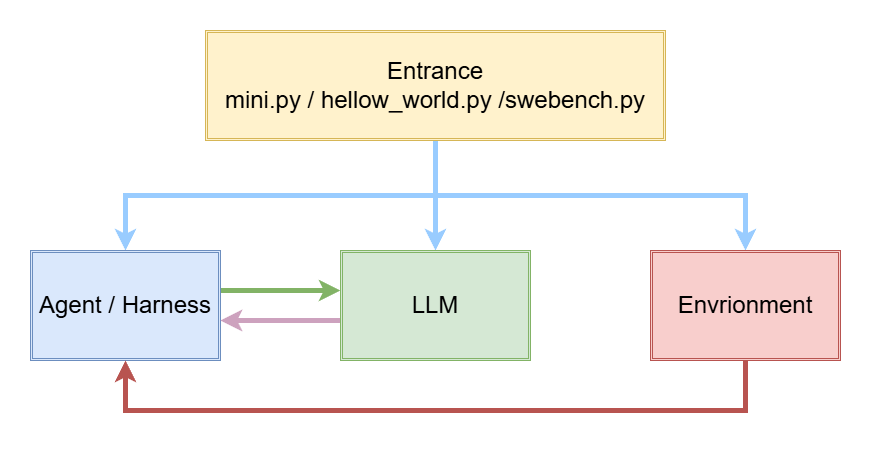
The file structure is :
1 | src/minisweagent/ |
2. __init__.py
__init__.py mainly defines 4 files:
version, Model Protocol,
Environment Protocol and Agent Protocol.
2.1 Version
Current version is 2.4.6 (2026-09-09).
1 | __version__ = "2.4.6" |
2.2 Model Protocol
1 | class Model(Protocol): |
This part defines a LLM protocol.
2.2.1 query
Function Name:
query
Params:
self
messages: list[dict[str, str]]
**kwargs
Return:
dict
Function Description:
Send the conversation history to the LLM, receive the response, parse the bash action to be executed, and return it wrapped in a dict.
e.g
1
2
3
4
5
6
7
8
9
10
11
12
13
14
15
16
17
18message = self.model.query(self.messages)
# self.message example
# [
# {"role": "system", "content": "You are a helpful assistant..."},
# {"role": "user", "content": "Please solve this issue:repair add function"},
# ]
# the returned message like this:
{
"role": "assistant",
"content": "I'll first look at the repository structure.",
"extra": {
"actions": [{"command": "ls -la", "tool_call_id": "call_abc123"}], # parsed bash action
"cost": 0.0123, # cost of this call(dollar)
"timestamp": 1730000000.0,
},
}
2.2.2 format_message
Function Name:
format_message
Params:
self
**kwargs
Return:
dict
Function Description:
Assembles the input fields into a standard message; the default implementation mainly expands multimodal content.
e.g
1
2
3
4
5
6
7
8# assemble system prompt:
self.model.format_message(role="system", content="You are a helpful assistant...")
# return:
{"role": "system", "content": "You are a helpful assistant..."}
# assemble user message:
self.model.format_message(role="user", content="Please solve this issue: ...")
{"role": "user", "content": "Please solve this issue: ..."}
2.2.3 format_observation_messages
Function Name:
format_observation_messages
Params:
self
message: dict
outputs: list[dict]
template_vars: dict | None = None
Return:
list[dict]
Function Description:
Render the command execution result into an observation message, append it back to the conversation history, and let the model see what the previous step produced.
e.g
1
2
3
4
5
6
7
8
9
10
11
12
13# assume the last command is `ls -la`
outputs = [{"output": "file1.py\nfile2.py\n", "returncode": 0, "exception_info": ""}]
# agent calls:
self.model.format_observation_messages(message, outputs, self.get_template_vars())
# return:
[{
"role": "tool",
"tool_call_id": "call_abc123",
"content": "<returncode>0</returncode>\n<output>\nfile1.py\nfile2.py\n</output>",
"extra": {"raw_output": "file1.py\nfile2.py\n", "returncode": 0, "timestamp": 1730000001.0},
}]
2.2.4 get_template_vars
Function Name:
get_template_vars
Params:
self
**kwargs
Return:
dict[str, Any]
Function Description:
Provide the variables needed to render the Jinja2 template (e.g., model name, model_kwargs, etc.).
e.g
1
2
3
4
5
6
7
8
9def get_template_vars(self, **kwargs):
return self.config.model_dump()
# return likes:
{
"model_name": "anthropic/claude-sonnet-4-5-20250929",
"model_kwargs": {"drop_params": True},
...
}These variables will be used to render system/instance template by Agent
2.2.5 serialize
Function Name:
serialize
Params:
self
Return:
dict
Function Description:
Serialize the model config/state for writing to the trajectory file at the end, recording which model was used.
e.g
1
2
3
4
5
6
7
8
9
10
11
12
13
14
15
16
17
18# when agent archive, it merges model information into final data
recursive_merge(agent_data, self.model.serialize(), self.env.serialize(), *extra_dicts)
# LitellmModel.serialize() return:
{
"info": {
"config": {
"model": {"model_name": "anthropic/claude-sonnet-4-5-20250929", ...},
"model_type": "minisweagent.models.litellm_model.LitellmModel",
}
}
}
# the information will be written into last_mini_run.traj.json:
# {
# "info": { "model_stats": {...}, "config": {"agent": {...}, "model": {...}, "environment": {...}} },
# "messages": [ ...dialog history... ]
# }
2.3 Environment Protocol
2.3.1 execute
Function Name:
execute
Params:
self
action: dict
cwd: str = “”
Return:
dict[str, Any]
Description:
Actually execute a bash command and return a dict bundling stdout, the exit code, and whether it errored. There’s also a hidden key behavior: if the first line of the output is “COMPLETE_TASK_AND_SUBMIT_FINAL_OUTPUT”, it raises a
Submittedexception to signal task completion.e.g
1
2
3
4
5
6
7
8
9
10
11
12
13
14
15
16
17
18
19
20
21# e.g agent parses action from response of LLM:
action = {"command": "ls -la", "tool_call_id": "call_abc123"}
# agent calls:
outputs = [self.env.execute(action) for action in actions]
# the Agent calls subprocess to run the command actually,
# the return is:
{
"output": "total 8\ndrwxr-xr-x ...\nfile1.py\nfile2.py\n",
"returncode": 0, # 0 == success
"exception_info": "", # empty == no error raised
}
# if command fails:
# 如果命令失败了(比如文件不存在):
{
"output": "ls: cannot access 'nope': No such file or directory\n",
"returncode": 2, # not-0 == failure
"exception_info": "",
}If task finished, it can be detected:
1
2
3
4
5
6
7
8
9# when task finished
echo COMPLETE_TASK_AND_SUBMIT_FINAL_OUTPUT
# raise submitted
raise Submitted({
"role": "exit",
"content": "",
"extra": {"exit_status": "Submitted", "submission": ""},
})
2.3.2 get_template_vars
Function Name:
get_template_vars
Params:
self
**kwargs
Return:
dict[str, Any]
Description:
Collect environment-related template variables (working directory config, OS info, environment variables, etc.) for the agent to fill in when rendering the system/instance prompts.
e.g.
1
2
3
4
5
6
7
8
9
10
11
12
13
# Impelemtation in LocalEnvironment
def get_template_vars(self, **kwargs):
return recursive_merge(self.config.model_dump(), platform.uname()._asdict(), os.environ, kwargs)
# it returns three types information
{
# ① Env Config
"cwd": "", "env": {...}, "timeout": 30,
# ② OS information(platform.uname())
"system": "Linux", "release": "6.8.0-...", "version": "...", "machine": "x86_64",
# ③ all Environment Variables(os.environ)
"PATH": "/usr/bin:...", "HOME": "/root", ...
}
2.3.1 serialize
Function Name:
serialize
Params:
self
Return:
dict
Description:
Serialize the environment config/type into a dict for writing to the trajectory file at the end, recording which environment it ran in.
e.g.
1
2
3
4
5
6
7
8
9
10
11
12# when agent archives, the information will be merged.
recursive_merge(agent_data, self.model.serialize(), self.env.serialize(), *extra_dicts)
# return of LocalEnvironment.serialize()
{
"info": {
"config": {
"environment": {"cwd": "", "env": {}, "timeout": 30},
"environment_type": "minisweagent.environments.local.LocalEnvironment",
}
}
}
2.4 Agent Protocol
2.4.1 run
Function Name:
run
Params:
self
task: str
**kwargs
Return:
dict
Description:
Run the agent loop (step()) until it finishes. Returns a dict containing exit_status and submission from the final exit message.
e.g.
1
2
3
4
5
6
7
8
9
10
11
12
13# From hello_world.py — the simplest entry point
agent = DefaultAgent(
...
LitellmModel(model_name="anthropic/claude-sonnet-4-5"),
LocalEnvironment(),
)
info = agent.run("Write a sudoku game")
# info returned by run():
# {
# "exit_status": "Submitted", # how the run ended
# "submission": "...", # the final text/patch the agent produced
# }
2.4.2 save
Function Name:
save
Params:
self
path: Path | None
*extra_dicts
Return:
dict
Description:
Serialize the full trajectory and write it to
path(if given). Returns the complete serialized dict.e.g.
1
2
3
4
5
6
7
8
9
10
11
12
13
14
15
16
17
18
# Save the trajectory to a file
data = agent.save(Path("last_run.traj.json"))
# Internally it does:
# data = self.serialize(*extra_dicts) # build the full dict
# path.write_text(json.dumps(data, indent=2))# write JSON to disk
# return data # return the same dict
# The saved file looks like:
{
"info": {
"model_stats": {"instance_cost": 0.05, "api_calls": 3},
"config": {"agent": {...}, "model": {...}, "environment": {...}},
"exit_status": "Submitted",
"submission": "..."
},
"message": [ ...entire conversation history... ]
}
3. Agent
The agent part structure is :
1 | agents/ |
3.1 __init__.py
Import:
1 | import copy |
Class Rejistry:
1 | _AGENT_MAPPING = { |
get_agent_class(), Look up the class by name.:
1 | def get_agent_class(spec: str) -> type[Agent]: |
get_agent(), create an agent class:
1 | def get_agent(model: Model, env: Environment, config: dict, *, default_type: str = "") -> Agent: |
3.2 default.py
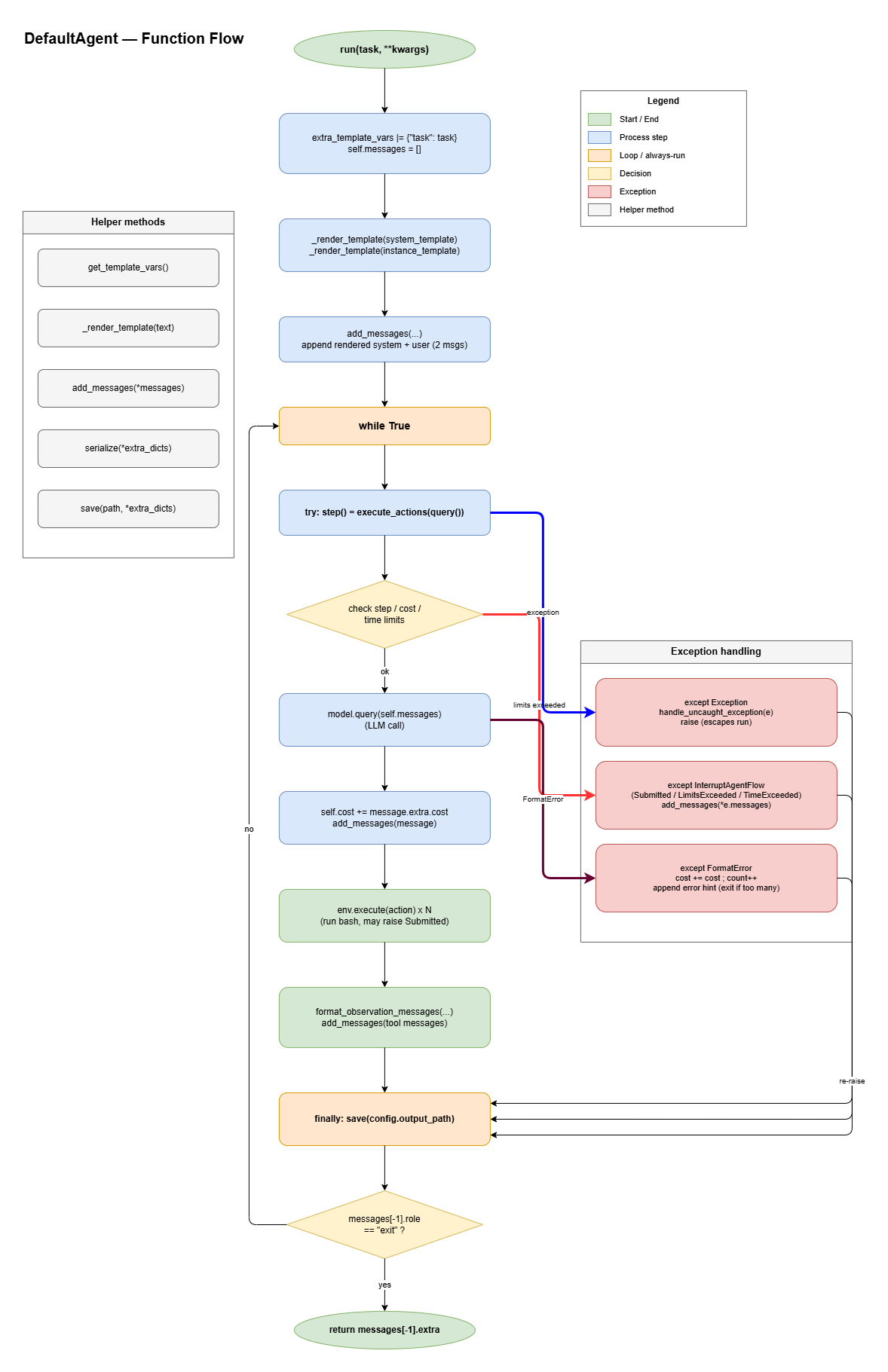
3.2.1 Import
1 | import json # JSON |
3.2.2 AgentConfig
1 | class AgentConfig(BaseModel): |
system_template: Template for system promptinstance_template: Template for user promptstep_limit: Max turn limitcost_limit: Max cost limitwall_time_limit_seconds: Stop agent after this many seconds of wall-clock time. 0 means no limit.max_consecutive_format_errors: Give up after N consecutive format errors.output_path: Path to save trajectory
3.2.3 DefaultAgent
3.2.3.1 __init__
1 | def __init__(self, model: Model, env: Environment, *, config_class: type = AgentConfig, **kwargs): |
Params:
model: Modelenv: Environmentconfig_class: default value is AgentConfig**kwargs
Initialization
self.config: from param **kwargs.self.messages: Initialize message history as a empty list.self.model: from param model.self.env: from param env.self.extra_template_vars: extra template vars, initialize as empty.self.logger: create a logger.self.cost: costed fee, initialize as 0.self.n_calls: number of calls of LLM.self.n_consecutive_format_errors: number of consecutive format errors.self._start_time: timestamp of start time.
The Initialized Agent:
1
2
3
4
5
6
7
8agent
├── .config → AgentConfig
├── .messages → [] (will be filled when call `run` func)
├── .model → model passed in
├── .env → environment passed in
├── .cost → 0.0
├── .n_calls → 0
└── ._start_time → current timestamp
3.2.3.2 tool functions
The function get_template_vars is to get template
variables, for example, a config file (YAML):
1 | instance_template: | |
Function get_template_vars is to extract the variables:
{{task}}, {{system}},
{{release}}, {{version}} and
{{machine}}.
get_template_vars:
1 | def get_template_vars(self, **kwargs) -> dict: |
_render_template:
1 | def _render_template(self, template: str) -> str: |
add_messages:
1 | def add_messages(self, *messages: dict) -> list[dict]: |
3.2.3.3 ‘query’
1 | def query(self) -> dict: |
3.2.3.4 ‘execute_actions’
1 | def execute_actions(self, message: dict) -> list[dict]: |
3.2.3.5 ‘step’
1 | def step(self) -> list[dict]: |
1 | run() in while loop: |
3.2.3.6 ‘run’
1 | def run(self, task: str = "", **kwargs) -> dict: |
3.2.3.7 ‘serialize’ & ‘save’
1 | def serialize(self, *extra_dicts) -> dict: |
1 | def save(self, path: Path | None, *extra_dicts) -> dict: |
serialize: Build a JSON-serializable dict of the whole agent state (stats, config, messages, model/env info).save: Serialize the state and write it topathif given; returns the same dict.
3.3 interactive.py
It’s a subclass of DefaultAgent that inherits the core logic (the main loop) wholesale and does exactly one thing: it puts a human in the loop — letting the user approve, reject, issue commands directly, and interject mid-run.
It provides 3 modes:
- human: No LLM calling, the User inputs commands directly.
- confirm(default): The actions returned by LLM need human’s confirm to execute.
- yolo: Auto-execution actions.
4. environment
…
5. Comparison between SWE-agent and MSWEA
| Dimension | SWE-agent | mini-SWE-agent | Why it changed |
|---|---|---|---|
| Tool Layer | Multi-tool bundles; per-tool commands, parameters, auto-generated
command docs; blocklist blocking interactive tools (vim,
nano, gdb) |
One single bash tool; every model response must contain
one bash call |
Models are already fluent in shell; designing a tool per capability is the scaffold doing the model’s thinking, with diminishing returns. Bash-only also means zero extra dependencies for any model or environment |
| Execution / session model | Stateful bash session via SWE-ReX: cwd, env vars and shell state persist across commands; plus file read/write APIs | Stateless per-command execution (subprocess.run /
docker exec): each command is a fresh process |
Isolation — a previous command cannot contaminate the next; timeouts can kill the whole process group; swapping sandboxes means swapping one command; trivially parallelizable |
| History / context | Pluggable HistoryProcessor pipeline that may compress,
truncate, or inject cache-control markers before sending to the
model |
A plain list with add_messages; the trajectory
*is* what the model sees |
No transformation layer: what you save is what the model saw — far easier to debug and fine-tune, and no processor-composition complexity |
| Action parsing | 4 selectable parsers (function-calling, JSON, thought/action, action-only) | 2 (tool-call or regex), tool-call explicitly recommended | Collapses the parser matrix; the tool-call format is guaranteed by the model API itself |
| Control flow | action_sampler (sample several candidate actions) +
reviewer / RetryLoop (score and retry
submissions) |
One query, one execute — no second opinion | Sampling/review/retry is the harness correcting the model; mini hands correction back to the model, which self-iterates on observations |
| Extensibility | Three-layer hooks (agent / environment / run) for out-of-tree behavior injection | No hooks; subclass and override methods
(e.g. InteractiveAgent overrides four) |
Python inheritance is native and sufficient; a dedicated hook framework is an extra abstraction layer |
5.1 Tool layer
5.1.1 Tool in SWE-agent
There are two main kinds tools in SWE-agent: the python class and the shell class.
1 | tools/ |
5.1.2 Tool in MSWEA
Those tools in SWE-agent can be divided into 3 other classes:
- can be implemented by
bash+ software engineering needed (most) -> delete - cannot be implemented by
bash+ software engineering needed (none) -> keep - cannot be implemented by
bash+ software engineering not needed (delete)
In the end, there is only 1 tool in MSWEA: bash.
Because most tools provided above, can be generated by LLM and
executed by the bash tool.
There are 4 extra operations:
src/minisweagent/config/default.yaml:The harness gives some using examples in User Prompt template agent.instance_template:
1
2
3
4
5
6
7
8
9
10## Useful command examples
### Create a new file:
```mswea_bash_command
cat <<'EOF' > newfile.py
import numpy as np
hello = "world"
print(hello)
EOF### Edit files with sed: {%- if system == "Darwin" -%} <important> You are on MacOS. For all the below examples, you need to use `sed -i ''` instead of `sed -i`. </important> {%- endif -%}### View file content:1
2
3
4
5
6
7
8
9
10
11# Replace all occurrences
sed -i 's/old_string/new_string/g' filename.py
# Replace only first occurrence
sed -i 's/old_string/new_string/' filename.py
# Replace first occurrence on line 1
sed -i '1s/old_string/new_string/' filename.py
# Replace all occurrences in lines 1-10
sed -i '1,10s/old_string/new_string/g' filename.py### Any other command you want to run1
2# View specific lines with numbers
nl -ba filename.py | sed -n '10,20p'1
anything
1
2
3
4
5
6
7
8
9
10
11
12
13
2. `src/minisweagent/config/default.yaml`:
Env Settings for bash:
```yaml
environment:
env:
PAGER: cat
MANPAGER: cat
LESS: -R
PIP_PROGRESS_BAR: 'off'
TQDM_DISABLE: '1'src/minisweagent/config/default.yaml:observation_template: The template structure the outputs:
distinct
return codeandoutput:1
2<returncode>{{output.returncode}}</returncode>
<output>{{ output.output }}</output>Optimize the extremely long text:
1
2
3
4
5
6
7<warning>
The output of your last command was too long.
Please try a different command that produces less output.
If you're looking at a file you can try use head, tail or sed...
If you're using grep or find and it produced too much output, you can use a more selective search pattern.
If you really need to see something from the full command's output, you can redirect output to a file and then search in that file.
</warning>
src/minisweagent/config/default.yaml:format_error_template: Guidance template for format errors.
1
2
3
4
5
6
7
8
9
10
11
12
13
14
15
16
17
18
19
20
21
22
23
24
25
26
27{% if finish_reason is defined and finish_reason in ["length", "tool_calls"] -%}
Your previous response reached the output token limit (finish_reason={{ finish_reason }}) before you produced a complete action, so it was cut off. Respond more concisely and provide exactly one action in the required format. If you need to think more, do so briefly.
{%- else -%}
Format error:
<error>
{{error}}
</error>
Here is general guidance on how to format your response:
Please always provide EXACTLY ONE action in triple backticks, found {{actions|length}} actions.
If you want to end the task, please issue the following command: `echo COMPLETE_TASK_AND_SUBMIT_FINAL_OUTPUT`
without any other command.
Else, please format your response exactly as follows:
<response_example>
Here are some thoughts about why you want to perform the action.
```mswea_bash_command
<action>
```
</response_example>
Note: In rare cases, if you need to reference a similar format in your command, you might have
to proceed in two steps, first writing TRIPLEBACKTICKSBASH, then replacing them with ```mswea_bash_command.
{%- endif %}
5.2 Execution / Session model
5.3 History / Context
The SWE-agent has a HistoryProcessor to deal with the long history. It will compress, truncate the long history, then send it to LLM.