WebShop
1. Paper Reading
What is WebShop?
WebShop is a large-scale web-based interactive environment with over 1.1 million real-world products scraped from amazon.com.
1.1 Task
WebShop can be formulated as a partially observable Markov decision process.
- State Space: 𝒮
- Action Space: 𝒜
- Deterministic Decision Function: 𝒯 : 𝒮 × 𝒜 → 𝒮
- Reward Function: ℛ : 𝒮 × 𝒜 → [0, 1]
- Instruction Space: 𝒰
- State Observation Space: 𝒪
1.1.1 State & Action
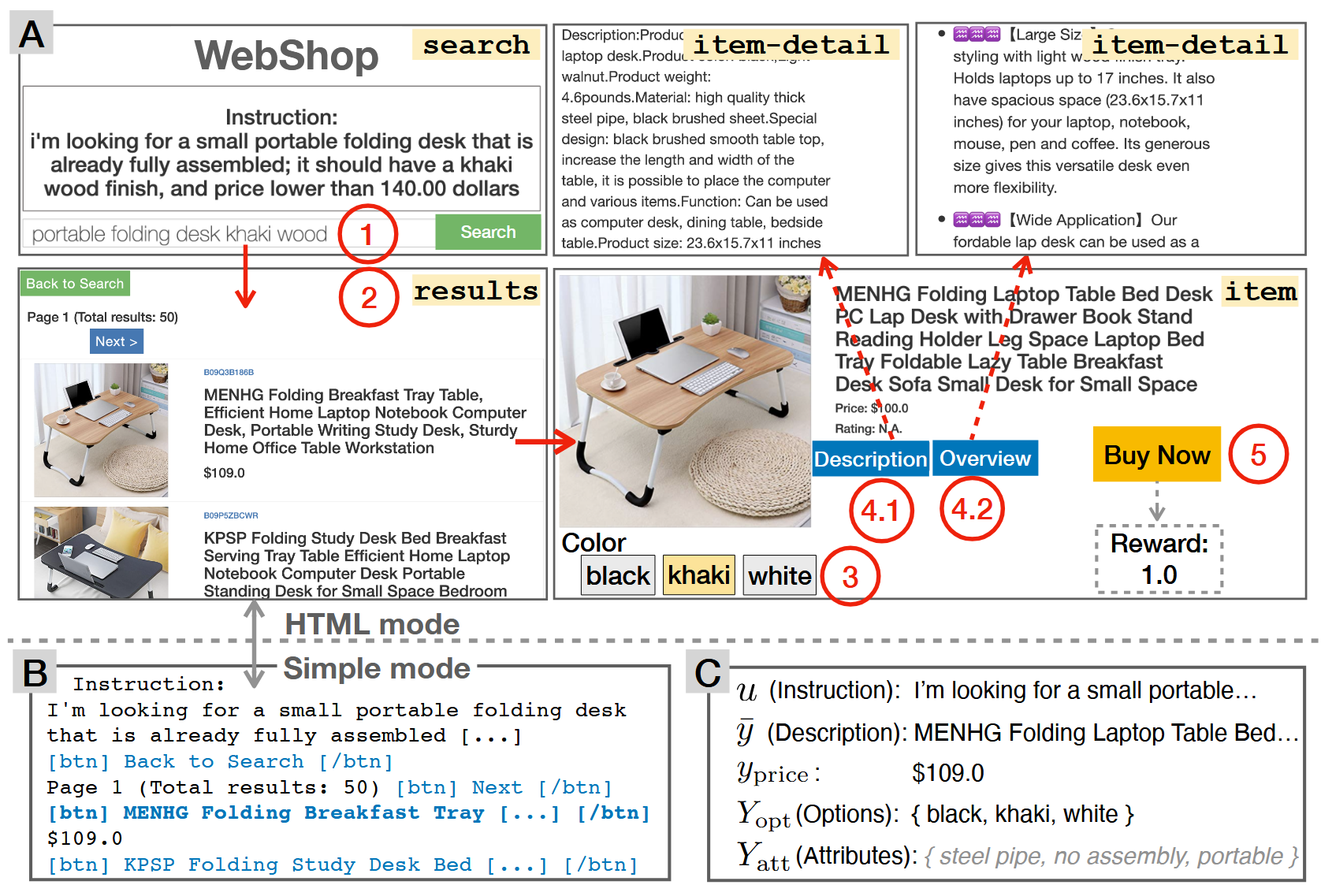
A state 𝓈 ∈ 𝒮 represents a web page, which falls into one of the four types:
- 𝓈ℯ𝒶𝓇𝒸𝒽 page: contains a research bar.
- 𝓇ℯ𝓈𝓊𝓁𝓉𝓈 page: lists a set of products returned by research engine.
- 𝒾𝓉ℯ𝓂 page: describes a product.
- 𝒾𝓉ℯ𝓂 − 𝒹ℯ𝓉𝒶𝒾𝓁 page: shows further information about the product.
For a product 𝓎, author denotes:
- 𝓎̂: aggregation of the various text fields including product title, description, and overview
- 𝓎𝓅𝓇𝒾𝒸ℯ: price
- Yopt: set of buying options
- I: images, each corresponding to a specific option
- Yatt: set of attributes hidden from the agent which is extracted from the title and the item − detail pages
Available actions 𝒶 ∈ 𝒜(𝓈) :
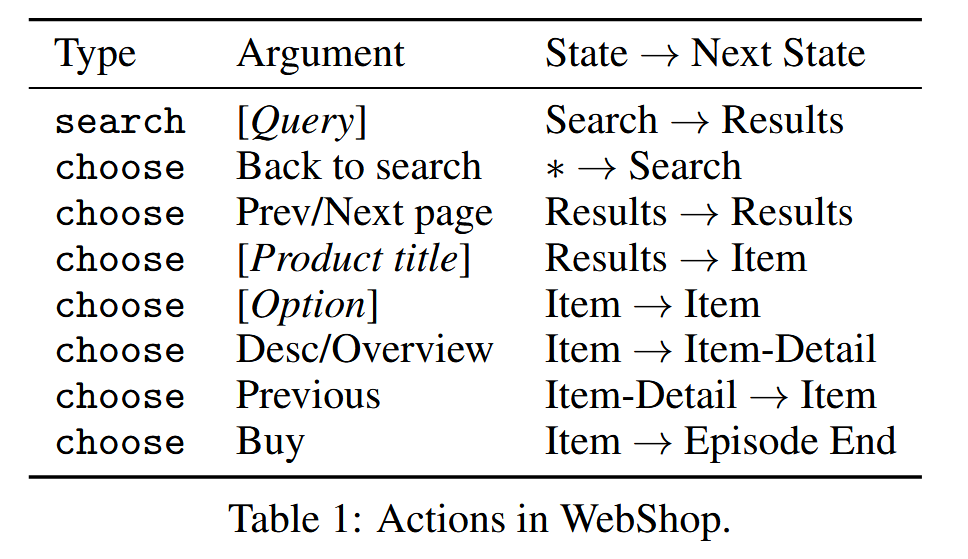
Generally, there are two action types: search and
choose. When agent is at search page, the only action
allowed is search. On other pages, click is the only action
choice.
The chosen action argument (button) will be clicked as a web link as opposed to the low-level mouse-click actions in previous environments such as World of Bits.
The transitions initiated by clicks deterministically redirect the web page to one of the four page types (Table 1). The transition initiated by search is based on a deterministic search engine.
1.1.2 Observation
Using Flask and OpenAI Gym, author provides two parallel observation modes to render the state and instruction 𝒮 × ℐ = 𝒪.
- HTML Mode: contains the HTML of the web page, allowing for interaction in a web browser.
- Simple Mode: strips away extraneous meta-data from raw HTML into a simpler format.
Human Performance Scores are collected in HTML mode, while all models are trained and trained and evaluated in the simple mode.
Note:
Though environment allows for training reinforcement learning agents on raw pixels in HTML mode. Author believes that it provides a very low-level non-semantic action space.
Moreover, it is straightforward to write a translator that converts any new HTML page into simple format for use with trained agents, which enables sim-to-real transfer.
1.1.3 Instruction & Reward
Each natural language instruction 𝓊 ∈ 𝒰 contains the following information: a non-empty set of attributes Uatt, a set of options Uopt, and a price uprice. The instruction is generated based on a target product ŷ by human annotators.
Concretely,
- Uatt ⊆ Yatt* is a subset of the product attributes
- Uopt ⊆ Yopt* is a subset of the product option field-value pairs
- uprice > yprice* is a price set to be higher than the target product price
e.g.
Instruction:
“Can you find me a pair of black-and-blue sneaker that is good in rain weather? I want it to have puffy soles, and price less than 90 dollars.”
The instruction contains the aforementioned attributes and options:
- Uatt = “waterproof”, “soft sole”
- Uopt = {“color”: “black and blue”}
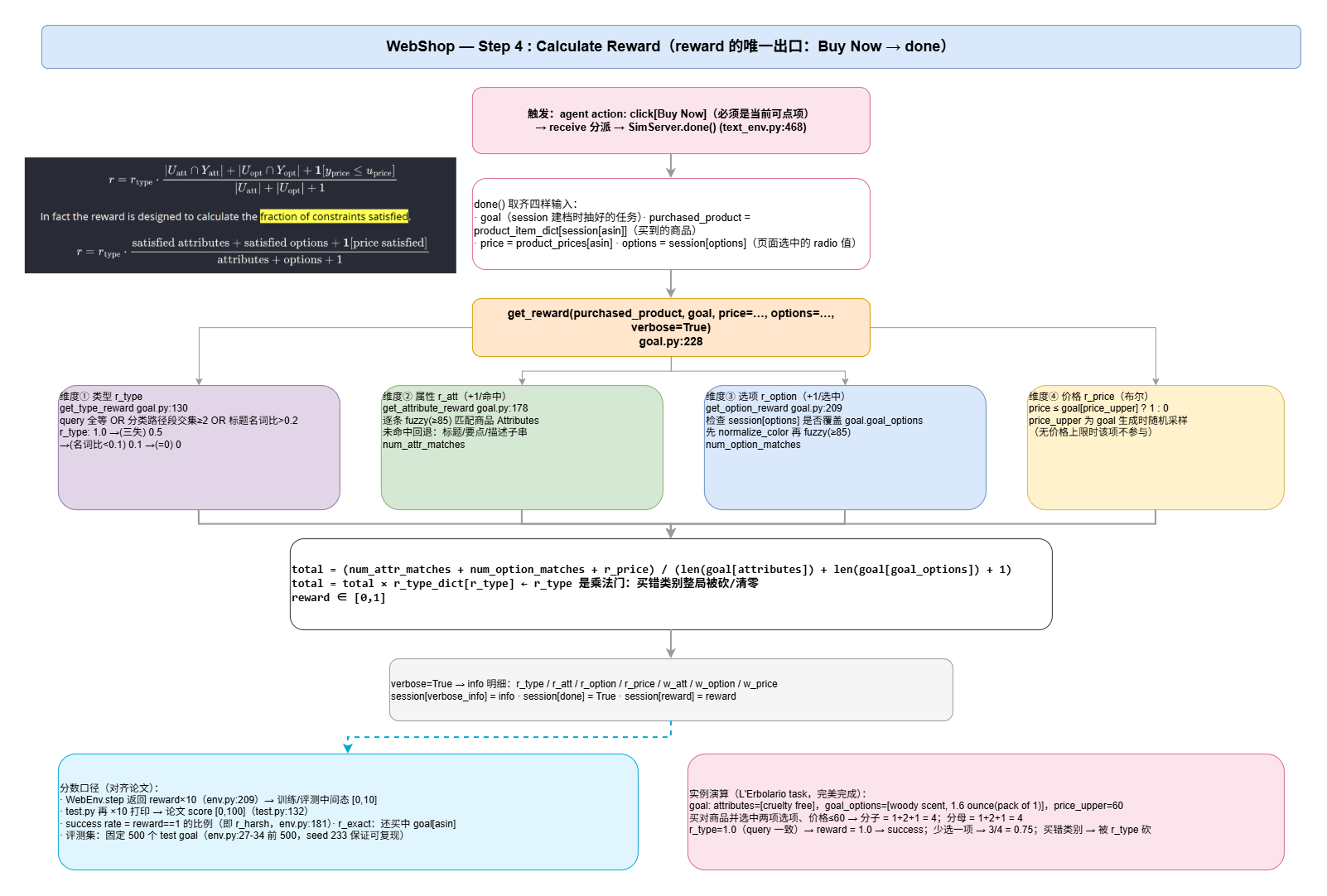
In each episode, the agent receives a reward 𝓇 = ℛ(𝓈𝒯, 𝒶) in the end at timestep T, where a = choose[buy], y is the product chosen by the agent in the final state sT, and Yatt and Yopt are its corresponding attributes and options. The reward is defined as:
$$ r = r_{\mathrm{type}} \cdot \frac{ |U_{\mathrm{att}} \cap Y_{\mathrm{att}}| + |U_{\mathrm{opt}} \cap Y_{\mathrm{opt}}| + \mathbf{1}[y_{\mathrm{price}} \leq u_{\mathrm{price}}] }{ |U_{\mathrm{att}}| + |U_{\mathrm{opt}}| + 1 } $$
In fact the reward is designed to calculate the fraction of constraints satisfied.
$$ r = r_\mathrm{type} \cdot \frac {\mathrm{satisfied\ attributes}+\mathrm{satisfied\ options}+\mathbf{1}[\mathrm{price\ satisfied}]} {\mathrm{attributes + options + 1}} $$
The type reward $r_\mathrm{type} = \text{TextMatch}(\overline y, \overline y^*)$ is based on text matching heuristics to assign low reward when y and y* have similar attributes and options but are obviously different types of products. For example, “butter” and “plant-based meat” differ in types but may both contain attributes “cruelty-free”, “non-GMO”, and an option “size: pack of 2”.
1.1.4 Evaluation Metrics
There are 2 evaluation metrics:
- Task Score defined as 100 × avg.reward, which captures the average reward obtained across episodes;
- Success Rate defined as the portion of instructions where r = 1. Note that it is possible to obtain r = 1 for an episode even if the final product is not y* — there could be many items that satisfy the goal “I want a red shirt”, even if the goal is generated from a specific red shirt item.
1.2 Environment
1.2.1 Data Scraping
Author uses ScraperAPI to scrape 1, 181, 436 products from amazon.com across 5 categories (fashion, makeup, electronics, furniture, and food) using 113 sub-category names as queries. The product texts (title and item details) have an average length of 262.9 and a vocabulary size 224, 041 (word frequency higher than 10). In addition, the products have a total of 842, 849 unique options, reflecting the scale and complexity of the data. More details about product scraping is in the Appendix §A.1.
1.2.2 Search Engine
Author uses Pyserini for the search engine, where indices are built offline using a BM25 sparse retriever with text for each product concatenated from the title, description, overview, and customization options. The search engine is deterministic, which eases imitation learning and result reproducibility. More details in A.3.
1.2.3 Attribute Mining and Annotation
Each product is annotated with a set of hidden attributes, which are used to represent its latent characteristics as well as to calculate the reward as detailed in §3. An attribute is a short natural language phrase that describes the property of the product (see examples in Figure 1). Author mines the attributes by calculating TF-IDF scores for all bi-grams in the concatenated titles and descriptions based on each product category. Author reviews the top 200 bi-grams for each category, remove the noisy ones by inspection (decide based on whether the bi-gram is human understandable), and assign them to the products. Author consolidates a pool of 670 attributes. See more details in the Appendix §A.2.
1.2.4 Natural Language Instructions
Author uses Amazon Mechanical Turk (AMT) to collect natural language instructions that specify goal products with appropriate options. Specifically, an AMT worker is presented with a sampled goal product, including the product title, category, attributes, and the buying options, and asked to write a command to instruct an automatic shopping agent to find the target. Workers are instructed to avoid being too specific such as including the entire title in the instruction, but stay faithful to describing the target product. Author collects a total of 12, 087 linguistically diverse instructions with an overall vocabulary size of 9, 036 words and an average length of 15.9 words. Author provides the detailed annotation process and interface in the Appendix §A.4.
1.2.5 Human Demonstrations
Author collects trajectories from humans performing the task in the HTML mode of WebShop to understand the task difficulty for humans and to analyze how humans would solve the task. Author uses qualification tests to train and select motivated workers to perform the task. Author recruits and train a total of 13 workers for data collection, and among them author selects the top 7 performing workers to be “experts” (see Appendix §A.6 for examples). Author also leverages this data to perform imitation learning (described in §4.2).
1.3 Training
Omit.
1.4 Experiments
Omit.
2. Engineering
2.1 Workflow
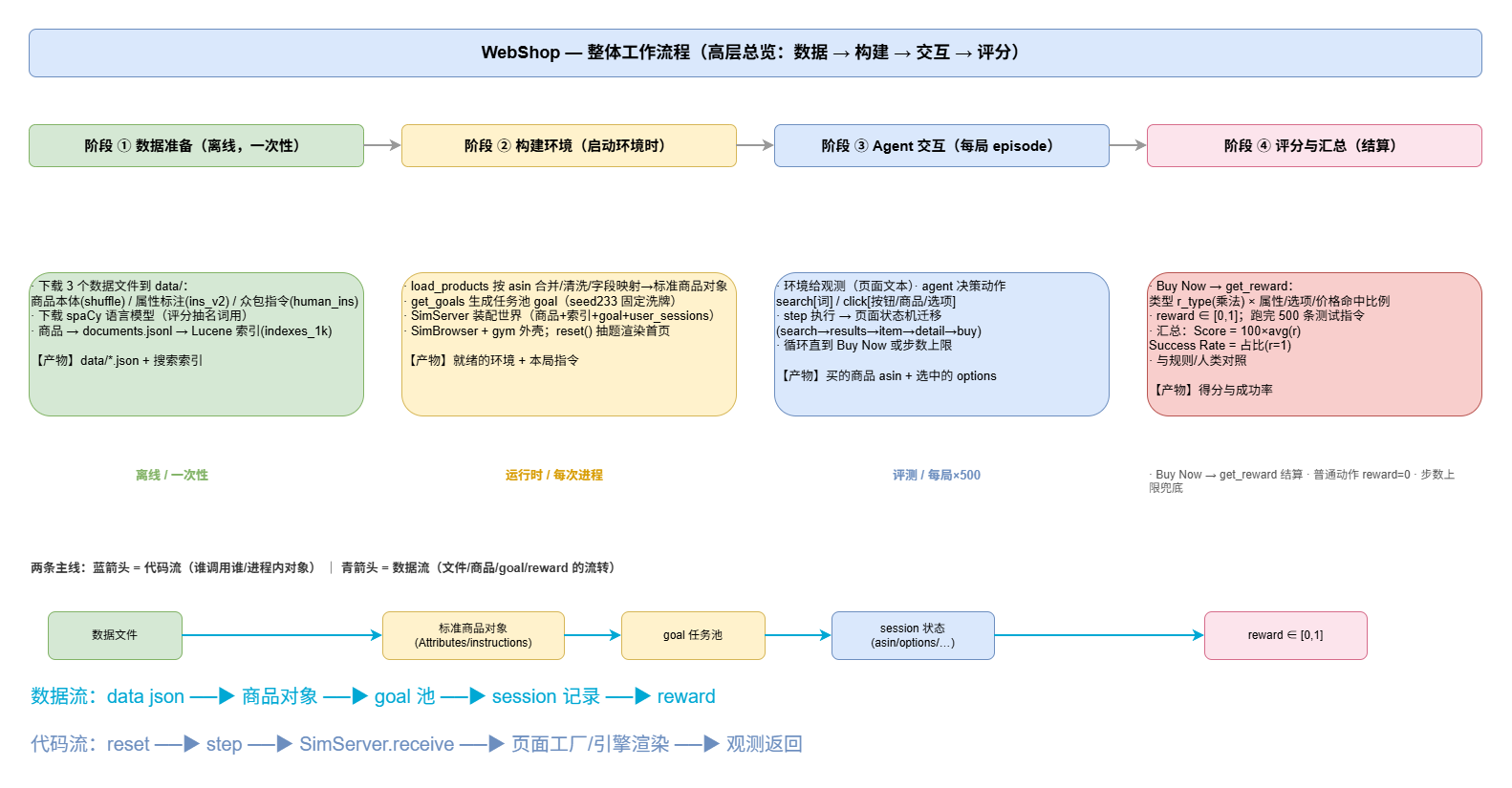
2.1.1 Basic Environment Preparation
1 | conda create -n webshop python=3.8.13 |
2.1.2 Data Preparation
2.1.2.1 setup.sh
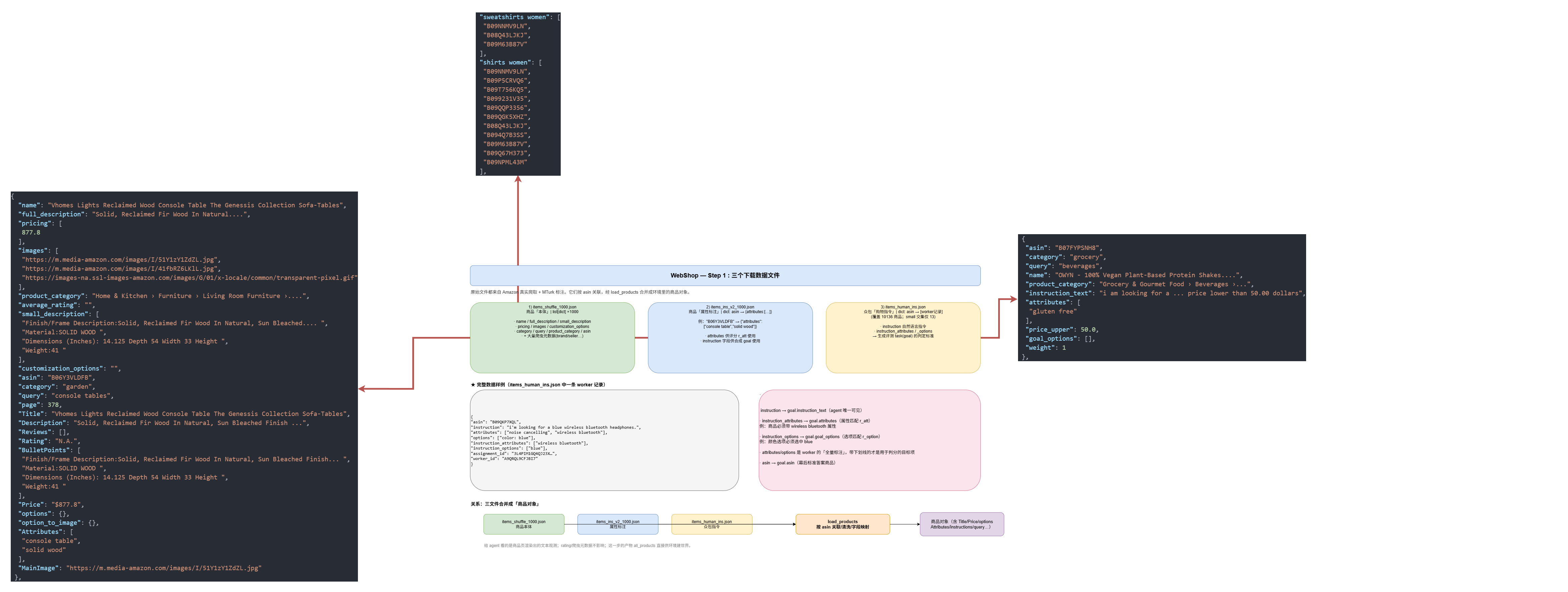
setup.shmainly downloads Item info, Instructions, NLP
model and builds Item Index.
1 | ./setup.sh -d small # or -d all |
small means 1000 item information; all
means all items.
setup.sh:
1 | mkdir -p data |
1 | # items_human_ins.json; human shopping instructions |
Download a NLP model; When calculating rewards, it is needed:
1 | # Download spaCy large NLP model |
Build research engine index:
When searching items, it is unrealistic to retrieve all items which costs a lot of time. Lucene builds a index:
[word -> lists of items including the word].
1 | # Build search engine index |
python convert_product_file_format.py: read
data/items_shuffle_1000.json and convert each product into
a single plain-text string optimized for search.
convert_product_file_format.py:21-28:
1 | doc = dict() |
converted item example:
1 | { |
2.1.2.2 data structrue
There are three main data (small):
items_shuffle_1000.jsonThis file includes 1000 commodities’ basic information. After processing, the data structure likes this:
1
2
3
4
5
6
7
8
9
10
11
12
13
14
15
16
17
18
19
20
21
22
23
24
25
26
27
28
29
30
31
32
33
34
35
36
37
38
39
40
41
42
43
44
45...
{
"name": "Vhomes Lights Reclaimed Wood Console Table The Genessis Collection Sofa-Tables",
"full_description": "Solid, Reclaimed Fir Wood In Natural, Sun Bleached Finish With Light Antiquing Glaze.",
"pricing": [
877.8
],
"images": [
"https://m.media-amazon.com/images/I/51Y1zY1ZdZL.jpg",
"https://m.media-amazon.com/images/I/41fbRZ6LKlL.jpg",
"https://images-na.ssl-images-amazon.com/images/G/01/x-locale/common/transparent-pixel.gif"
],
"product_category": "Home & Kitchen › Furniture › Living Room Furniture › Tables › Sofa & Console Tables",
"average_rating": "",
"small_description": [
"Finish/Frame Description:Solid, Reclaimed Fir Wood In Natural, Sun Bleached Finish With Light Antiquing Glaze. ",
"Material:SOLID WOOD ",
"Dimensions (Inches): 14.125 Depth 54 Width 33 Height ",
"Weight:41 "
],
"customization_options": "",
"asin": "B06Y3VLDFB",
"category": "garden",
"query": "console tables",
"page": 378,
"Title": "Vhomes Lights Reclaimed Wood Console Table The Genessis Collection Sofa-Tables",
"Description": "Solid, Reclaimed Fir Wood In Natural, Sun Bleached Finish With Light Antiquing Glaze.",
"Reviews": [],
"Rating": "N.A.",
"BulletPoints": [
"Finish/Frame Description:Solid, Reclaimed Fir Wood In Natural, Sun Bleached Finish With Light Antiquing Glaze. ",
"Material:SOLID WOOD ",
"Dimensions (Inches): 14.125 Depth 54 Width 33 Height ",
"Weight:41 "
],
"Price": "$877.8",
"options": {},
"option_to_image": {},
"Attributes": [
"console table",
"solid wood"
],
"MainImage": "https://m.media-amazon.com/images/I/51Y1zY1ZdZL.jpg"
},
...items_ins_v2_1000.jsonThis file annotates commodities by attributes —
asin -> {"attributes": [...]}, e.g.1
2
3
4
5
6"B06Y3VLDFB": {
"attributes": ["console table", "solid wood"]
},
"B08GFNJN5R": {
"attributes": []
}Note: the reverse map (
attribute -> [asin, ...]) shown in some write-ups is not this file — it is built at runtime asattribute_to_asinsbyload_products(web_agent_site/engine/engine.py), and is only used by the<a>(search-by-attribute) prefix.items_human_ins.jsonThis file includes 13 real shopping instructions like:
1
2
3
4
5
6
7
8
9
10
11
12
13
14
15
16
17{
"asin": "B005X7IXTK",
"category": "beauty",
"query": "deodorants & antiperspirants",
"name": "L'Erbolario - Iris - Deodorant Cream - Floral and Powdery Scent - Anti-perspirant Properties - Maintains Freshness, Protects Skin - Made with Marshmallow, 1.6 Oz",
"product_category": "Beauty & Personal Care › Personal Care › Deodorants & Antiperspirants › Deodorant",
"instruction_text": "i need cruelty free deodorant that has a woody scent and is 1.6 oz, and price lower than 60.00 dollars",
"attributes": [
"cruelty free"
],
"price_upper": 60.0,
"goal_options": [
"woody scent",
"1.6 ounce (pack of 1)"
],
"weight": 1
}instruction_text: it is the only part agent can read.asin: the corresponding commodity’s asin.category/query/name/product_category: real attributes from commodities’ basic information. This is for calculating final reward. For example, when agent finally buys a similar commodity, these attributes could be used to judge this shopping test.
2.1.3 Environment Interaction
2.1.3.1 Env Shell
2.1.3.1.1 Import
web_agent_site/envs/web_agent_text_env.py:1
- Standard Library
1
2
3
4
5
6
7
8import gym
import json
import random
import string
import time
import torch
import numpy as np
gym: to realize gym protocol(reset/step), and to inheritgym.Envjson: to deal commodities’ informationrandom+string: to generate random session_idtime: for timingtorch: to deal image informationnumpy
HTML Parsing
1
2
3from bs4 import BeautifulSoup
from bs4.element import Comment
from collections import defaultdictFlask
flaskis a Micro-framework, you can deploy a simple web server with it. Only works in html modes.1
2
3from flask import Flask
# ...
app = Flask(__name__)Engine Function
The following code imports some engine functions:
1
2
3
4
5
6
7
8
9
10
11
12
13
14
15
16
17from web_agent_site.engine.engine import (
load_products,
init_search_engine,
get_top_n_product_from_keywords,
map_action_to_html,
parse_action,
get_product_per_page,
ACTION_TO_TEMPLATE,
END_BUTTON, NEXT_PAGE, PREV_PAGE, BACK_TO_SEARCH,
)
from web_agent_site.engine.goal import get_reward, get_goals
from web_agent_site.utils import (
DEFAULT_FILE_PATH,
FEAT_CONV,
FEAT_IDS,
random_idx
)Other Import
1
2
3
4
5
6
7from web_agent_site.engine.goal import get_reward, get_goals
from web_agent_site.utils import (
DEFAULT_FILE_PATH,
FEAT_CONV,
FEAT_IDS,
random_idx
)
2.1.3.1.2 Env Init
web_agent_site/envs/web_agent_text_env.py:33
1 | class WebAgentTextEnv(gym.Env): |
init:1
2
3
4
5
6
7def __init__(
self,
observation_mode='html',
file_path=DEFAULT_FILE_PATH,
server=None,
**kwargs
):observation_mode=htmlfile_path=DEFAULT_FILE_PATHserver=none
other params:
1
2
3
4
5
6
7
8
9
10
11
12"""
Arguments:
observation_mode (`str`) -- ['html' | 'text'] (default 'html')
get_image
filter_goals
limit_goals
num_products
human_goals
session
session_prefix
show_attrs
"""Variable Initialization:
1
2
3
4
5super(WebAgentTextEnv, self).__init__()
self.observation_mode = observation_mode
self.kwargs = kwargs
self.file_path = file_path
self.base_url = 'http://127.0.0.1:3000'Create Simserver
If there already exists a server, use it instead of creating a new one:
1
2
3
4
5
6
7
8
9self.server = SimServer(
self.base_url,
self.file_path,
self.kwargs.get('filter_goals'),
self.kwargs.get('limit_goals', -1),
self.kwargs.get('num_products'),
self.kwargs.get('human_goals'),
self.kwargs.get('show_attrs', False),
) if server is None else serverbind a browser & session settings
1
2
3self.browser = SimBrowser(self.server)
self.session = self.kwargs.get('session')
self.session_prefix = self.kwargs.get('session_prefix')Optional: Load Image Features:
1
2
3
4if self.kwargs.get('get_image', 0): # default value 0
self.feats = torch.load(FEAT_CONV) # Feature Vector of Commodities' Image
self.ids = torch.load(FEAT_IDS)
self.ids = {url: idx for idx, url in enumerate(self.ids)}Memory Support:
1
2
3
4
5
6
7
8self.prev_obs = []
self.prev_actions = []
# number of previous observations to include (default 0)
self.num_prev_obs = self.kwargs.get('num_prev_obs', 0)
# number of previous actions to include (default 0)
self.num_prev_actions = self.kwargs.get('num_prev_actions', 0)Automatically Start:
1
self.reset()
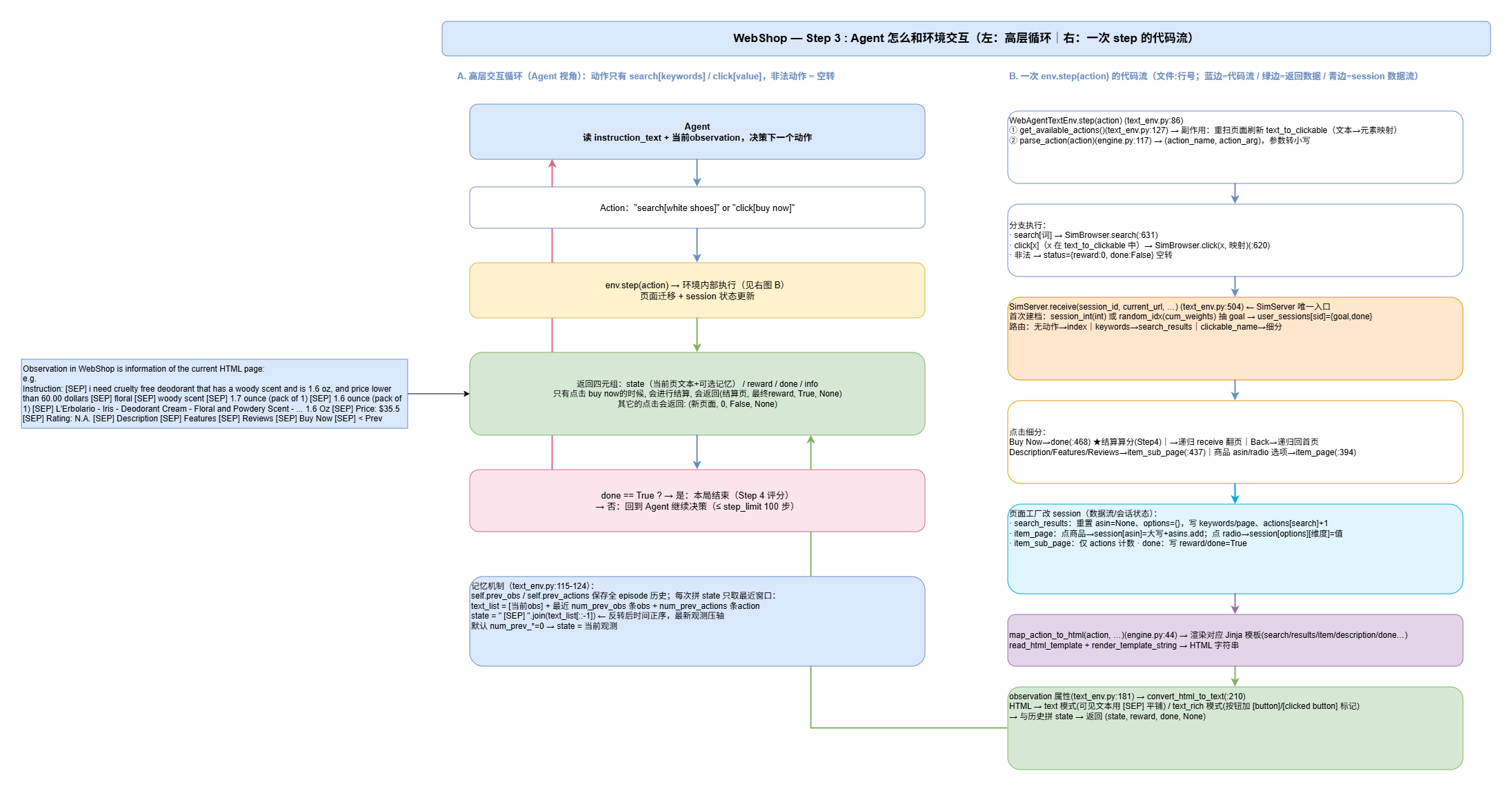
2.1.3.1.3 Step
web_agent_site/envs/web_agent_text_env.py:86
1 | def step(self, action): |
Only 2 action types: search and click.
"If action not valid, perform nothing"
Get available actions of current page:
1
2info = None
self.get_available_actions()Parse action and convert the action into lower case.
1
2
3action_name, action_arg = parse_action(action)
if action_arg is not None:
action_arg = action_arg.lower()e.g. action
click[Buy Now]will be parsed into('click', 'Buy Now'); and the paramBuy Nowwill be converted intobuy now.Deal the action:
1
2
3
4
5
6if (action_name == 'search' and action_arg is not None and action_arg != ''):
status = self.browser.search(action_arg)
elif (action_name == 'click' and action_arg in self.text_to_clickable.keys() and action_arg != 'search'):
status = self.browser.click(action_arg, self.text_to_clickable)
else:
status = dict(reward=0, done=False)Update state:
1
2
3
4
5
6
7
8
9
10
11
12
13
14
15
16
17# current observation
ob = self.observation
# store as an item of a List of String
text_list = [ob]
# append action history
self.prev_actions.append(action)
# append action history and obs history
for i in range(1, 1 + max(self.num_prev_obs, self.num_prev_actions)):
if len(self.prev_actions) >= i and self.num_prev_actions >= i:
text_list.append(self.prev_actions[-i])
if len(self.prev_obs) >= i and self.num_prev_obs >= i:
text_list.append(self.prev_obs[-i])
state = ' [SEP] '.join(text_list[::-1])
self.prev_obs.append(ob)
return state, status['reward'], status['done'], infoprev_obsandprev_actionsstore whole action history and observation history.text_list: is a sliding window which only store latest-n logs of action and observation.state = ' [SEP] '.join(text_list[::-1]): Reverse concatenation
2.1.3.1.4 Available Actions
web_agent_site/envs/web_agent_text_env.py:127
1 | def get_available_actions(self): |
4 available operational elements:
search_bar: search barbuttons: Description / Features / Reviews / Buy Now / < Prev / Next > …product-links: Commodity’s linkbuying_options: available purchase options like color and size…
2.1.3.1.5 State/Observation
web_agent_site/envs/web_agent_text_env.py:198
1 | def state(self): |
web_agent_site/envs/web_agent_text_env.py:182
1 |
|
observationis a subset ofstate, the functionobservationwill call function:convert_html_to_textto parse a html and get observation text.- Conclusion:
Stateincludes everything of the env,observationis the processed part and will be sent to Agent.
2.1.3.1.6 Reset
web_agent_site/envs/web_agent_text_env.py:240
1 | def reset(self, session=None, instruction_text=None): |
resetis to start a new game (task).
Generate new session id:
1 | session_int = None |
Open the home page:
1 | init_url = f'{self.base_url}/{self.session}' |
Reset states:
1 | self.text_to_clickable = None |
2.1.3.1.7 Tag Clear
web_agent_site/envs/web_agent_text_env.py:269
This function is to filter html page. Filter out content for agent to read.
1 | def tag_visible(element): |
2.1.3.2 Env Internals
2.1.3.2.1 SimServer
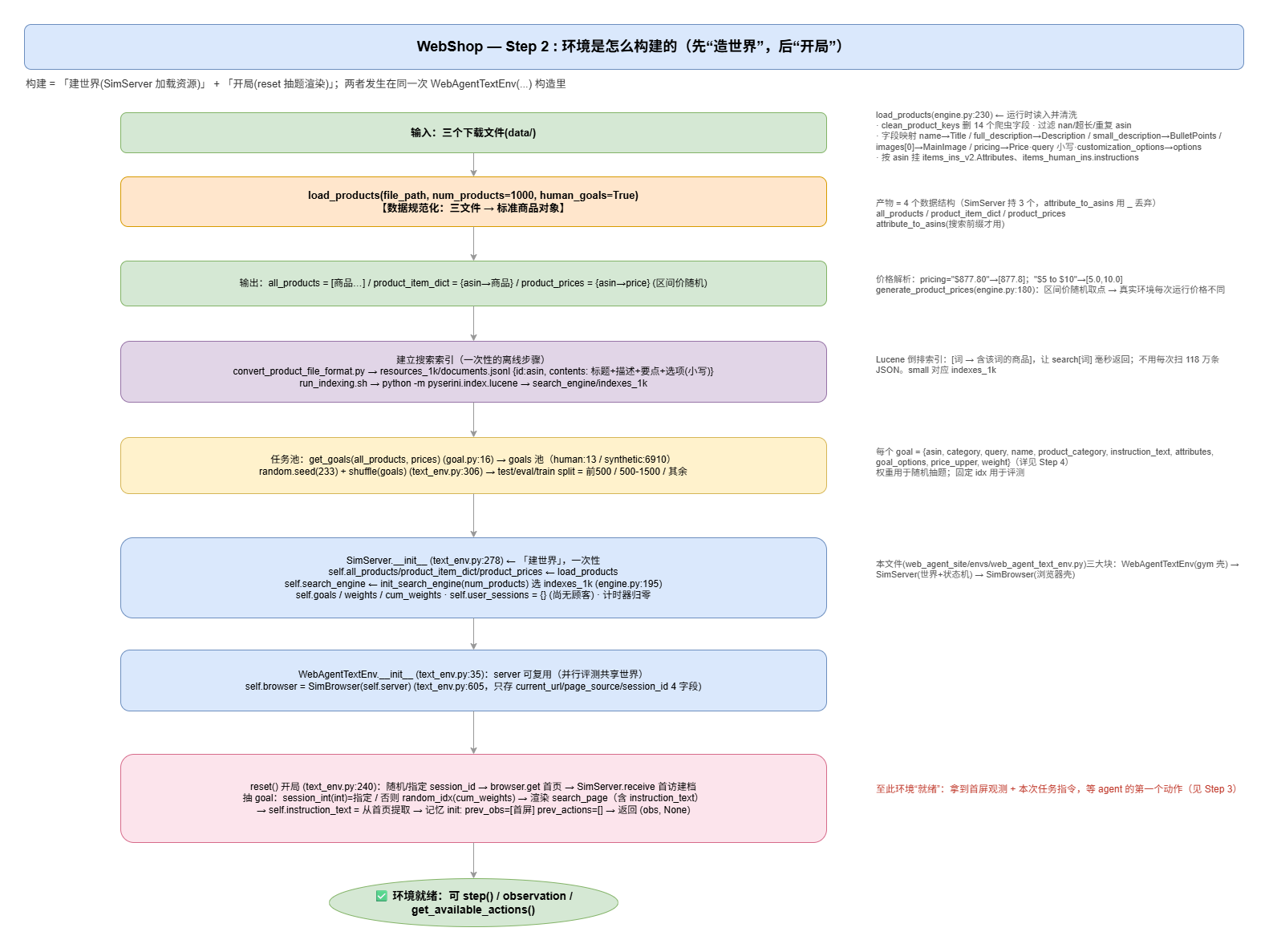
SimServer simulates the entire Flask shopping website within a process - it holds all the resources and session states of the “world” and is responsible for answering the question: “Given an action, which page should the website turn into?”
web_agent_site/envs/web_agent_text_env.py:276
Initiation
1
2
3
4
5
6self.base_url = base_url
self.all_products, self.product_item_dict, self.product_prices, _ = \
load_products(filepath=file_path, num_products=num_products, human_goals=human_goals)
self.search_engine = init_search_engine(num_products=num_products)
self.goals = get_goals(self.all_products, self.product_prices, human_goals)
self.show_attrs = show_attrsThis step is to load resources:
load_products: Load commodities informationinit_search_engine: Initiate search engineget_goals: Generate task pool.
Fix & Process task sequence :
1
2
3
4
5
6
7
8
9
10
11
12
13
14
15
16
17
18random.seed(233)
random.shuffle(self.goals)
if filter_goals is not None:
self.goals = [
goal for (i, goal) in enumerate(self.goals)
if filter_goals(i, goal)
]
if limit_goals != -1 and limit_goals < len(self.goals):
self.weights = [goal['weight'] for goal in self.goals]
self.cum_weights = [0] + np.cumsum(self.weights).tolist() # 权重前缀和
idxs = []
while len(idxs) < limit_goals:
idx = random_idx(self.cum_weights) # 按权重随机抽一个下标
if idx not in idxs: # 去重(同一题不抽两次)
idxs.append(idx)
self.goals = [self.goals[i] for i in idxs]Generate Index(HomePage) by session id:
1
2
3def index(self, session_id, **kwargs):
...
return html, urlSearch Results:
1
2
3def search_results(self, session_id, **kwargs):
...
return html, urlCommodity Related Page
There are three main commodity related pages:
item_page,item_sub_page,done1
2
3
4
5
6
7
8
9
10
11
12
13
14
15
16
17
18def item_page(self, session_id, **kwargs):
session = self.user_sessions[session_id]
clickable = kwargs['text_to_clickable'][kwargs['clickable_name']] # 文本→真实元素
if clickable.get('class') and clickable['class'][0] == 'product-link':
# ① 点的是【商品】→ 记录本次要买的商品
session['asin'] = kwargs['clickable_name'].upper() # 小写→大写(字典键是大写)
session['asins'].add(session['asin']) # 记入"点过的商品"集合
elif clickable.get('name'):
# ② 点的是【radio 选项】→ 记录选中的选项值
session['options'][clickable['name'].lower()] = kwargs['clickable_name']
# options = {'color': 'black'} ← 维度名 → 选项值
product_info = self.product_item_dict[session['asin']] # 查商品完整数据
html = map_action_to_html('click', ...,
product_info=product_info,
options=session['options']) # 渲染商品页
return html, urlitem_page: assert it’s commodity or option, and update session
1
2
3
4
5
6
7
8
9
10
11
12
13def item_sub_page(self, session_id, **kwargs):
clickable_name = kwargs['clickable_name']
for k in ACTION_TO_TEMPLATE: # 小写 → 规范名(Description/Features/Reviews)
if clickable_name.lower() == k.lower():
clickable_name = k
break
session['actions'][clickable_name] += 1 # 仅统计浏览次数
html = map_action_to_html(f'click[{clickable_name}]',
product_info=self.product_item_dict[session['asin']],
options=session['options']) # 渲染子页
return html, urlitem_sub_page: just for view item details.
1
2
3
4
5
6
7
8
9
10
11
12
13
14
15
16
17def done(self, session_id, **kwargs):
session = self.user_sessions[session_id]
goal = session['goal'] # 任务:要什么
purchased = self.product_item_dict[session['asin']] # 买到:是什么
price = self.product_prices.get(session['asin']) # 价格
reward, info = get_reward(purchased, goal, # ★ 评分
price=price,
options=session['options'],
verbose=True) # info = 评分明细
session['verbose_info'] = info # 明细(供外层指标 r_harsh 等读取)
session['done'] = True # 标记会话结束
session['reward'] = reward # 存最终分
html = map_action_to_html('click[Buy Now]', ..., reward=reward, ...)
return html, url, reward # ★ 注意多返回 reward(供 receive 更新 status)done: to calculate final rewardreceive
1
2
3
4
5
6
7
8
9
10
11
12
13
14
15
16def receive(self, session_id, current_url, session_int=None, **kwargs):
status = dict(reward=0.0, done=False) # ① 默认:没奖励、没结束
# ② 会话建档 + 抽题
if session_id 是新会话:
idx = session_int(若是 int)或 random_idx(cum_weights) # 指定 or 按权重随机
goal = self.goals[idx] # ★ 抽一道题
user_sessions[session_id] = {'goal': goal, 'done': False}
else:
instruction_text = 该会话已定的 goal 的指令 # 老会话:任务不变
# ③ 三分支分派(决定调哪个页面函数)
if 无动作: → index() + 初始化会话状态(keywords/asin/options/actions)
elif 有 keywords: → search_results()
elif 有 clickable_name: → 按点击内容细分(见下)→ 调 done / item_page / item_sub_page / 递归
return html, url, statusreceive: receive is entrance of SimServer.
2.1.3.2.2 SimBrowser
SimBrowser is a browser simulation. It has only 4
fields:
1 | self.server # bound SimServer |
SimBrowser do not do any web operation, it just storages information of html.
2.1.3.3 Task & Reward
2.1.3.3.1 What is a Task
In WebShop, a task is exactly a goal —
the minimal evaluation unit. The task pool self.goals is
built in SimServer.__init__
(web_agent_site/envs/web_agent_text_env.py:302):
1 | self.goals = get_goals(self.all_products, self.product_prices, human_goals) |
Two generation paths
(web_agent_site/engine/goal.py):
human_goals=True→get_human_goals: one task per instruction annotated by MTurk workers (items_human_ins.json). Note: the raw file mapsasin -> [worker records]; only records whose product intersects the loaded corpus become goals (13 for the 1000-product small set).human_goals=False→get_synthetic_goals: tasks synthesized frominstruction+ the Cartesian product of the product’s options (items_ins_v2), weighted by attribute rarity (6910 for the small set — matching README’sLoaded 6910 goals.).
Each goal is a dict whose fields split into two audiences:
| field | meaning | read by |
|---|---|---|
instruction_text |
the natural-language shopping instruction | agent only (shown on every page) |
asin |
ground-truth target product id | scorer (indirect) |
category / query / name /
product_category |
identity profile of the target product | scorer → type judgement |
attributes |
required product attributes | scorer |
goal_options |
options that must be selected (color/size/…) | scorer |
price_upper |
price ceiling (randomly sampled) | scorer |
weight |
sampling weight | goal sampling |
A task is instantiated when a session is created:
reset(idx) (web_agent_text_env.py:240) passes
session_int=idx, and SimServer.receive
(:511) picks goals[idx] into
user_sessions[session]['goal']. The agent never sees the
goal dict — only instruction_text — while
session accumulates what the agent actually did
(asin, options).
2.1.3.3.2 How Reward is Computed
Reward is produced only at checkout: clicking
Buy Now → SimServer.done()
(web_agent_text_env.py:468) → get_reward
(goal.py:228):
1 | reward, info = get_reward( |
get_reward decomposes into four dimensions:
| dimension | function | what it checks | role |
|---|---|---|---|
| type | get_type_reward (goal.py:130) |
bought product is the same kind: query
equality OR category-path overlap ≥2 OR noun-overlap ratio
(title_score) |
multiplicative r_type (1.0 → 0.5 → 0.1
→ 0) |
| attribute | get_attribute_reward (goal.py:178) |
how many goal attributes fuzzy-match (thefuzz, ≥85) the
product’s Attributes/Title/Desc |
+1 per hit |
| option | get_option_reward (goal.py:209) |
how many goal_options the agent actually
selected (after normalize_color) |
+1 per hit |
| price | r_price |
price <= goal['price_upper'] |
boolean 0/1 |
1 | total = (num_attr_matches + num_option_matches + r_price) \ |
Key design: attributes/options/price are linear bonus
terms; r_type is a multiplier
gate — buying the wrong kind of product collapses the whole
score.
Example — the B005X7IXTK task above, perfectly solved
(buy the right deodorant, select woody scent +
1.6 ounce (pack of 1), price ≤ 60):
1 | numerator = attr(1) + options(2) + price(1) = 4 |
2.1.3.3.3 Score Scaling & Metrics
get_rewardreturns[0, 1](withverbosebreakdownr_type/r_att/r_option/r_price/w_*).WebEnv.stepscales ×10 →[0, 10](baseline_models/env.py:209); ondoneit addsr_harsh(reward==1),r_exact(also bought goalasin),r_norm(reward/steps).test.pyprints ×10 again → paper’s 0–100 score; success rate = fraction withreward == 1.0(r_harsh), evaluated over the fixed 500-goal test split (env.py:27-34).
2.2 Conclusion