Paper Summary – OSWorld
1. Introduction
Human interact with computer by:
- Graphic User Interface(GUI)
- Command Line Interface(CLI)
Previous benchmarks provide datasets of demonstrations without executable environments. Their non-execution-based evaluation assumes a single solution for each task and wrongfully penalizes alternative correct solutions.
Prior work that introduce executable environments simplify the observation and action spaces of human-computer interaction and limit task scope within specific applications or domains, such as web navigation in a few domains, coding and the combination.
In short, he scenarios covered by previous benchmarks are all too specific. A web benchmark is to test web tasks, a SWE benchmark is to test SWE tasks. But the true scenario may include many different applications.
1.1 Environment
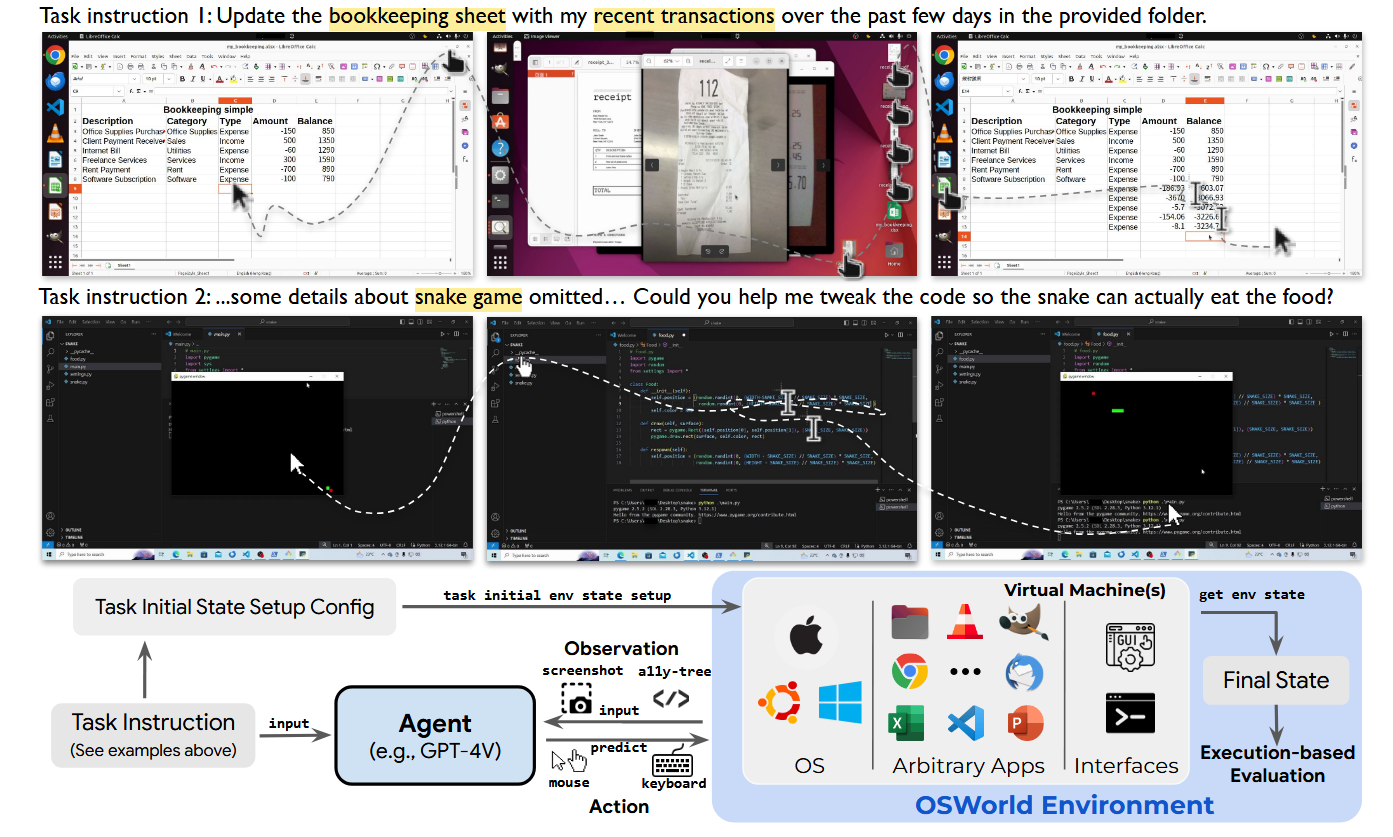
The authors introduce OSWorld: a real Computer Environment and attached Benchmark.
This executable environment allows input:
- free-form raw keyboard and mouse control of real computer applications
Supports:
- Initial task state configuration
- Execution-based evaluation
- Interactive learning
Including mainstream Operating System:
- Ubuntu
- Windows
- MacOS
OSWORLD enables evaluation of open-ended computer tasks that involve arbitrary applications, ranging from image viewing to software functionality integration and programming.
1.2 Benchmark
The authors create a benchmark with 369 real-world computer tasks that involve widely-used web and desktop apps in open domains, OS file I/O, and multi-app workflows through both GUI and CLI.
2. OSWorld Environment
2.1 Task Definition
An autonomous digital agent task can be formalized as a partially observable Markov decision process (POMDP) (𝒮, O, A, T, R) :
- State Space: 𝒮
- Observation Space: 𝒪 including natural language ℒ
- Action Space: 𝒜
- Transition Function: 𝒯 : 𝒮 × 𝒜 → 𝒮
- Reward Function: ℛ : 𝒮 × 𝒜→ℝ
Observation ot ∈ 𝒪:
- Natural Language Instruction:
- Concrete Observation:
- Screenshot
- A11y tree
- Combination
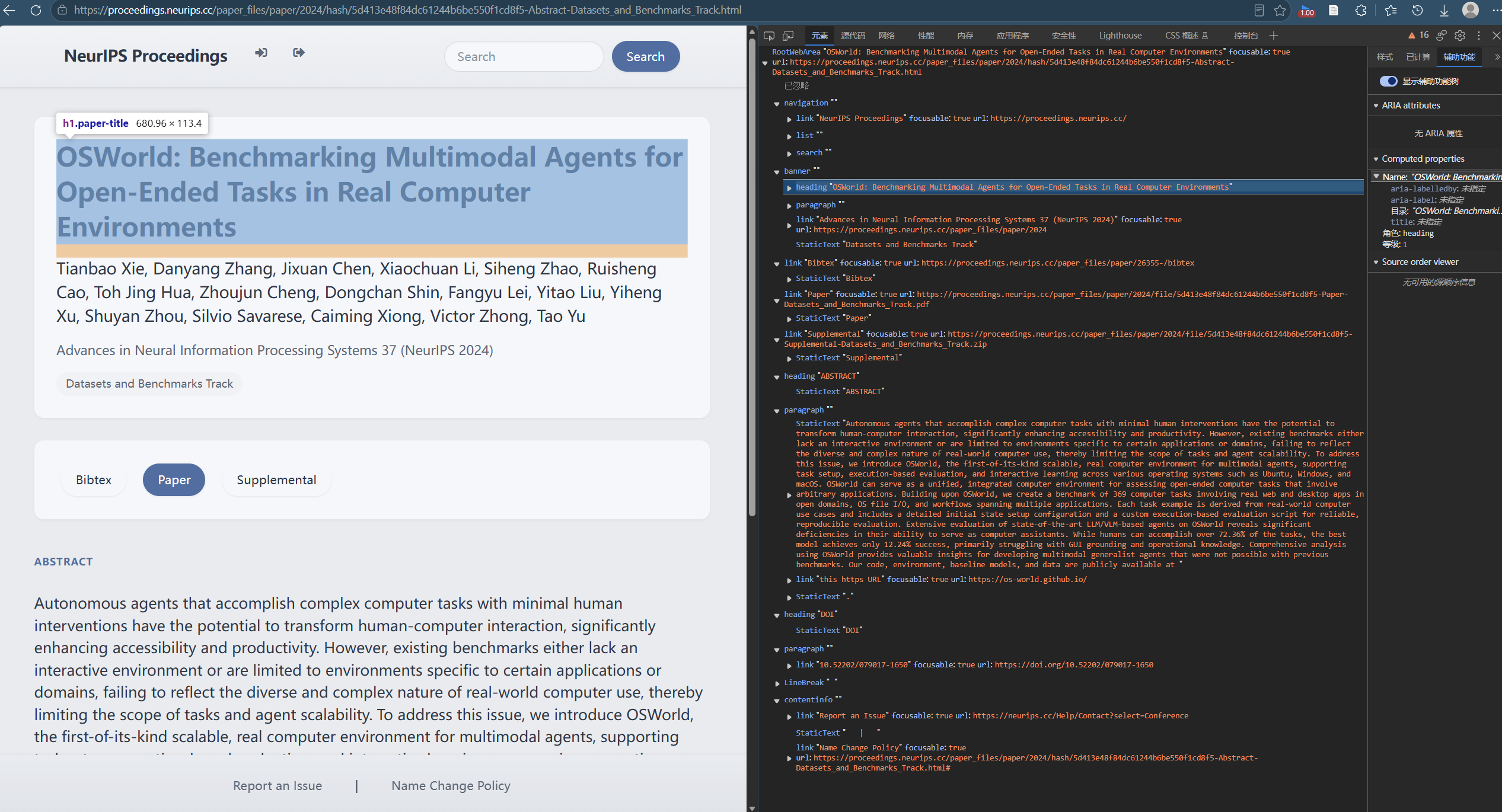
Accessibility Tree (A11Y Tree) is a text expression of applications’ GUI:
e.g.:
Given an Observation ot ∈ 𝒪, agent generates executable Action at ∈ 𝒜, (e.g., clicking on the certain pixel of the screen — .click(300, 540, button=‘right’), press key combination .hotkey(‘ctrl’, ‘alt’, ‘t’)), which results in a new State st + 1 ∈ S and a new partial Observation ot + 1 ∈ 𝒪.
This ReAct loop won’t end till until the task is DONE or FAIL.
Reward:
- Task Success / Partial Success: 1 or positive decimal under 1
- Task Failure: 0
2.2 Real Computer Environment Infrastructure
OSWorld is an executable and controllable environment using Virtual Machine technology.
Virtual Machine offers:
- asafe isolated environment and prevents the agent resulting in irreversible damaging effect on the real host machine
- the snapshot feature enabling efficient reset of the virtual environment.
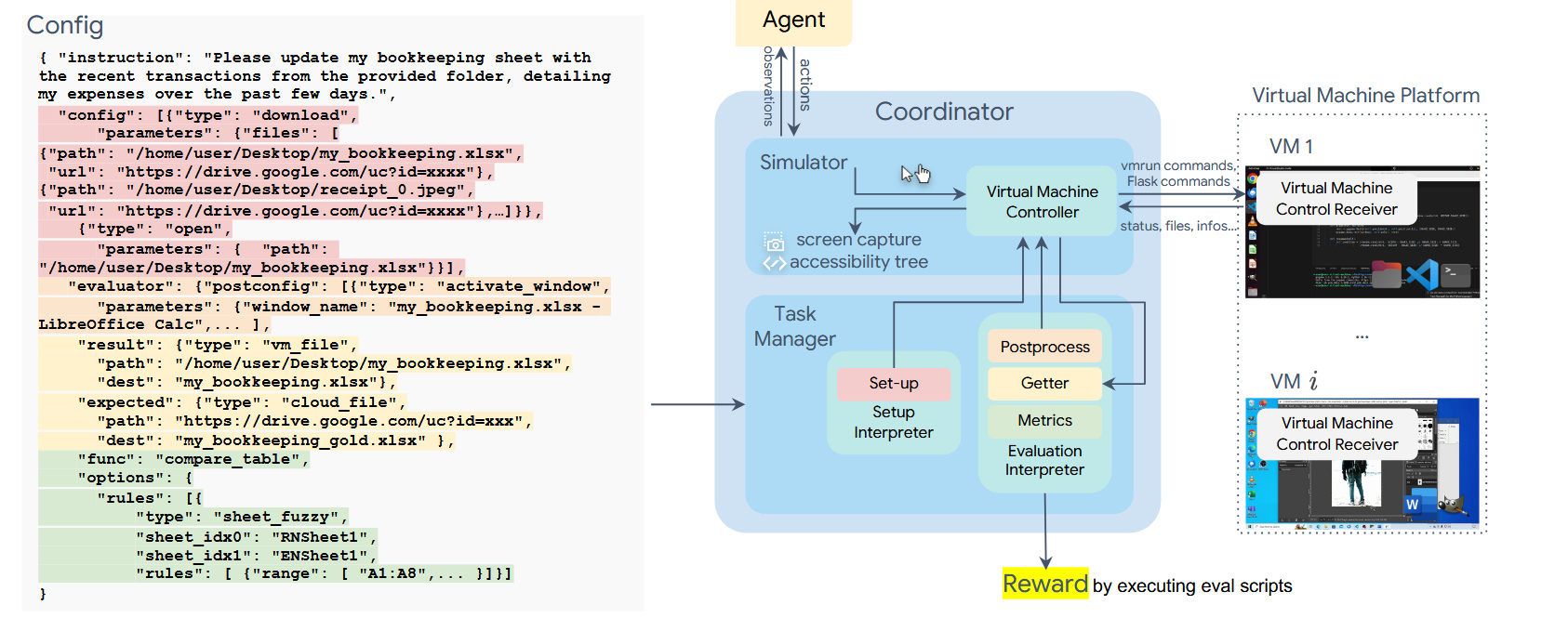
The configuration file of OSWorld is used to:
- Initialization Phase: Interface initialization
- Evaluation Phase: Post-processing (activating certain windows, saving some files for easy retrieval of information …)
- Acquiring files and information for evaluation (such as the final spreadsheet file for spreadsheet tasks, cookies for Chrome tasks)
- Evaluation Functions
- Parameters
2.2.1 Overview
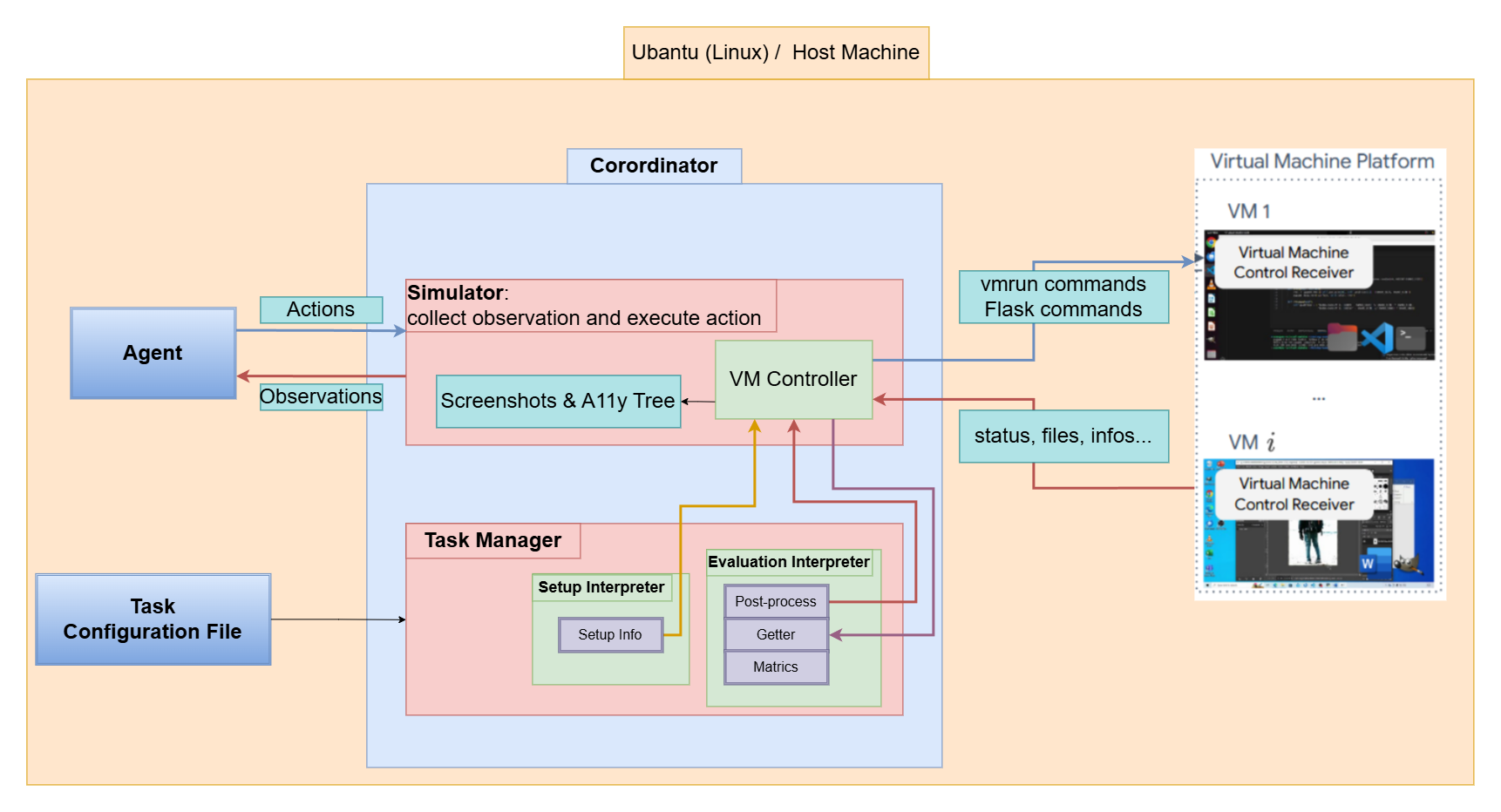
OSWorld environment runs on the host machine.
OSWorld:
- Coordinator:
- Accepts configuration file at the initialization of a computer task.
- Runs commands to create VM instance.
- Initializes the required state for the task through Task Manager.
- Configuration File:
- Specifies the snapshot file of VM (vm.xml -> vm.qcow2).
- Indicates the information needed for setup.
Once the environment is set up, agents start to interact with the environment, receiving observations such as:
- Screenshots
- Accessibility (a11y) Tree
- Customized Streams Such as terminal outputs.
Agents subsequently generate executable actions (e.g., .click(300, 540)) that manipulate the keyboard and mouse.
Each action of the agent is input into the environment as a code string, and the environment’s Simulator executes them in the virtual machine.
After completion of a task, the Task Manager performs post-processing (file saving, reopening certain apps…) according to the task’s post-config, retrieves data to the host machine and runs evaluation scripts.
Multiple virtual machines can run simultaneously on a single host machine, thereby parallelizing training and evaluation.
2.2.2 Initial Task Environment Setup
Many real-world scenarios that needs assistance occur at the time of intermediate stages, such as when certain software is already open or the computer has experienced a crash.
So the OSWorld wanna create a scenario at intermediate stages, there are two ways:
- Create a VM
- Read the configuration file
- Run commands to reach the intermediate state
- Create a VM with a snapshot describing the intermediate state
The second method looks more convenient, but it costs a lot extra storage. So the OSWorld takes the first method.
The setup procedure is divided into 3 parts:
- Start the VM emulator.
- Prepare files (download the files or scripts from the cloud, etc. optional).
- Execute reprocessing commands (open files or tabs, change the window size, etc. optional).
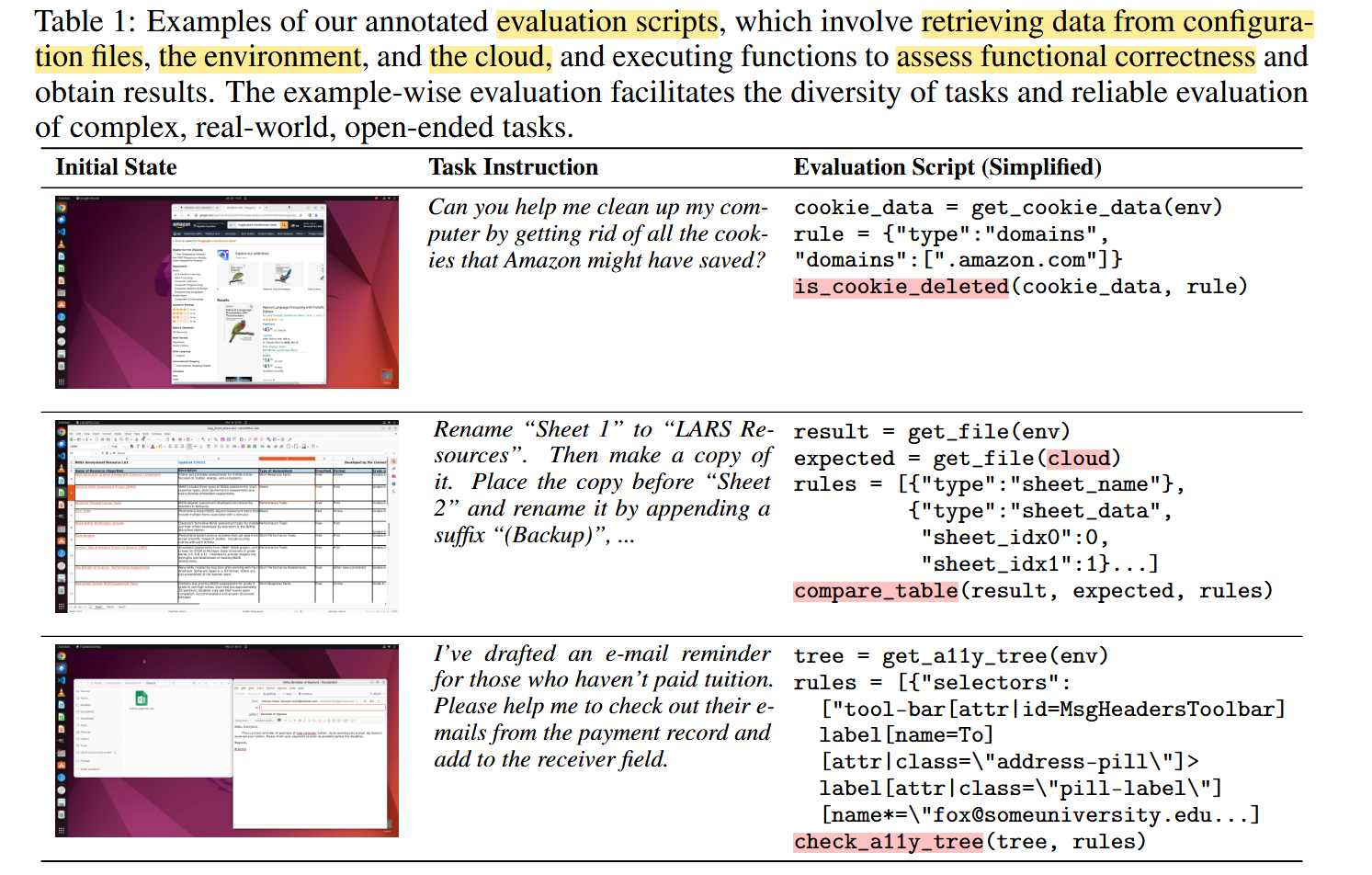
2.2.3 Execution-Based Evaluation
There are many different kinds of computer tasks, so it is impossible to evaluate them by a single metric.
This work designs example-specific evaluation metrics including:
- pre-setup
- post-processing
- dedicated functions
This involves interpreting the software’s internal files, utilizing specific packages, and preemptively setting up scaffolding based on the software’s permissions (e.g., opening remote debugging ports for Chrome and VLC, creating extensions for VS Code).
As a result, the authors construct a vast collection of functions to evaluate:
2.3 Observation Space
The observation space in OSWORLD contains:
- A complete screenshot of the desktop screen, including the mouse’s position and shape, various application windows, files, and folders that are opened in different sizes and orders, maintaining the same perception as a human.
- XML-format accessibility (a11y) tree (obtained via ATSPI 2 on Ubuntu, via PyWinAuto on Windows, etc.),
- Terminal output.
2.4 Action Space
Action space 𝒜 in OSWorld encompasses all mouse and keyboard actions, including movement, clicks (left-key, right-key, multiple clicks), dragging, keystrokes, hotkeys, and others, covering all human-computer action space.
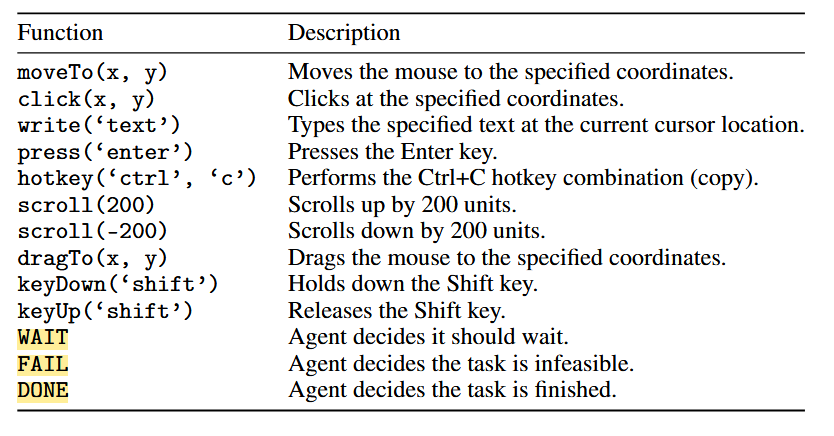
This work uses mouse and keyboard control library pyautogui3 for our action space. Timing is very critical, so the authors add 3 special action: WAIT, FAIL and DONE.
The prior works like WebArea didn’t model all the possible actions on a computer, leading a limitation when attempting actions like right-clicking and clicking with the ctrl key held to select items. This imposes an upper bound on agent learning capabilities.
3. OSWorld Benchmark
The OSWorld Benchmark provides:
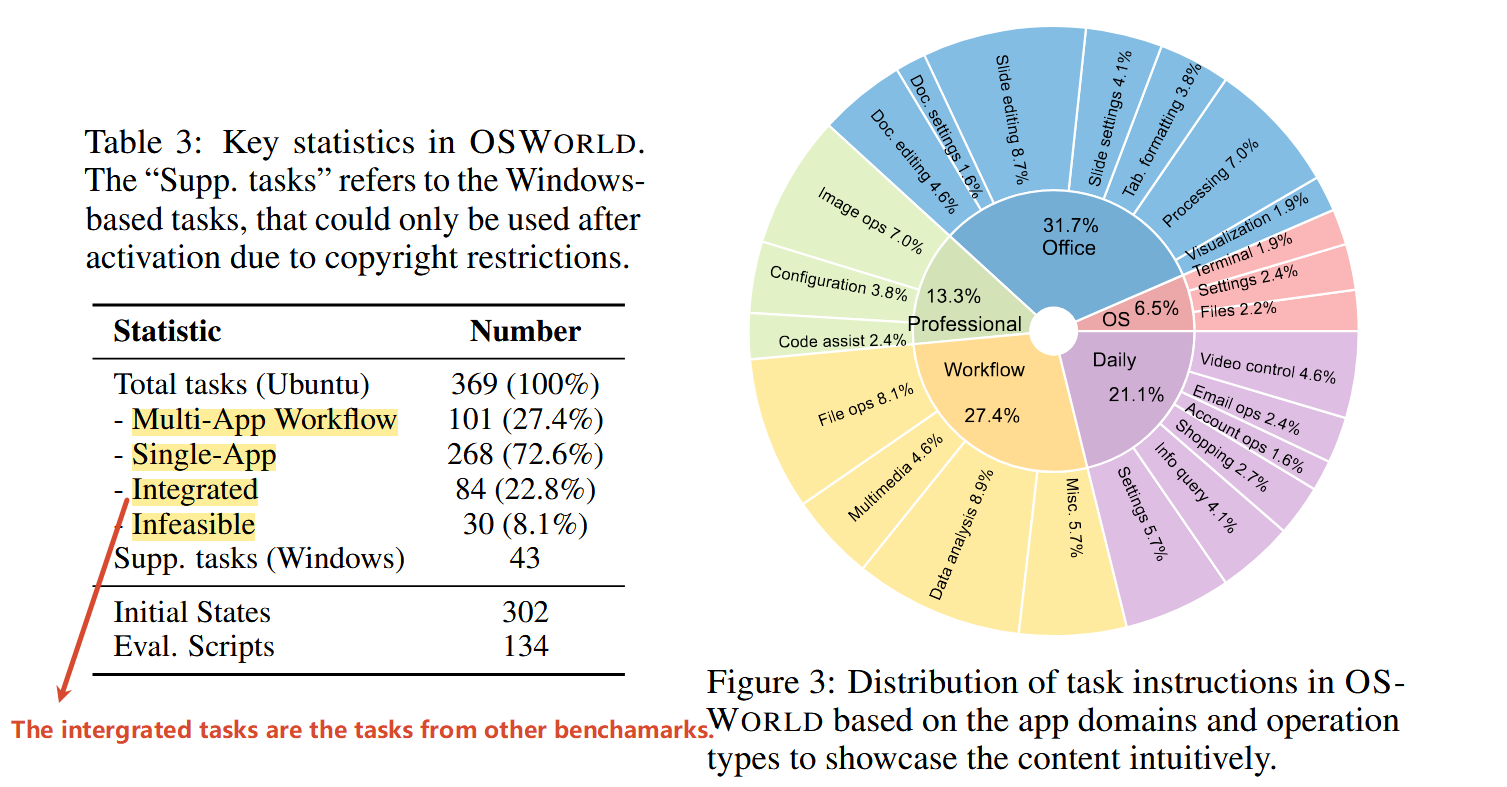
- 369 real computing tasks defined and executed on Ubuntu.
- 43 tasks for Windows
3.1 Operating System and Software Environments
Because of the VM, the OSWorld could define all kinds of computer tasks.
But the authors mainly focus on eight representative applications as well as the basic ones system provide:
- Chrome for web browsing
- VLC for media playback
- Thunderbird for email management
- VS Code as a coding IDE
- LibreOffice (Calc, Writer, and Impress) for handling spreadsheets, documents, and presentations
- GIMP for image editing
- other basic OS apps like terminal, file manager, image viewer, and PDF viewer
3.2 Tasks
The authors created the benchmark suite of 369 real-world computer tasks on Ubuntu environment from diverse sources.
Each example is carefully annotated with:
- a natural language instruction
- a setup configuration with corresponding files and setup actions for initialization of initial states upon provided VM image
- a manually crafted evaluation script to check if the task is successfully executed
3.2.1 Task instructions and scenarios
The selected task are from official guidelines & tutorials, video pieces giving tips and tutorials on the Internet (e.g., TikTok and YouTube), how-to websites (e.g., WikiHow), Q&A forums (e.g., Reddit, Quora, Superuser, & StackOverflow), formal video courses (e.g., Coursera and Udemy), and publicly-available personal blogs & guidelines.
The examples are selected by judging their popularity, helpfulness, and diversity, revealed by the views and votes.
And to authors combine some existing examples or drawing inspiration from daily-life scenarios, to compile the tasks.
The instructions and task-related files are then crafted from these real-world guidelines and questions by the authors.
The authors not only collect tasks that can be finished, but also collect the infeasible ones that are inherently impossible to be completed.
Additionally, to demonstrate the unification ability of OSWORLD environment for the creation of open-ended computer tasks, the authors also integrate 84 examples from other benchmarks focusing on single-application or domain-specific environments such as NL2Bash, Mind2Web, SheetCopilot, PPTC, and GAIA.
3.2.2 Initial state setup configs
For the initial state setup, the authors also developed some
functions based on the APIs of software and OS to control the opening
and resizing of software windows and reimplement some functions that are
difficult to achieve with APIs using pyautogui.
For different tasks, the authors write configs to set the files and initial steps in the virtual machine and verify them in the environment.
3.2.2 Execution-based evaluation
Configuration File:
- getter function: used to extract key components (e.g., the modified file, the text contents displayed in a window element) from the final state of the environment.
- evaluator function: the evaluator function assesses success based on the extracted key components.
- parameters
The authors implement nearly sample-specific executable evaluation scripts, resulting in a total of 134 unique evaluation functions for assessing functional correctness—significantly more than the previous benchmarks.
3.2.3 Stastics
The authors cluster the examples into the software categories.
Specifically, these categories include OS, Office (LibreOffice Calc, Impress, Writer), Daily (Chrome, VLC Player, Thunderbird), Professional (VS Code and GIMP), and Workflow (tasks involving multiple apps).
3.3 Benchmarking LLM and VLM Agent Baselines
3.3.1 LLM and VLM Agent Baselines
The authors implement 4 inputs:
- Accessibility Tree
- Screenshot
- Screenshot + Accessibility Tree
- Set-of-Marks(SoM)
3.3.2 Results
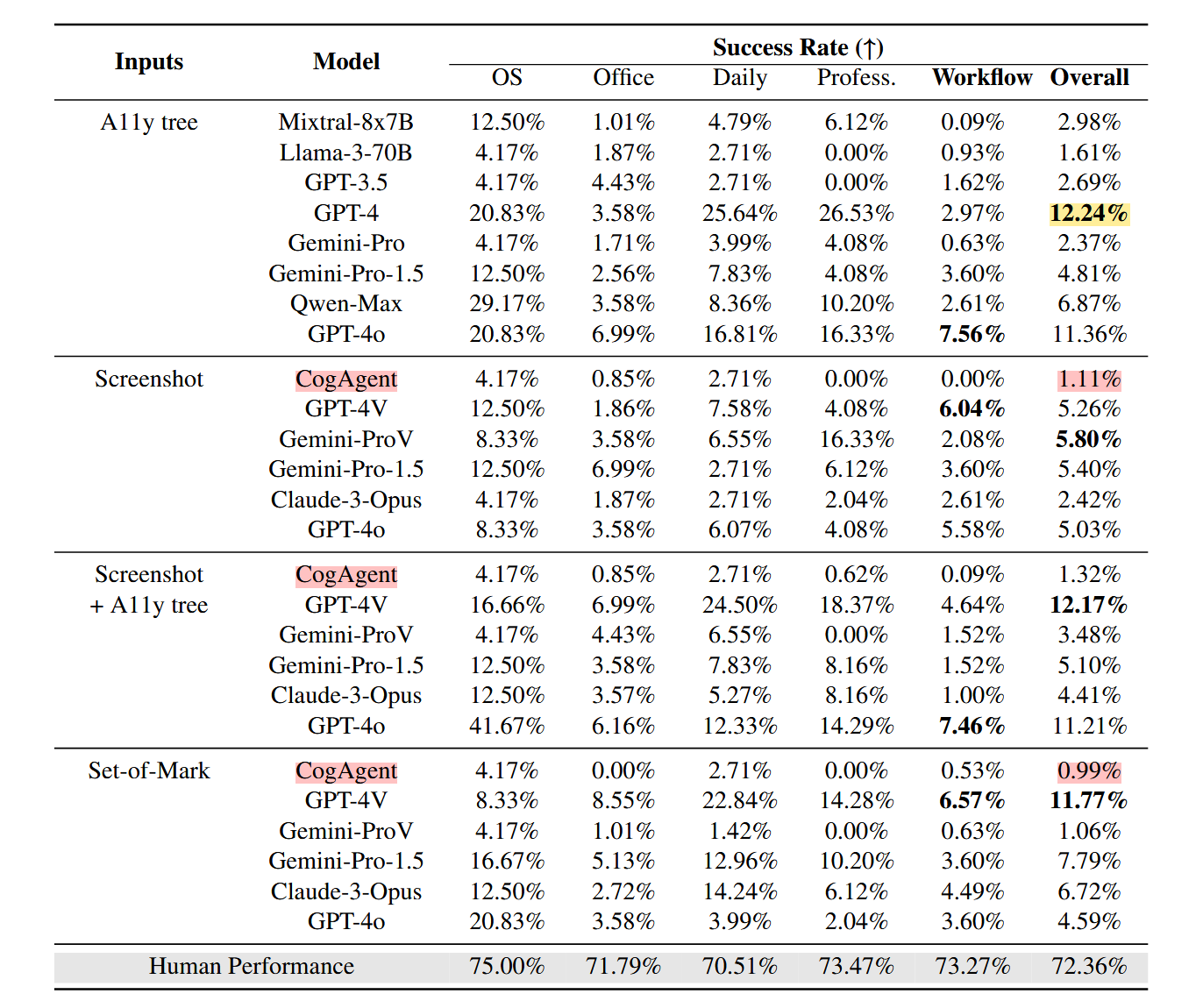
- LLMs and VLMs are still far from being digital agents on real computers.
- Agent performance has much higher variance than human across different types of computer tasks.
- A11y tree and SoM’s effectiveness varies by models.
- VLM agents with screenshot-only setting show lower performance, but it should be the ultimate configuration in the long run.
4. Workflow