Panorama of Agent
1. What is Agent & Harness?
First, the Large Language Model(LLM) is very mature now. Its essence is a prediction model:
- You input a string of token, and it outputs a string of token.
The LLM nowadays can answer our questions but it can not finish a job independently. For example, you can ask LLM how to create a new folder on PC and it can give you an answer. However, the LLM cannot create the folder directly because the only thing it can do is output tokens.
Now we have LLM to describe the workflow of a job. But we need to finish the workflow ourselves. Agent is the software that can resolve problems independently.
Agent is usually composed of two parts: LLM and Harness.
Agent ≈ LLM-based Policy + Harness
The LLM provides the main reasoning/policy capability, while the Harness provides orchestration, state/context management, tools, environment interaction, execution, and runtime controls.
e.g. LLM thought it needs to read a file, then the Harness part will read the file and return the result to LLM.
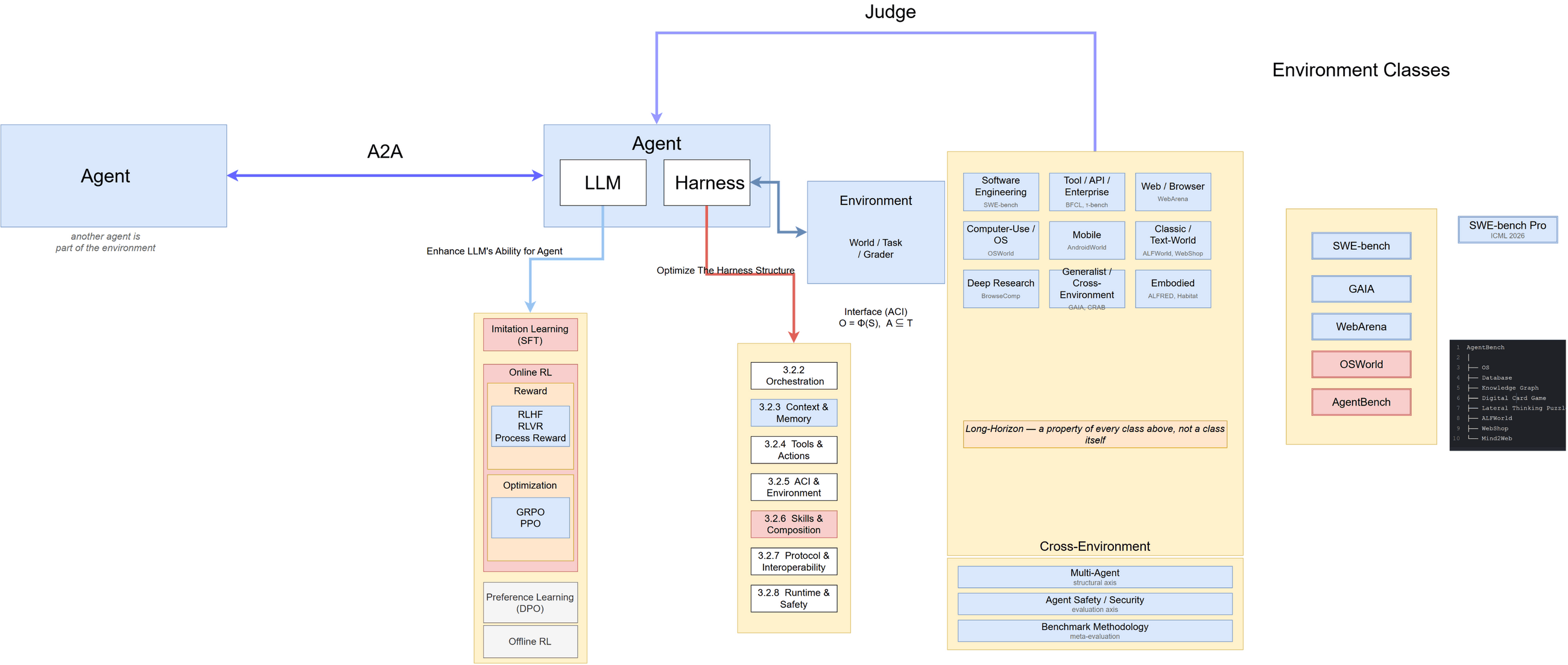
But an Agent does not exist in a vacuum. An Agent is defined jointly with the environment it acts in. The Harness interacts with the environment through an Interface: it renders the environment’s state into observations the LLM can read, and translates the LLM’s decisions into actions the environment accepts.
Interface: O = Φ(S), A ⊆ 𝒯
So the well-known decomposition describes the Agent’s capability, while the environment class determines the shape of that capability:
- Different environments expose different observation formats → different Context & Memory designs
- Different environments accept different action spaces → different Tools & ACI designs
- Different environments offer different verification signals → different training methods available
This is why SWE Agents and Web Agents look so different even when they share the same LLM: they are two extreme points of the same Interface design axis, not two unrelated species of Agent.
In Agent, LLM is more likely a role of “Brain”, and the Harness is the “Limb”.
2. Agent’s Pursuit
Agent is designed to solve problem independently. Everything we do now is to improve Agent’s ability of solving problems.
We hope Agent can solve particular problems in daily life and complex problems in specific area like software engineering.
3. Optimizing an Agent
Agent is composed of LLM and Harness.
So it is obvious that we should enhance LLM’s performance in Agent area. And optimize the Harness part. Then we need benchmarks to judge the Agent’s performance.
This article is organised as six parts, following one chain of reasoning:
| Part | Question it answers |
|---|---|
| 1. What is an Agent? | What is it made of? |
| 2. The Pursuit of Agent | Why do we build it? |
| 3. Optimizing an Agent | How do we make it stronger? |
| 4. Agent Categories | Which kinds exist, and how is each one actually built? |
| 5. Benchmark | How do we measure it? |
| 6. Multi-Agent | What changes when there are several? |
Parts 3 and 4 are complementary and deliberately separated:
- Part 3 is the abstract layer – it asks which components an Agent has, and how to improve each one. The seven Harness layers in 3.2.2 are meant to apply to every Agent.
- Part 4 is the concrete layer – it asks how those same components are actually instantiated in each environment: what the observation interface looks like, what the action space allows, what the classic implementation does, and where the real engineering pain is.
The same Orchestration layer from Part 3 looks completely different in a software repository than in a browser. Part 4 is about that difference.
This is the original version of Agent Panorama:
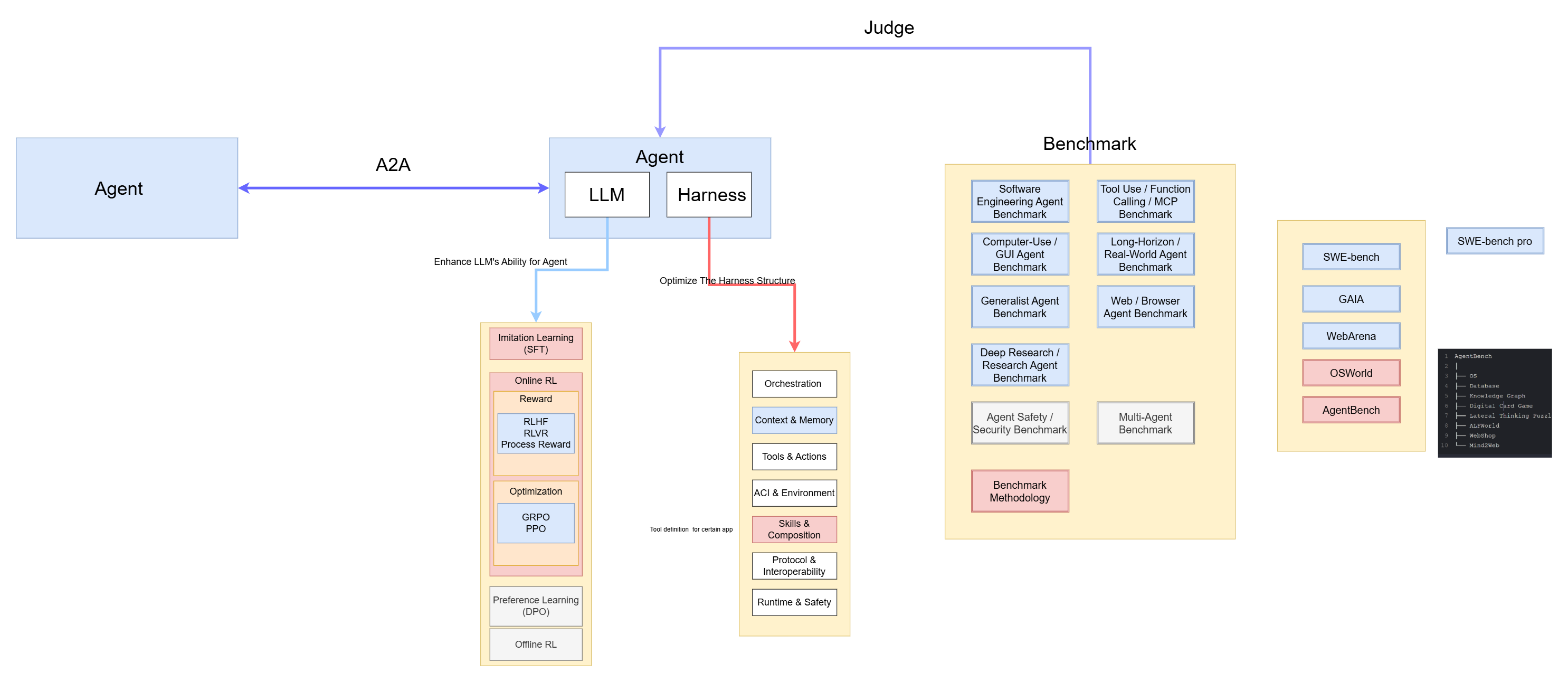
This is the second version which considering the relation between Env and Agent:
3.1 LLM Tuning
In Agent area, the most popular post-training methods are:
- Imitation Learning (SFT)
- Online RL
- Offline RL
- Preference Learning (DPO)
3.1.1 Imitation Learning (SFT)
ℒSFT = −∑tlog Pθ(tokent ∣ token < t)
3.1.1.1 Trajectory SFT
Core Process:
1 | Expert Agent Trajectory |
Trajectory (ReAct) :
1 | task |
Relative papers:
SWE-Gym (ICML 2025), Rejection Sampling / Self-Improvement
SWE-Lego: Pushing the Limits of Supervised Fine-tuning for Software Issue Resolving (arXiv:2601.01426, Jan 2026)
Reports that SFT alone — with error masking and a difficulty-based curriculum over 32k task instances and 18k validated trajectories — reaches 52.6% on SWE-bench Verified (Qwen3-32B), rising to 58.8% with test-time scaling.
3.1.1.2 Critical-Step SFT
A trajectory includes many steps, but not all steps are necessary. One approach is to apply SFT only to the critical steps within a trajectory.
- ATLaS — (Findings ACL 2025), only train critical steps
3.1.1.3 Synthetic Trajectory
One problem of SFT is that high-quality training data is few, so there is a research direction that aims to synthesize trajectories.
- SWE-smith (NeurIPS 2025), Synthetic Trajectory
3.1.1.4 Distillation
Distillation is to extract reasoning trajectories from different teachers and distill into a student model.
1 | Teacher A |
- Agentic-R1 (EMNLP 2025)
3.1.2 Online RL
3.1.2.1 Reward Design
The reward is a criterion to judge how good a trajectory is.
There are many ways to calculate reward:
1 | Reward |
RLVR (Reinforcement Learning Verifiable Reward) is an important type, because many engineering problems are verifiable.
- SWE-RL (NeurIPS 2025)
- WebAgent-R1 (EMNLP 2025)
Process Reward Model(PRM) is another research roadmap; There are many steps in a trajectory. The traditional reward is trajectory-level, which means thatthe LLM cannot tell which step in a trajectory matters.
1 | Step 1 |
- LLM cannot know if step 3 is really important.
1 | Outcome Reward |
- Rewarding Progress (ICLR 2025)
- PURE (NeurIPS 2025)
- ReasonFlux-PRM (NeurIPS 2025)
3.1.2.2 RL Optimization Algorithm
After calculating the reward of a trajectory, we need to update the weights of LLM.
There are three ways to update weights, but the PMD is not commonly used.
1 | Reward |
3.1.2.2.1 GRPO
GRPO has become one of the most widely used policy-optimization methods for reasoning-oriented LLM post-training. A key difference from standard PPO is that GRPO estimates relative advantages from a group of sampled responses instead of maintaining a separate value/critic model.
1 | Question x |
- SWE-RL
3.1.2.2.2 PPO
The core thought of PPO (Proximal Policy Optimization) is:
- Need to make LLM more inclined to generate high-reward responses, while ensuring that a single update does not deviate too far from the original model.
1 | Question x |
3.1.3 Offline RL
- OREO (ACL 2025): Offline Reinforcement Learning for LLM Multi-step Reasoning
- Reward-Weighted Fine-Tuning (NeurIPS 2025): Offline RL by Reward-Weighted Fine-Tuning for Conversation Optimization
3.1.4 Preference Learning (DPO)
DPO (Direct Preference Optimization) is widely used in LLM post-training, but in Agent-specific post-training it is generally less dominant than SFT and online RL.
SFT teaches the LLM what the right answer is while Preference Learning just tells LLM: A is better than B.
1 | Task |
Train:
1 | πθ(A|x) ↑ |
Basic DPO process:
1 | Prompt |
Traditional DPO compares entire trajectories. Nowadays the tendency is to research which certain step makes trajectory better.
1 | Trajectory-level |
- HPL (ICLR 2026): Solving the Granularity Mismatch: Hierarchical Preference Learning for Long-Horizon LLM Agents
- Online DPO (ICLR 2025)
- SDPO (ACL 2025)
3.2 Harness Structure
3.2.1 Environment Classes —— The First-Order Classification
Before listing the Harness layers, we must first answer: what kind of world does the Agent live in? This is the first-order classification of the field, because the environment class fixes three things at once.
| Axis | Spectrum |
|---|---|
| Observability(观测形态) | plain text tokens → structured tree (DOM / AX) → pixel screenshots → video / point cloud / proprioception |
| Action space(动作自由度) | open primitives, new tools writable on the fly → closed enumerated actions → continuous motor control |
| Verifiability(可验证性) | test pass/fail → state assertion → LLM judge → human rating |
The taxonomy induced by these three axes:
| Environment Class | Observability | Action Space | Verifiability |
|---|---|---|---|
| Classic / Text-World ALFWorld, WebShop |
text description | few discrete text actions | environment state |
| Software Engineering SWE-bench |
files, stdout, diff | curated ACI + shell (open) | test suite (pass/fail) |
| Tool / API / Enterprise BFCL, τ-bench, TheAgentCompany |
JSON tool returns | tool calls (closed) | state assertion + user simulator |
| Web / Browser WebArena, Mind2Web |
DOM / AX tree / screenshot | click / type / scroll / goto
(closed) |
state assertion |
| Computer-Use / OS OSWorld |
screenshot (+ AX tree) | click(x,y) / type / key (closed) |
state assertion |
| Mobile AndroidWorld |
screenshot + view tree | tap / swipe / back (closed) |
state assertion |
| Deep Research BrowseComp |
web text | search / fetch / synthesize |
LLM judge (weak) |
| Embodied ALFRED, Habitat |
video / point cloud / proprioception | continuous motor primitives | physical / simulator |
Key observation — the action space and the environment class are two views of one thing. An environment is its action space generator: Aenv = ActionSpace(Environment)
So “designing an Agent” and “designing an action space” are the same activity seen from two sides. SWE Agents collapse the action space into one escape hatch (a shell) plus a few curated commands; Web Agents are handed a closed, enumerated action set. This is not a difference in Agent architecture — it is a difference in what the environment chose to expose.
Second observation — the available training method follows verification, not environment complexity. SWE has a free correctness signal (run the tests), which is why SWE-RL and SWE-Gym advanced fastest and why RLVR works there. Deep Research is a far simpler environment, yet there is no cheap ground truth, so the field is left with LLM-as-judge and weak process rewards (see 3.1.2.1 and 3.1.2.2).
For this research map, the Harness is organized into seven engineering-oriented layers. This is a practical taxonomy rather than a universally accepted academic standard, and the layers can overlap in real systems.
| Part | Abstract | Description |
|---|---|---|
| Orchestration Loop / Planning / ReAct / Reflection / Verification |
Control | How should the agent decide what to do? |
| Context & Memory Context Management / Retrieval / Compression / Memory |
State | What should the agent remember? |
| Tools & Actions Tool Calling / Discovery / Selection / Code / Browser / Computer |
Action | What can the agent do? |
| ACI & Environment State / Action Space / Observation / Error / Feedback |
Interface | What state, observations, actions, errors, and feedback does the environment expose to the agent? |
| Skills & Composition Skills / Workflow / Subagents / Agent-as-a-Tool |
Capability | How can reusable capabilities and workflows be represented, retrieved, composed, and reused? |
| Protocol & Interoperability MCP / A2A / Agent API / Session Protocol |
Interoperability | How do agents/tools/services communicate? |
| Runtime & Safety Sandbox / Execution / Permission / Guardrail / Reliability / Observability / Cost |
Runtime & Governance | Where and how are actions executed? How do we keep agents safe, reliable, observable, recoverable, and economical? |
1 | Agent |
3.2.2 Orchestration / Control
Q: How should the Agent decide what to do?
1 | Orchestration |
Earlier Agent(Classic ReAct):
1 | LLM → Tool → LLM → Tool |
Nowadays Agent:
1 | Plan → Act → Verify → Reflect → Re-plan → Act |
From simple ReAct Loop to a Loop with planning / verification / recovery.
PlanGEN (EMNLP 2025): This work combines
planninganditerative verification.ReflAct (EMNLP 2025): The traditional ReAct structure will accumulate little errors which will make agent drift from correct path. (ALFWorld + 27.7% than ReAct)
1
2
3
4
5
6
7Current State
↕
Goal State
↓
Reflection
↓
ActionMetaAgent-P (ACL 2025)
3.2.3 Context & Memory / State
Q: What should the Agent know at the current moment, and what past information should be retained ?
1 | Orchestration |
The Context & Memory is not just ‘Chat Log’. It store the Agent State.
1 | Current Context |
The tradition memory system:
1 | Memory |
Nowadays:
1 | Agent decides: |
Memory Management will be considered into Agent Policy.
Memory OS of AI Agent, (EMNLP 2025)
This work design the Memory System like operating system hierarchy.
1
2
3
4
5Short-term
↓
Mid-term
↓
Long-termCoarse-to-Fine Grounded Memory, (EMNLP 2025)
This work use memory to replan. Memory is used to store useful things.
1
2
3
4
5
6
7Past Experience
↓
Grounded Memory
↓
Current Situation
↓
PlanningAgentic Memory, ACL 2026
Memory-R1,ACL 2026
One problem:
How Memory Management Impacts LLM Agents, ACL 2026:
The agent will clearly exhibit “experience-following”: after retrieving historical experience from similar tasks, it is easy to reproduce similar behaviors. So if there exists wrong memory, the Agent is inclined to repeat the wrong operations.
3.2.4 Tools & Actions / Action
What can Agent do ?
The tradition actions system is simply call tools like:
1 | Search |
The new tendency of actions area is:
1 | Tool Discovery |
LLM Agents Making Agent Tools,ACL 2025
1
2
3
4
5
6
7
8
9
10
11Paper + GitHub Code
↓
Agent
↓
Install dependencies
↓
Generate tool
↓
Execute
↓
Debug / Self-correctIn this work, the Agent creates its own tools
Adaptive Tool Use,ACL 2025
More tools do not necessarily mean a better Agent. If one tool frequently returns errors, the Agent should realize that.
ToolScope,ACL 2026
In large tool ecosystem, there exists a problem:
1
2
3
4
5
6
7Too Many Tools
+
Repeated Tools
+
Tedious Schema
+
Trouble ChoosingSolution:
1
2
3
4
5Tool Merging
+
Tool Retrieval
+
Context-aware Filtering
3.2.5 ACI & Environment / Interface
Agent-Computer Interface.
This part is to solve the problem: What form should the external world take for the agent, and how should the agent act upon it?
A common API-agent interface takes a form like:
1
search(query)
A computer-use Agent instead exposes a human-like interaction loop:
1
2
3
4
5
6
7
8
9Screenshot
↓
LLM
↓
click(x,y)
↓
Screenshot
↓
...
The key shift is from tool-specific APIs to general-purpose interaction interfaces. Instead of designing a dedicated tool for every task, the Agent can operate through interfaces already available to humans, such as GUI, CLI, and Web.
OS Agents Survey,ACL 2025:
The paper defines OS Agent that interact with:
1
2
3
4
5GUI
CLI
Web
Mobile
DesktopOSWorld-Human, ICML 2025:
To finish a certain task, the Agent takes more steps/operations than human.
1
2
3
4
5Agent Benchmark
↓
Can you finish?
+
Can you finish efficiently?
3.2.6 Skills & Composition / Capability
How can we extract complex, repeatable capabilities from a specific agent and turn them into reusable, composable capabilities?
1 | Tool = an executable capability or interface for an action |
1 | Tools → Atomic Capability |
Tendency: Skills are evolving from prompts into software artifacts.
The traditional Skill is a text:
1 | To finish ... task, you should: |
It’s a stable text describing a fixed workflow.
Agent Skills,Anthropic 2025
Skill is no more a huge text file. It’s new structure:
1
2
3
4Skill/
├── instructions
├── scripts
└── resourcese.g:
1
2
3
4
5
6
7
8
9pdf-to-excel/
├── SKILL.md
├── scripts/
│ ├── extract_table.py
│ ├── clean_data.py
│ └── validate.py
└── resources/
├── excel_template.xlsx
└── examples/There’s a small Skill metadata like tool definitions will be read by Agent when system starts:
1
2
3
4
5
6
7Available Skill:
Name:
pdf-to-excel
Description:
Extract structured tables from PDFs and produce validated Excel files.When handling a certain task:
1
2
3
4
5Task
↓
Skill Retrieval
↓
Load Relative Skill, e.g. pdf-to-excel/SKILL.mdIn Skill.md, there may exists content like:
1
2
3
4
5
6
7...
Run:
python scripts/extract_table.py report.pdf
...In effect, the scripts act as tools for skills.
GitHub - anthropics/skills: Public repository for Agent Skills · GitHub
SkillWeaver, arXiv:2504.07079
1
2
3
4
5
6
7
8
9
10
11
12
13
14
15
16
17Web Task
↓
Agent Exploration
↓
Successful Trajectory
↓
Skill Discovery
↓
Skill Synthesis
↓
Skill Practice / Debugging
↓
Reusable Skill API
↓
Skill Library
↓
Future TasksSkillRL: Evolving Agents via Recursive Skill-Augmented Reinforcement Learning (arXiv:2602.08234, Feb 2026)
Distills raw experience into a hierarchical
SkillBank, then lets the skill library co-evolve with the policy during RL, instead of storing raw trajectories.1
2
3
4
5
6
7
8
9
10
11
12
13
14
15Experience
↓
Skill Distillation
↓
Hierarchical SkillBank
↓
Retrieval
↓
RL Training
↓
Policy Improvement
↓
New Experience
↓
SkillBank EvolutionSkillCraft: Can LLM Agents Learn to Use Tools Skillfully? (arXiv:2603.00718, Feb 2026)
1
2
3
4
5
6
7
8
9
10
11Task A
↓
Learn Skill
↓
Task B
↓
Reuse Skill
↓
Task C
↓
Reuse / Compose SkillGenerative Skill Composition for LLM Agents (arXiv:2606.32025, Jun 2026)
Formalizes structured skill composition — which skills, how many, and in what order — as task-conditioned skill sequence prediction, decoded jointly rather than by retrieval plus reranking.
Agent Skills for Large Language Models: Architecture, Acquisition, Security, and the Path Forward (arXiv:2602.12430, Feb 2026), Agent Skills ’26 Workshop @ ACM CAAS 2026
A survey of the skill abstraction layer, covering
SKILL.md, progressive context loading, the complementary roles of Skills and MCP, and security (it reports that 26.1% of community-contributed skills contain vulnerabilities).
3.2.7 Protocol & Interoperability / Interoperability
Solve the problems of communication between Agents, Tools, Data Source and Services.
MCP (Model Context Protocol):
1
2
3Agent
↕
Tools / Data / ServicesA2A (Agent to Agent):
Different Agents should have the capability to work together.
1
Agent A ↔ Agent B
MCP-AgentBench, AAAI 2026
3.2.8 Runtime & Safety
Make the Agent actually run in a controlled, secure, observable, and recoverable environment.
Traditional safety check:
1 | Prompt |
Agent workflow:
1 | Prompt |
So we should check safety of not only prompt and output but also Action, Tool Call, State Transition and Permission.
Task Shield,ACL 2025
Is this action really relevant to the user’s task?
IPIGuard,EMNLP 2025
Create a
Tool Dependency Graph, and limit the tool call by the dependency graph.
3.2.9 Conclusion
| Field | 2025 | Tendency in 2026 |
|---|---|---|
| Orchestration | ReAct、Planning、Reflection | Adaptive / verified / long-horizon control |
| Context & Memory | RAG、hierarchical memory、context compression | Agentic memory、learned memory management |
| Tools & Actions | Tool calling、tool selection | Tool discovery、tool management、tool creation、computer use |
| ACI & Environment | Browser / GUI agents | Efficient action spaces、long-horizon computer interaction、Secure ACI |
| Skills & Composition | Skills、workflows、multi-agent | Reusable capability、skill lifecycle、agent composition |
| Protocol & Interoperability | MCP、A2A | large ecosystem、discovery、identity、security、task protocols |
| Runtime & Safety | Sandbox、guardrails、tracing | Durable runtime、containment、permission、agent security、cost/reliability |
4. Agent Categories
4.1 How to Read This Chapter
Part 3 was about the abstract Agent: which components it has, and how to improve each one. This part is about the concrete Agent: how those same components are instantiated in each environment, and what the classic implementation of each category actually looks like.
Every category below is described with the same seven fields, so they can be compared side by side:
| Field | What it captures |
|---|---|
| Observation Interface | What the Agent can perceive |
| Action Space | What the Agent is allowed to do |
| Classic Agent | The canonical, widely-copied implementation |
| Harness Implementation | How the layers from 3.2 are actually realised here |
| Practical Usage | When this category is the right tool |
| Verification & Training | What signal is available, so what training works |
| Current Limits | Where it breaks today |
Scope note. Categories are chosen by influence within the field and by the availability of a public reference implementation, not by current SOTA. Embodied and Mobile Agents are out of scope for this article; the Generalist (“cross-environment”) setting is discussed at the end as an evaluation axis rather than as a category of its own.
4.2 Environment Classes, Revisited
3.2.1 already established the first-order classification. For convenience:
| Category | Environment | Observation | Action Space | Verification | Representative Benchmarks |
|---|---|---|---|---|---|
| Software Engineering | repository + OS sandbox | files, stdout, diff | curated ACI + shell (open) | test suite (pass/fail) | SWE-bench, SWE-bench Verified, SWE-Bench Pro |
| Web / Browser | website | DOM / AX tree / screenshot | click / type / scroll / goto
(closed) |
state assertion | WebArena, Mind2Web, WebVoyager |
| Computer-Use / OS | desktop OS, cross-application | screenshot (+ AX tree) | click(x,y) / type / key (closed) |
state assertion | OSWorld, OSWorld-Human, WindowsAgentArena |
| Deep Research | open web + documents | web text | search / fetch / synthesize |
LLM judge (weak) | BrowseComp, BrowseComp-Plus, MLR-Bench |
| Tool / API / Enterprise | borrowed – no dedicated world | JSON tool returns | tool calls (closed) | state assertion + user simulator | BFCL, τ-bench / τ²-bench, MCP-Bench, TheAgentCompany |
The single most useful thing to notice in this table is the open vs. closed action space column. It is the sharpest dividing line in the whole field, and it explains most of the downstream differences: whether the Agent can create new tools mid-task, how much of the work lives in the Harness, and how safely the Agent can be deployed.
4.3 Software Engineering Agent
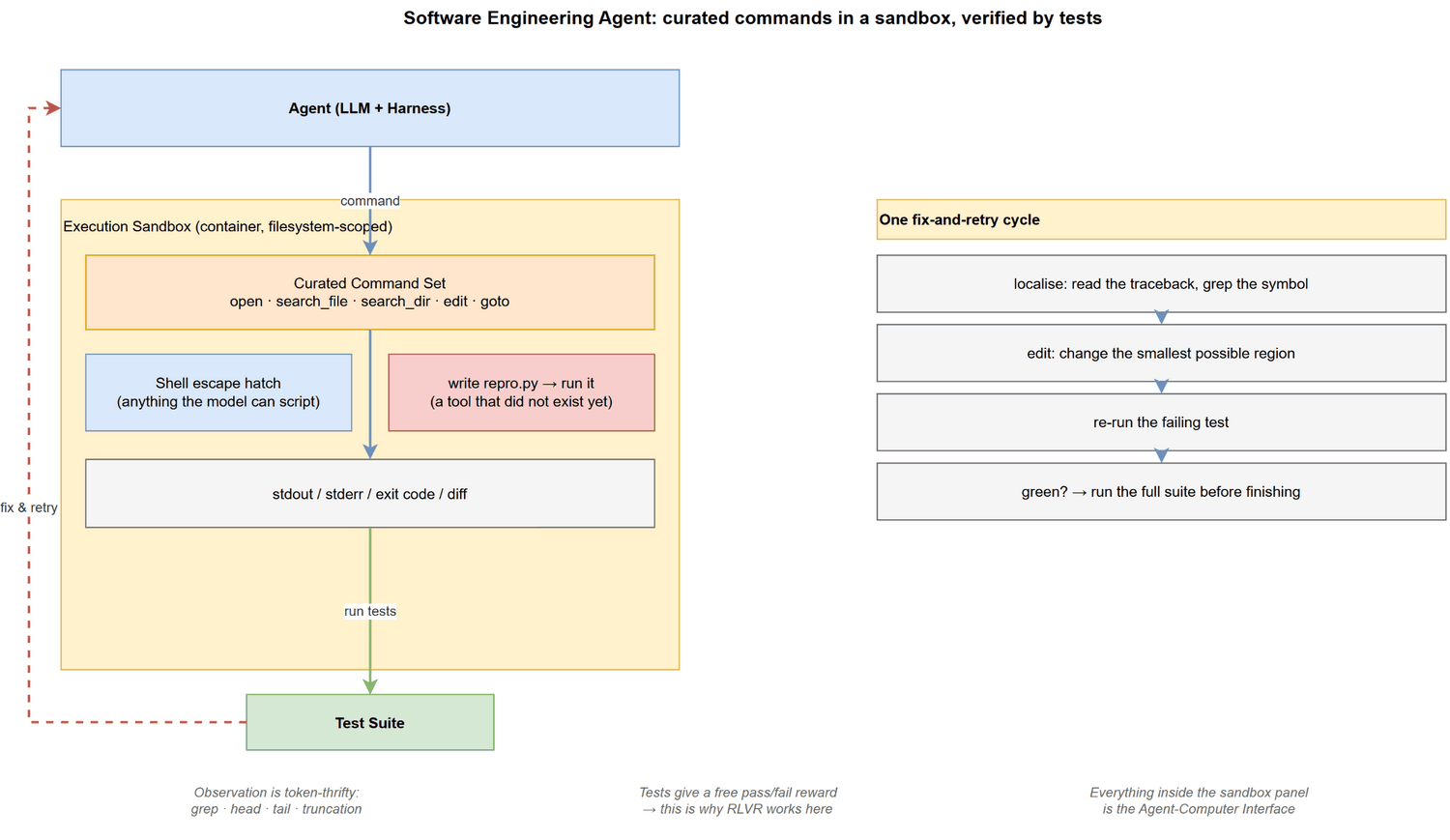
Observation Interface. A repository plus a shell.
The Agent reads files, runs commands, and inspects stdout, stderr, exit
codes and diffs. Crucially, output can be filtered before it
reaches the model: grep, head,
tail, and truncation are all legal, so this is a
token-thrifty environment.
Action Space. Open. The Agent can write a new script and execute it. This is the defining property of the category: the Agent can create new tools for itself in the middle of a task.
1 | write repro.py |
Classic Agent: SWE-agent. Its contribution was not a
better model but a better interface: the Agent-Computer
Interface (ACI). Instead of handing the model a raw shell, SWE-agent
defines a small set of structured commands (open,
search_file, search_dir, edit,
goto) whose output is bounded and whose syntax is
validated. The lesson generalises: when the model is weak at an
interface, redesign the interface rather than fine-tune the
model.
Harness Implementation.
| Layer | How it is realised here |
|---|---|
| Orchestration | ReAct loop, plus a verification step (run tests) and a reflection step on failure |
| Context & Memory | File slices on demand; aggressive trajectory compression; the “last N observations” rule |
| Tools & Actions | A small curated command set, plus an escape hatch to the shell |
| ACI & Environment | This is the heart of the category – command design, output truncation, edit validation |
| Skills & Composition | Reusable recipes (“how to run this project’s tests”), plus subagents for exploration |
| Protocol | MCP servers for issue trackers, CI, and code search |
| Runtime & Safety | Container sandbox, filesystem scoping, cost caps |
Practical Usage. Bug fixing in an existing repository, test generation, dependency upgrades, code review, and repository-scale refactors. It is the category with the best cost-benefit ratio today, because verification is free and the environment is reproducible.
Verification & Training. Tests give a free 0/1 reward, which is why this category leads in RL: SWE-RL, SWE-Gym and SWE-Lego all exploit it. Trajectory SFT remains the base, and RLVR is the differentiator. This is the only category where RL is straightforwardly worth the engineering cost.
Current Limits. Localisation is still the bottleneck, not editing. Performance is also contamination-sensitive: as shown in 5.2.7, models score far better on SWE-bench Verified than on comparable fresh benchmarks, which suggests part of the reported progress is memorisation rather than skill.
4.4 Web / Browser Agent
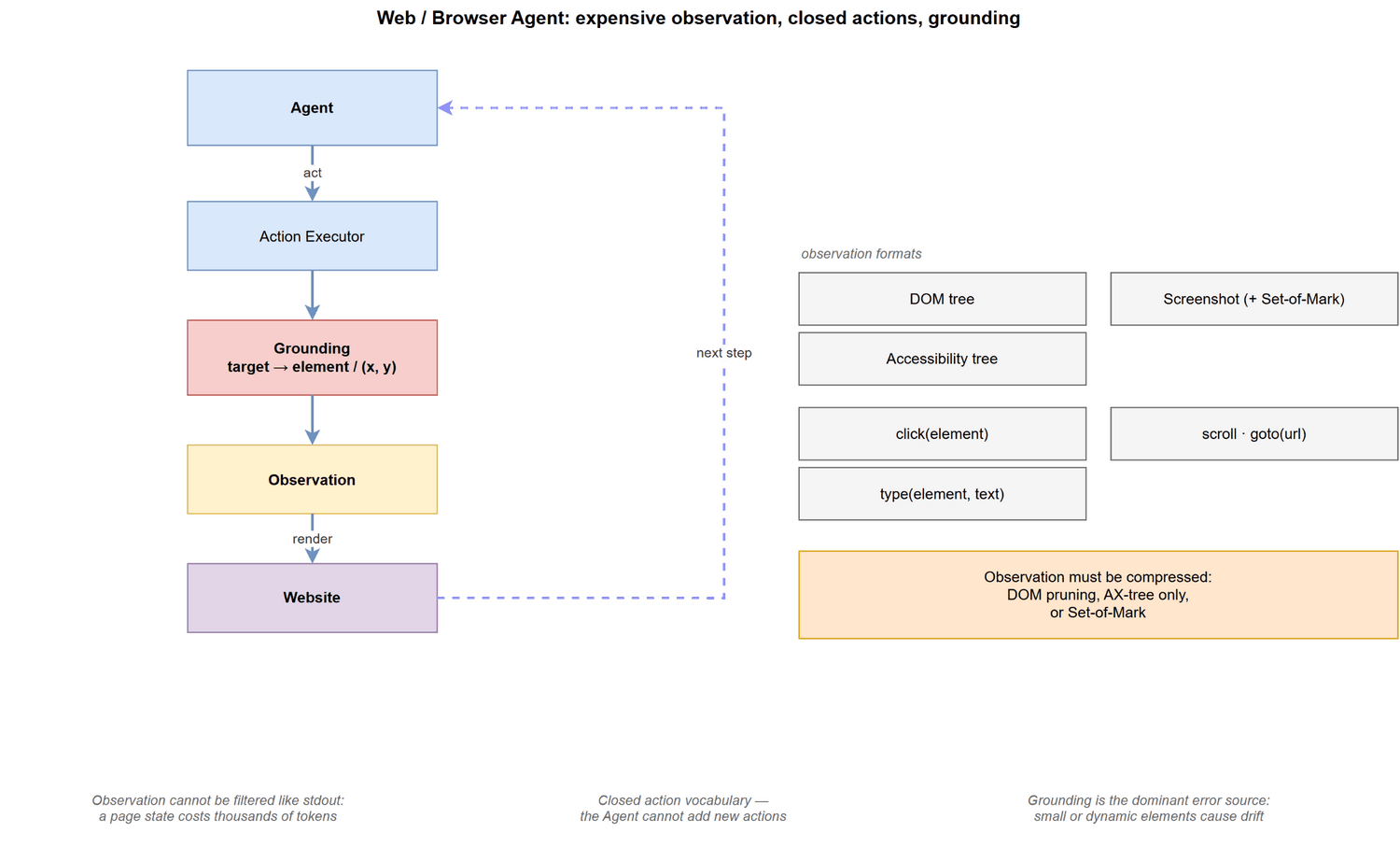
Observation Interface. A live web page, exposed as some combination of DOM, accessibility tree, and screenshot. Unlike SWE, the observation is expensive: a full page state may cost thousands of tokens and cannot be filtered the way stdout can.
Action Space. Closed. A fixed set of primitives –
click(element), type(element, text),
scroll, goto(url), go_back. The
Agent cannot add to this set.
Classic Agent: WebArena + BrowserGym. WebArena provides self-hosted, reproducible websites (e-commerce, forum, GitLab, CMS) so that results are comparable; BrowserGym standardises the observation/action interface so that different agents can be evaluated on the same environment. WebVoyager is the canonical end-to-end demonstration on the open web.
Harness Implementation.
| Layer | How it is realised here |
|---|---|
| Orchestration | ReAct-style loop, but with an explicit grounding step before each action |
| Context & Memory | Observation compression is the main cost driver: DOM pruning, AX-tree only, or screenshot + Set-of-Mark |
| Tools & Actions | A fixed action vocabulary; parallel tabs for search-and-compare workflows |
| ACI & Environment | Element grounding: mapping “the login button” to a concrete element id or (x,y) |
| Skills & Composition | Site-specific recipes; skill synthesis (e.g. SkillWeaver) turns successful trajectories into reusable APIs |
| Protocol | Browser drivers (CDP/Playwright), plus MCP servers for specific sites |
| Runtime & Safety | Domain allow-lists, credential isolation, confirmation before irreversible actions |
Practical Usage. Information gathering across many sites, form filling, price and inventory monitoring, and any task where no API exists. When an API does exist, prefer the Tool/API category – a browser Agent driving a UI is strictly more fragile than a typed function call.
Verification & Training. Final state assertions (did the order appear? did the row change?), plus LLM judges for open-ended tasks. Training is dominated by SFT on trajectories, with online RL on the simulated WebArena suite as a growing direction. Note the asymmetry with SWE: WebArena gives a simulated deterministic website, and that simulator is exactly what makes training possible at all.
Current Limits. Grounding remains the dominant error source – small or dynamic elements cause drift and hallucinated clicks. Long horizons amplify it, and unlike SWE there is usually no clean rollback.
4.5 Computer-Use / OS Agent
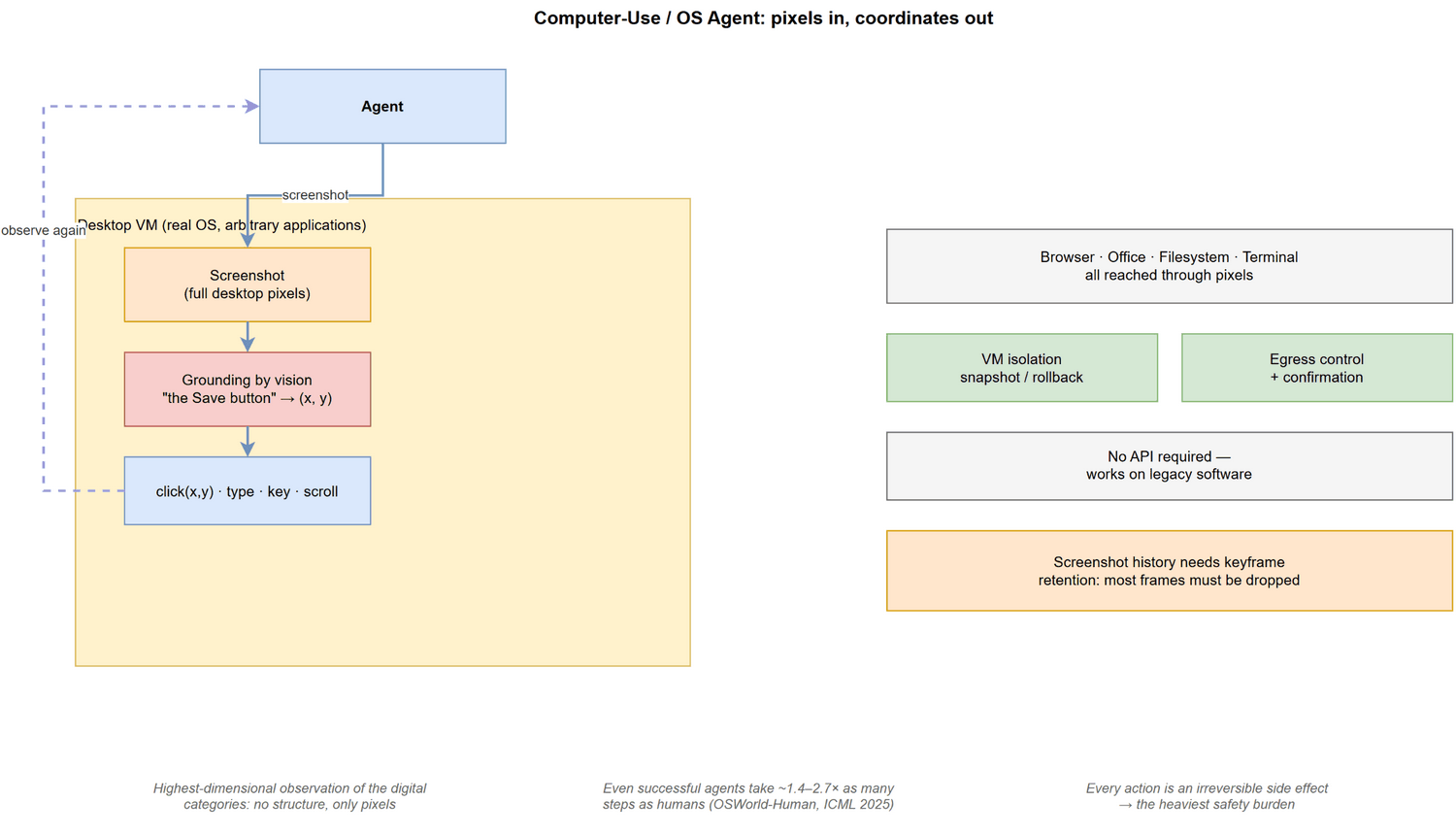
Observation Interface. Pixels. The Agent sees a screenshot of the whole desktop and must locate UI elements visually, across arbitrary applications. This is the highest-dimensional, least structured observation of the digital categories.
Action Space. Closed and low-level.
click(x, y), type(text),
key(combo), scroll, screenshot.
Note that actions are addressed by coordinates, not by
semantic element identifiers – which is precisely what makes grounding
hard.
Classic Agent: OSWorld + Claude Computer Use. OSWorld (NeurIPS 2024) is the reference environment: a real Ubuntu desktop with browser, office applications, filesystem and terminal, with execution-based evaluation. Claude’s Computer Use was the first widely available productised implementation of the same interface, and established the screenshot-to-action loop as an industry pattern.
Harness Implementation.
| Layer | How it is realised here |
|---|---|
| Orchestration | Tight perceive-act loop; limited planning, because each step is expensive |
| Context & Memory | Screenshot history with keyframe retention; most past frames must be dropped |
| Tools & Actions | Coordinate-level primitives, sometimes augmented with OCR or an AX tree |
| ACI & Environment | Grounding: turning “the Save button” into (x, y); resolution and scaling normalisation |
| Skills & Composition | Application-specific macros; replaying demonstrated workflows |
| Protocol | VM/container orchestration, screen-capture and input-injection services |
| Runtime & Safety | Full VM isolation, snapshot/rollback, strict egress control |
Practical Usage. Automating legacy software with no API, cross-application workflows (copy from a PDF into a spreadsheet and email it), and desktop QA. It is the last resort category: if an API or a CLI exists, use it – OS Agents are strictly less reliable and far more expensive per step.
Verification & Training. State assertions on the filesystem or application state. Training combines SFT on human demonstrations with RL on simulators; grounding models are often trained separately as a vision task.
Current Limits. Efficiency is the headline problem: even when top agents succeed, they take roughly 1.4-2.7x as many steps as humans (OSWorld-Human, ICML 2025). Add latency, brittleness to layout changes, and the fact that every step is an irreversible side effect, and the safety burden is the highest among the digital categories.
Boundary note. Web and Computer-Use overlap: a browser is an application running on an OS. The distinction is which interface the Agent targets – the page’s structured representation, or the desktop’s pixels.
4.6 Deep Research Agent
Observation Interface. Web text, retrievable by query. It is the only category that is purely read-only and side-effect free.
Action Space. search(query),
fetch(url), plus internal actions such as
extract, summarise, compare and
cite. There is no state to mutate.
Classic Agent. This category is unusual in that its canonical implementations are products rather than papers – OpenAI Deep Research and Gemini Deep Research defined what users expect the interaction to look like. On the research side, Search-R1 is the reference for treating retrieval as a trainable action inside an RL loop, and BrowseComp is the benchmark that made the category measurable.
Harness Implementation.
| Layer | How it is realised here |
|---|---|
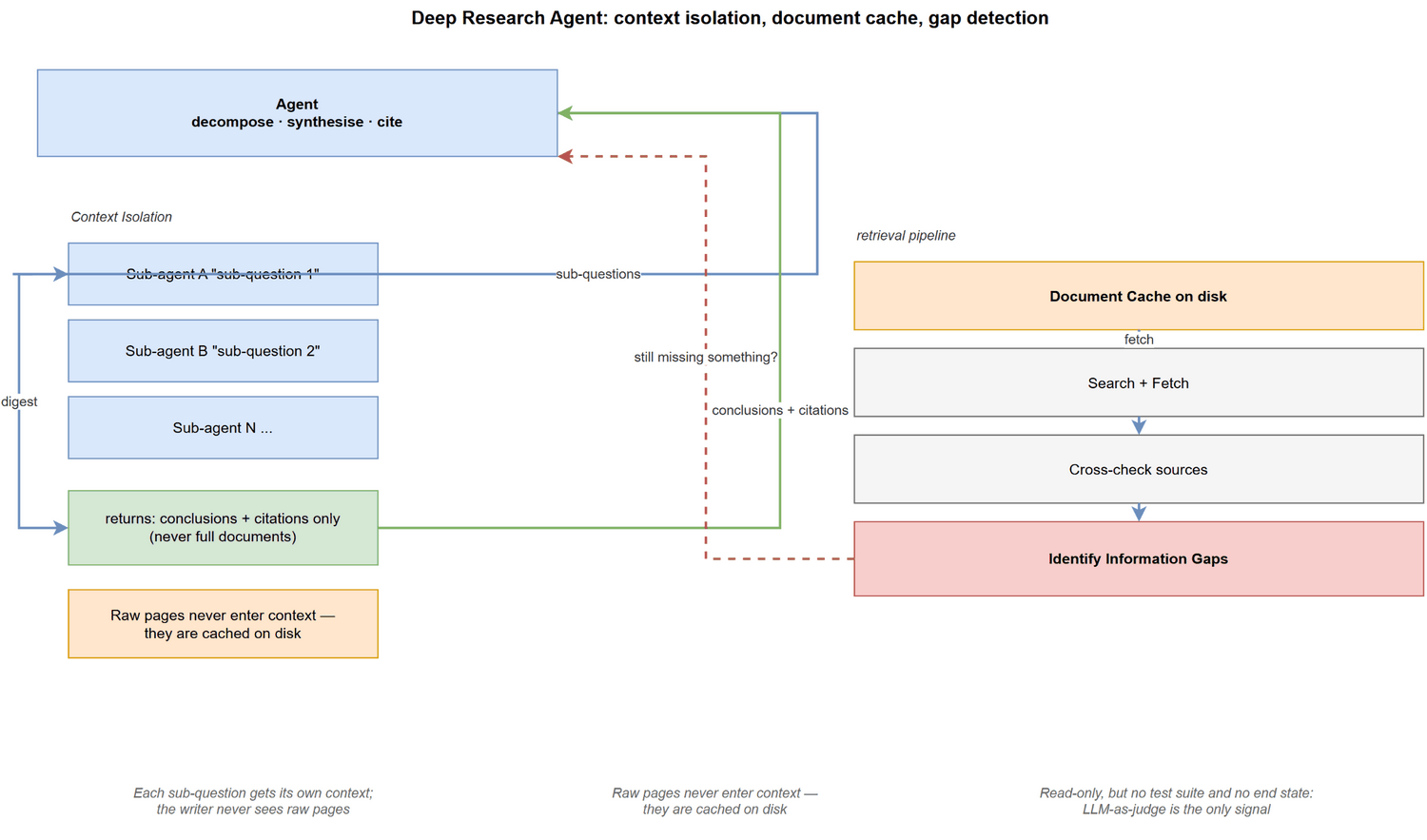
| Orchestration | Decompose into sub-questions, then iterate: search, read, cross-check, identify gaps, re-search |
| Context & Memory | Document cache on disk; never put whole documents in context – return extracts or summaries |
| Tools & Actions | Search, fetch, extract; heavy use of parallel search over independent sub-questions |
| ACI & Environment | Search-result ranking, deduplication, source credibility scoring |
| Skills & Composition | Sub-agents used for context isolation, not for collaboration |
| Protocol | Search APIs, MCP servers for scholarly databases |
| Runtime & Safety | Low risk (read-only); the real risks are fabricated citations and source bias |
The subtlest design point is context isolation. Production systems split retrieval from writing: each sub-question gets its own context that digests pages and returns only conclusions plus citations, and the writer never sees raw pages. Without this split, a few rounds of full documents exhaust the window. This is the clearest real use of the Subagents pattern from 3.2.6 – and note that it is used for context management, not because the task needs multiple minds.
Practical Usage. Market and literature surveys, competitive analysis, “what is the current state of X” questions, and any task whose output is a cited report rather than a single answer.
Verification & Training. This is the weakest spot in the entire field. There is no test suite and no deterministic end state, so evaluation falls back on LLM-as-judge plus citation-faithfulness checks, both of which are unreliable. The consequence is structural: because there is no cheap ground truth, RLVR does not apply, and progress has been much slower than in SWE – even though this environment is far simpler. This is the cleanest illustration of the rule stated in 3.2.1: the available training method follows verifiability, not environment complexity.
Representative benchmarks: BrowseComp (questions
deliberately hard to answer by direct search),
BrowseComp-Plus (separates retrieval quality from reasoning
quality), and MLR-Bench (open-ended research tasks).
Important distinction. There are two very different research agents here. Search agents (BrowseComp) find existing answers on the open web. Scientific agents (MLR-Bench) run experiments and therefore do have executable verification, which makes them closer to the SWE category than to BrowseComp. Do not treat them as one thing.
Current Limits. Gap detection – knowing what it still does not know – is the main failure mode; agents stop early and deliver a confident-looking report with holes. Fabricated or mismatched citations are the second. Both are made worse by the fact that neither is cheaply detectable.
4.7 Tool / API / Enterprise Agent
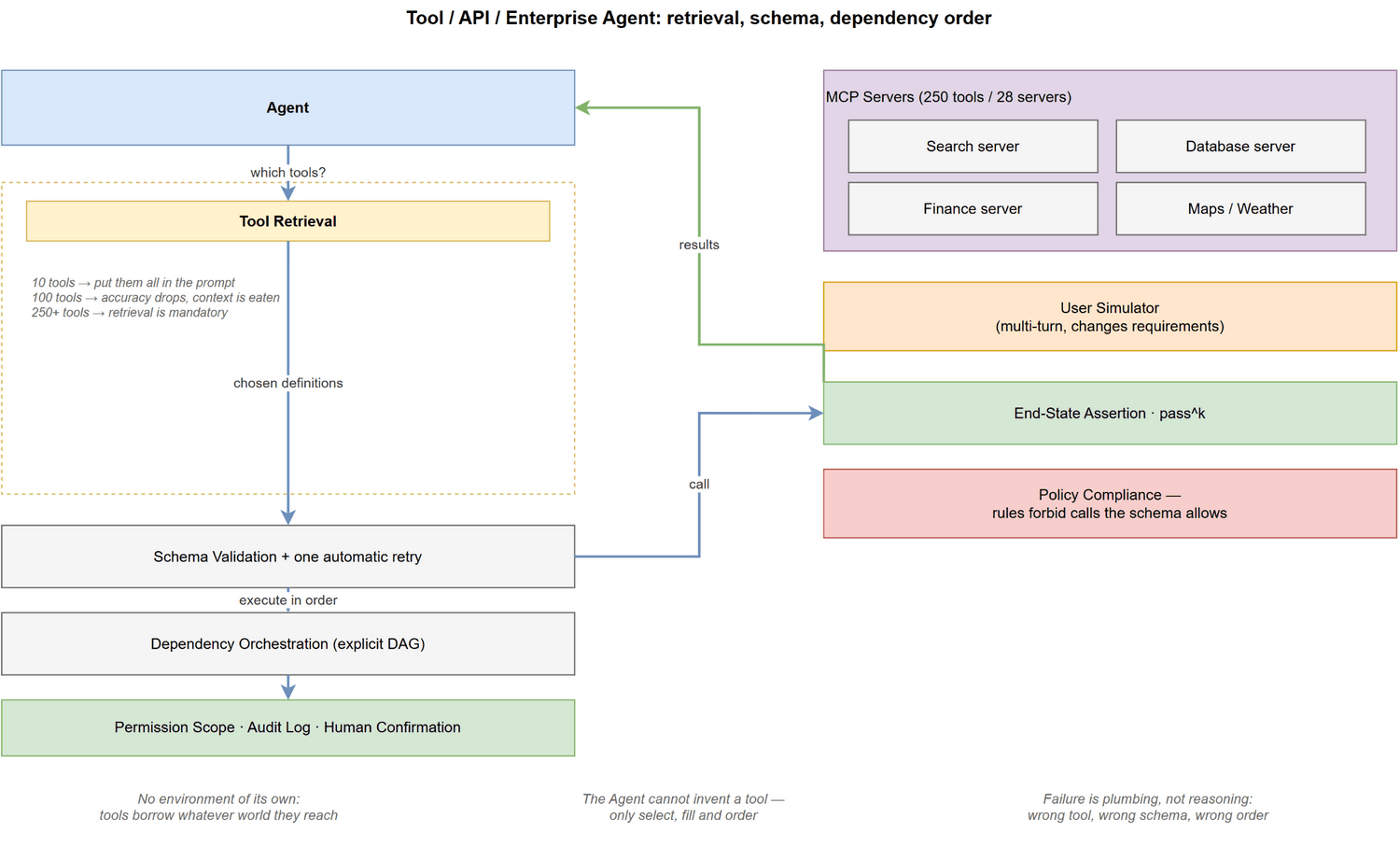
Observation Interface. Structured tool returns (usually JSON, sometimes XML). Observation is cheap and bounded – but see “large ecosystems” below.
Action Space. Closed and externally defined. The Agent can call the tools it is given. It cannot invent one.
This category has no environment of its own. Every other category has a world: SWE has a repository, Web has a page, OS has a desktop. Tool agents have none – they borrow whatever the tools reach. This is why the category is really a cross-cutting capability rather than an environment class, and it is also why it appears inside every other category.
That said, when tools are the main interface, three problems appear that are specific to this category.
Problem 1: the action space is defined by someone else. Because the Agent cannot create tools, all the engineering moves from making actions to finding, understanding and sequencing them:
1 | Tool Discovery / Retrieval ← too many tools to choose from |
Problem 2: the tool inventory itself is a context budget problem.
1 | 10 tools → put them all in the system prompt |
The mechanism is identical to RAG: embed the tool descriptions, retrieve the top-k, and inject only those definitions. ToolScope (which combines tool merging, retrieval and context-aware filtering) is the research counterpart of this engineering pattern. Tool registries need the same care as document indexes – deduplicate, merge near-duplicates, and rewrite descriptions for retrievability.
Problem 3: real users do not name the tools. MCP-Bench addresses this directly by generating fuzzy task variants that omit tool names and execution steps, and by attaching ten distractor servers (100+ irrelevant tools) to every task. In production, inferring intent from an underspecified request is the common case, not the edge case.
Classic Agent. There is no single canonical implementation; the category is defined by its benchmarks instead. The lineage runs:
1 | ReAct → the prototype: interleave reasoning with tool calls |
Harness Implementation.
| Layer | How it is realised here |
|---|---|
| Orchestration | Plan-then-execute or multi-turn plan-act-observe; dependency-aware scheduling |
| Context & Memory | Tool retrieval; observation compression (tool outputs can be long); state externalised |
| Tools & Actions | Schema design, validation, retry, idempotency keys |
| ACI & Environment | Error semantics: distinguishing a bad argument from a transient failure |
| Skills & Composition | Tool composition into higher-level capabilities; agent-as-a-tool |
| Protocol | MCP is the centre of gravity – discovery, auth, and governance live here |
| Runtime & Safety | Permission scoping, audit logging, human confirmation for destructive calls |
Practical Usage. Enterprise workflow automation: CRM updates, ticketing, scheduling, payments, and any SaaS operation with an API. This is the category with the most immediate commercial value, because the environment already exists and only needs wrapping.
Verification & Training. End-state assertions on
a database, plus pass^k (did it succeed every time
across k runs) – the right metric for anything touching money or
records. τ-bench adds policy compliance:
the tool permits a call that business rules forbid (refunding an
already-refunded order), so the Agent must read the policy, not just the
schema. This is where the Permission and Guardrail layers of 3.2.8 get
their real justification.
Current Limits. Failure is dominated by the plumbing rather than by reasoning: wrong tool, wrong arguments, wrong order, missing dependency, duplicated non-idempotent call, or a hallucinated tool name. The research frontier has largely moved from model capability to interface standards – early work asked “can the model call a tool?”, and the current question is “the MCP ecosystem is huge, so how do we discover, authenticate and govern tools?”
Common failure modes and their engineering answers:
| Failure | Countermeasure |
|---|---|
| Wrong tool selected | tool retrieval, merging duplicates, better descriptions |
| Schema violation | strict validation plus one automatic retry |
| Wrong dependency order | explicit DAG orchestration |
| Duplicate / non-idempotent call | idempotency keys, write de-duplication |
| Hallucinated tool name | allow-list validation |
| Out-of-scope operation | permission sandbox, confirmation, audit log |
4.8 What Changes Across Categories
Reading the categories side by side exposes four regularities. They are the reason this part exists.
1. Tool creation is the sharpest dividing line. Only the SWE Agent can build a new tool mid-task. Everywhere else the action space is closed, so the Agent can only select and compose. This is why skill-library and skill-synthesis research is driven mainly by Web and general agents – if you cannot create tools at runtime, you must manufacture reusable ones offline.
2. Observation cost determines action granularity.
Text observations can be filtered (grep, head,
truncation), so the SWE Agent can take semantically coarse
actions. Screenshots cannot be filtered, so OS and Web agents are forced
into fine-grained actions and therefore into long trajectories.
The awkwardness of computer-use agents is not a modelling failure; it
follows directly from the cost of their observations.
3. Verifiability determines which training method is available.
| Category | Signal | Therefore |
|---|---|---|
| SWE | test suite | RLVR works; fastest RL progress |
| Web / OS | state assertion | simulated environments make training feasible |
| Tool / Enterprise | end-state + policy | pass^k and user simulation |
| Deep Research | LLM judge | weak rewards; slow progress |
This is the same rule stated in 3.2.1, now with the evidence attached: training method follows verifiability, not environment complexity.
4. Irreversibility determines safety design. A repository has version control, so a bad edit is recoverable. A submitted form, an overwritten file, a sent email and a physical action are not. The Runtime & Safety layer of 3.2.8 is therefore not an optional add-on – it is derived from the environment’s reversibility, and it grows in importance along exactly the axis from SWE to Tool/Enterprise to OS to Embodied.
Generalisation is an evaluation axis, not a category. GAIA and AgentBench do not describe a kind of world; they test whether one Agent can operate across several worlds. That makes them a measure of transfer, and they belong with the cross-environment structures of 5.2.2 rather than in the list above.
5. Benchmark
5.1 What Does an Agent Benchmark Evaluate?
Agent benchmarks evaluate more than final-answer correctness. Depending on the benchmark, they may measure task success, long-horizon execution, tool use, environment interaction, efficiency, reliability, safety, and generalization.
1 | Agent Evaluation |
5.2 Popular Categories
The categories below follow directly from the environment classes defined in 3.2.1. Each environment class induces its own benchmark family; multi-agent and safety are cross-environment concerns rather than environment classes of their own.
5.2.1 Environment Classes and Their Benchmarks
| Environment Class | Representative Benchmarks |
|---|---|
| Classic / Text-World | ALFWorld, WebShop |
| Software Engineering | SWE-bench, SWE-bench Verified, SWE-Bench Pro |
| Tool / API / Enterprise | BFCL, τ-bench / τ²-bench, TheAgentCompany, AgencyBench |
| Web / Browser | WebArena, Mind2Web, TurkingBench, X-WebAgentBench |
| Computer-Use / OS | OSWorld, OSWorld 2.0, OSWorld-Human, WindowsAgentArena |
| Mobile | AndroidWorld, MobileAgentBench |
| Deep Research | BrowseComp, BrowseComp-Plus, MLR-Bench |
| Generalist / Cross-Environment | GAIA, CRAB |
| Embodied | ALFRED, Habitat, BEHAVIOR |
5.2.2 Cross-Environment Structures and Evaluation Axes
| Category | Kind | Representative Benchmarks |
|---|---|---|
| Multi-Agent | structural axis — crosses every environment class | MultiAgentBench, AgentVerse-related benchmarks |
| Agent Safety / Security | evaluation axis — crosses every environment class | Agent safety / tool-use security benchmarks |
| Benchmark Methodology | meta-evaluation | BrowseComp-Plus and related benchmark methodology work |
Note on Long-Horizon. Long-horizon execution is not an environment class — it is a property that every environment class can exhibit (SWE, Web, OS, and Deep Research all have long-horizon variants). It is therefore folded into each class above rather than listed as its own category.
5.2.3 Generalist Agent Benchmark
Generalist benchmarks evaluate whether an agent can combine reasoning, tool use, information gathering, and multi-step execution across heterogeneous tasks. GAIA is a representative benchmark in this category.
The agent workflow nowadays can look like:
1 | Goal |
Traditional benchmarks often judge if the final answer is correct.
This research direction is about:
1 | Can the Agent still complete the task after taking dozens, hundreds, or even thousands of actions? |
5.2.4 Long-Horizon / Real-World Agent Benchmark
Long-horizon is a property, not an environment class (see the note in 5.2.2). This section is kept separate only because these benchmarks are usually discussed together, and because they are the clearest stress test of sustained execution. In terms of environment class they belong to Tool / API / Enterprise (TheAgentCompany, AgencyBench), and their distinguishing feature is the horizon, not the world they run in.
These benchmarks emphasize sustained execution over many interacting steps, often across realistic workplace or application environments.
TheAgentCompany, NeurIPS 2025
This benchmark builds a company system:
1
2
3
4
5
6
7
8Company Environment
│
├── Browser
├── Code repository
├── Terminal
├── Internal websites
├── Communication
└── CoworkersAgencyBench, ACL 2026
5.2.5 Computer-Use / GUI Agent Benchmark
1 | Can an Agent really operate a computer instead of merely describing the operations? |
OSWorld, NeurIPS 2024.
The most important Computer-Use Benchmark.
1
2
3
4
5
6
7
8Agent
│
├── Desktop OS Environment
├── Browser
├── Office Applications
├── File System
├── Terminal
└── Desktop ApplicationsOSWorld-Human, ICML 2025 Workshop on Computer-Use Agents
Calculate efficiency of Agent.
Even when they successfully complete the task, top agents still require 1.4–2.7× as many steps as humans.
OSWorld 2.0
CRAB, ACL 2025
Cross-Environment Agent Benchmark for Multimodal Language Model
Thought: Benchmark should not be bound by certain environment.
5.2.6 Tool Use / Function Calling / MCP Benchmark
Tools Evaluation Process:
1 | Function Calling |
BFCL, ICML 2025
It judges:
1
2
3
4
5
6
7
8
9
10
11
12
13Single-turn
↓
Multiple functions
↓
Parallel calls
↓
Multi-turn
↓
Memory
↓
Dynamic decision making
↓
Long-horizon agentic behaviorToolSandbox, NAACL 2025 Findings
τ-bench, ICLR 2025
MCP-Bench, ICLR 2026
1
2
3
4
5
6
7
8
9
10
11Tool Discovery
↓
Tool Selection
↓
Parameter Control
↓
Multi-hop Planning
↓
Cross-tool Coordination
↓
Task Completion
5.2.7 Software Engineering Agent Benchmark
SWE-bench, ICLR 2024 Oral
SWE-bench Multimodal, ICLR 2025
SWE-Bench Pro, ICML 2026.
For Long-Horizon software engineering.
There’s a problem: Contamination.
The paper finds that some models’ performance on SWE-bench Verified may be affected by training data contamination:
Does SWE-Bench-Verified Test Agent Ability or Model Memory?
5.2.8 Web / Browser Agent Benchmark
The core of Web Agent is not “Search” but:
The Agent observes webpages, plans, clicks, types, navigates, calls APIs, and ultimately completes tasks in real-world web environments.
Classic workflow:
1 | User Goal |
- WebArena, ICLR 2024.
- TurkingBench, NAACL 2025 Long.
- X-WebAgentBench, ACL 2025 Findings
5.2.9 Deep Research / Research Agent Benchmark
Normal Web Research:
1 | Web Agent |
Deep Research:
1 | Research Question |
BrowseComp
BrowseComp-Plus, ACL 2026
MLR-Bench, NeurIPS 2025:
1
2
3
4
5Web Research
↓
Deep Research
↓
Scientific Research AgentCan AI do research itself?
5.2.10 Multi-Agent Benchmark
Multi-agent benchmarks evaluate coordination, communication, task decomposition, role assignment, negotiation, and collaborative problem solving among multiple agents. This is a distinct evaluation axis from single-agent capability.
Multi-Agent is a structural axis, not an environment class (see 5.2.2). Its benchmark family is therefore orthogonal to the environment classes above.
To be added…
5.2.11 Agent Safety / Security Benchmark
Agent safety benchmarks evaluate whether agents remain within task, permission, and security constraints while interacting with tools, external data, and stateful environments. Important dimensions include prompt injection, unsafe tool use, excessive permissions, policy violations, and recovery from adversarial conditions.
5.3 Benchmark Methodology
Benchmark design itself is an important research direction. A useful benchmark should measure the intended capability without being dominated by contamination, brittle verifiers, uncontrolled environment changes, or hidden implementation details.
Important questions include:
1 | Benchmark Quality |
BrowseComp-Plus is a representative example of this direction, emphasizing controlled and reproducible evaluation for deep-research agents.
5.4 Benchmark Deep Dive: AgentBench
5.4.1 AgentBench
AgentBench (ICLR 2024) is a multi-environment benchmark suite, rather than a single environment-specific benchmark. It includes:
1 | AgentBench |
Classic Agent Environments
ALFWorld, WebShop, and Mind2Web have an important historical role in LLM-agent research and should not be treated as merely implementation details of AgentBench. They are independently used environments/benchmarks that also appear within the AgentBench suite.
- ALFWorld — interactive household tasks in a text-based embodied environment.
- WebShop — simulated e-commerce tasks involving search, browsing, product selection, and purchase.
- Mind2Web — web-agent tasks grounded in real-world websites and interaction trajectories.
This distinction avoids mixing a benchmark suite (AgentBench) with individual environments (ALFWorld/WebShop/Mind2Web) at the same conceptual level.
6. Multi-Agent
This part is still being written.
Multi-Agent is a structural axis, not an environment class: every category in Part 4 can be built as a single Agent or as several. Planned sections: 6.1 Why Multiple Agents, 6.2 Communication Topologies, 6.3 Frameworks, 6.4 Failure Modes and Cost.