OS & Bash & Terminal
1. Brief
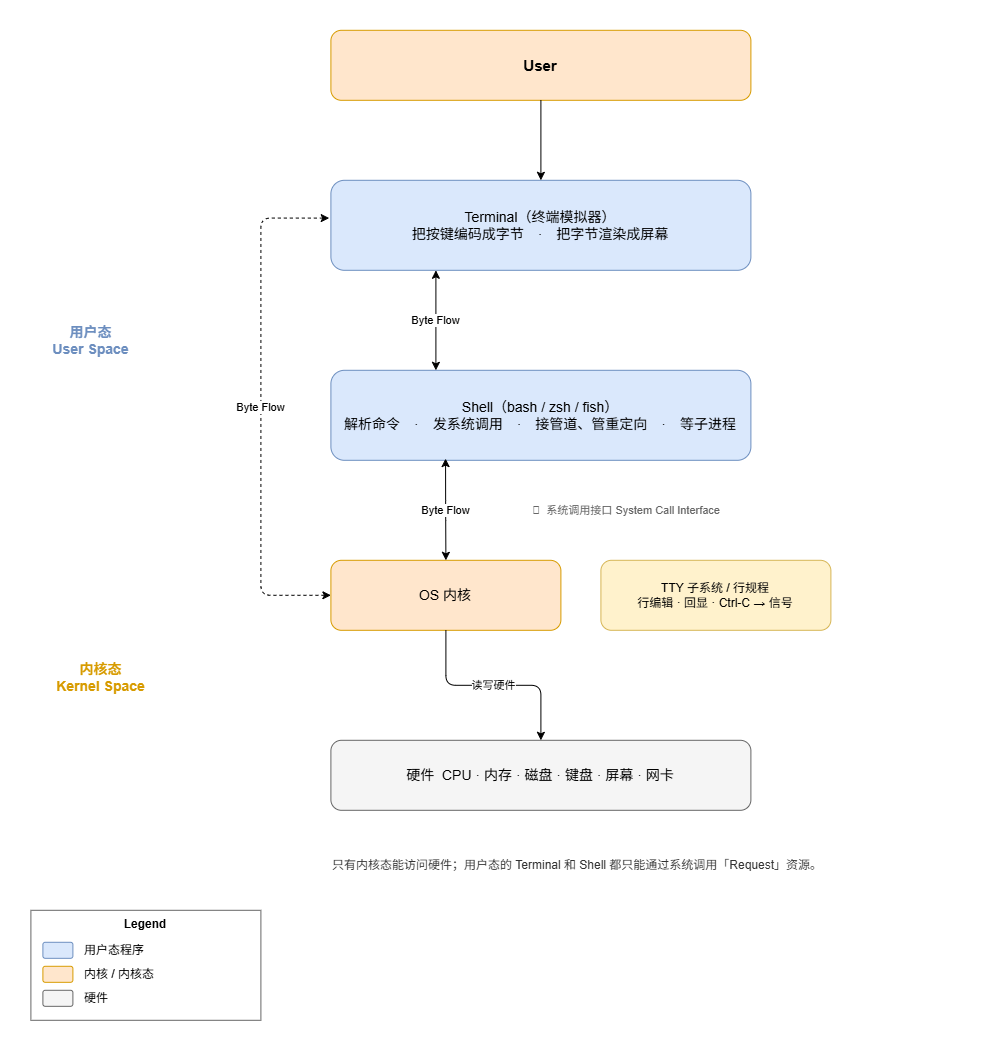
We don’t control Operating System directly nowadays. There are many layers between User and OS. This article aims to clarify the relationship between the OS and the User.
The OS manages the computer’s software and hardware resources.
1 | ┌──────────────────────┐ |
The OS is usually divided into 2 parts: User Space and Kernel Space.
CPU has privilege. A process with high privileges can execute all instructions and access all memory and hardware. A process with low privileges, by contrast, can execute only unprivileged instructions and cannot access hardware or other processes’ memory.
The distinction exists because user programs cannot be trusted. Were all programs able to access the disk directly, modify arbitrary memory, and disable interrupts, three classes of failure would follow:
- a single out-of-bounds write could overwrite operating-system data and crash the machine;
- a single non-terminating loop could monopolize the CPU and stall all other programs;
- and a single process could read another’s memory, exposing its passwords and cryptographic keys;
The interface between User Space and Kernel Space is System Call Interface. If a User process needs a block of memory, it can only obtain it through the corresponding System Call.
2. Terminal
Terminal is a User Space process. It is a translator.
It translate signal between hardware(Keyboard) and software.
For example:
- Input: When you press key
A, the kernel driver captures the interrupt and emits an input_event on/dev/input/event*; the display server reads it and routes it to the focused window as akey event, the terminal will receive the event and translate into a byte flow:0x61. - Input : When you press key
⬆, the terminal will translate into a byte flow:ESC [ A (0x1b 0x5b 0x41), theESC [ Ameans the latter byte flow0x1b 0x5b 0x41is a command, and whenvimreads the command, it knows that it means move the cursor above. - Output: When the command
lswrites a byte flow:0x61 0x2e 0x74 0x78 0x74 0x0a, the terminal translate it:0x61= a,0x2e = .…0x0a = New Line. Finally it means print:a.txt.
3. Shell
Shell is a User Space process, it translate the text Instructions into System Calls. It do not do actual work, it just starts, connects and waits.
e.g.
text instruction:
"ls -l | grep txt > out.txt"
Shell:
Tokenize:
1
2
3
4
"ls -l | grep txt > out.txt"
↓
[ WORD:ls ] [ WORD:-l ] [ PIPE:| ] [ WORD:grep ] [ WORD:txt ]
[ REDIR_OUT:> ] [ WORD:out.txt ]Parse:
This step is to parse the tokens from previous step. And organize them into a Abstract Syntax Tree(AST).
1
2
3
4
5
6
7
Pipeline
/ \
Command Command
ls -l grep txt
│
Redirection
stdout → out.txtEach node in the AST maps to a set of System Call.
4. Bash
What is bash? Bash is a Concrete Implementation of
shell.
5. Coreutils
Coreutils (GNU Core Utilities) is a set of commonly used user-space utilities packaged and shipped by Linux distributions.
Commonly used tools include:
ls cp mv rm
cat echo mkdir ln
touch chmod chown dd
df du sort uniq
wc head tail cut
tr seq date whoami
id env sleep
test
…