
Mechanism of Agent
1. Short Introduction
1.1 Core Loop of Agent (ReAct)
The core concept of Agent is: LLM + Tools + Loop.
- LLM for thinking what’s the next step.
- Tool for executing.
- Loop for uniting the whole procedure.
The core loop procedure is:
1 | ① Think |
1.2 Demo Code
1 | import json |
1.3 Demo Code Explain
1.3.1 Tools Field
1 | tools = [ |
tools is a List, like Hash Map
in C.
The list includes many items. There’s only one item in the demo code.
This field defines many JSON Schema, which has many
specified structures.
The item has these info it describes:
1 | tools |
1.3.2 Function Begin
The function field:
1 | def run_agent(user_input: str, max_turns: int = 10) -> str: |
1 | def run_agent(user_input: str, max_turns: int = 10) -> str: |
Define a core function named run_agent :
str type input parameter: user_input
int type and max value as 10 input
parameter:max_turns
function output parameter type: str
Initialization in function:
1 | messages = [{"role": "user", "content": user_input}] |
Initialize a list: messages, including 2 fields
role and content.
1 | messages |
Into the loop, the loop can keep max_turn times:
1 | for turn in range(max_turns): |
Configure the model, messages and tools and send them to LLM:
1 | response = client.chat.completions.create( |
The python will serialize them into a JSON text like:
1 | { |
Then they will be packed and send to LLM. The LLM will output some tokens. The tokens (in fact just some string). Then the LLM provider like OpenAI, will post-process these tokens.
1.3.3 The Post-Processing Phase
Notice the code:
1 | response = client.chat.completions.create( |
The chat.completions.createfucntion will package our
info into a JSON type text and send it into LLM as input prompt.
The LLM will get output prompt, but the prompt is not equal to the
response.
In fact, the prompt will be post-processed, then, it can be the
response.
What is the post-process?
The output prompt is just a string paragraph. The original output token is mostly non-structural, impure, and even wrong-format.
The post-process ’ main purpose is to process the output
tokens into fully controllable structured object.
Buffering & Concatenation
The process will turn all tokens into a consecutive string
Parsing, Validation & Auto-fix
Parse the string into the Key-Value pairs.
Validate if the parsed content matches the format you need. e.g. check if the
expressionis string type.Auto-fix
Some process will even try to fix some problems with the output token.
Mapping & ID Generation
The original output text may not have field named
tool_call_id, there’s onlynameandarguments.The post-process will generate a unique identifier for this function calling.
Conclusion:
The response is not the original output token of LLM.
It’s product of the output token.
1.3.4 Process msg
1 | msg = response.choices[0].message |
msg = response.choices[0].message
In fact, response.choices[] is a list, which includes many answers of
LLM. You can require LLM to generate 3 different replies at once.
response.choices[0] means the first reply.
The response’s structure likes this:
1 | response |
If the msg.content is not empty and no
tool_calls found, we can regard the task is finished. We
can just return the msg.content.
If the tool_calls is found, means the LLM hope us to
call a tool. First we need to update the message:
1 | messages.append({"role": "assistant", "tool_calls": msg.tool_calls}) |
There are many kind of role, user represents the user,
assistant represents the LLM, tool represents
tools.
Now we append LLM’s info to messages, then we need to do the tool_call:
1 | for tool_call in msg.tool_calls: |
We get a a result of the tool_call.
Then we append the tool_call’s info to messages.
1.3.5 Append Context Example
e.g.
The original message:
1 | messages = [ |
Turn 1:
Think: Agent will send
message+toolsto LLM. LLMthinkit is needed to call the tool. The LLM will return:1
2
3
4
5
6
7
8
9
10
11msg.content = None # or a empty string or some prompt like "Let Me Calculate it for you."
msg.tool_calls = [
ChatCompletionMessageToolCall(
id="call_abc123",
type="function",
function=Function(
name="calculator",
arguments='{"expression": "(3 + 5) * 7"}'
)
)
]Act: Agent knows that LLM try to call a tool named “calculator”. It will first add the LLM’s decision into the context(message, Note: message is a global context, msg is only the LLM’s current reply.)
1
2messages.append({"role": "assistant", "tool_calls":
msg.tool_calls}Now the global context is :
1
2
3
4
5
6
7
8
9
10
11
12
13
14
15
16messages = [
# [0] the original user input
{"role": "user", "content": "帮我算一下 (3 + 5) * 7 等于多少"},
# [1] newly added:LLM dicide to call tool
{"role": "assistant", "tool_calls": [
{
"id": "call_abc123",
"type": "function",
"function": {
"name": "calculator",
"arguments": '{"expression": "(3 + 5) * 7"}'
}
}
]}
]then agent knows that there’s a tool_call, so it will call the tool and get some output(result):
1
2args = json.loads (tool_call.function.arguments)
result = eval (args ["expression"]) #Here the result is 56Observe
After the tool_calling, agent will append the tool_calling info to the context:
1
messages.append({"role": "tool", "tool_call_id": "call_abc123", "content": "56"})
Now the message is:
1
2
3
4
5
6
7
8
9
10messages = [
# [0] the original user input
{"role": "user", "content": "帮我算一下 (3 + 5) * 7 等于多少"},
# [1] LLM dicide to call tool
{"role": "assistant", "tool_calls": [...]},
# [2] newly added:result of the tool_calling
{"role": "tool", "tool_call_id": "call_abc123", "content": "56"}
]
Turn 2:
Think: Agent sends
messagesandtoolto LLM. LLM can see the history:- What did user ask?
- LLM has called calculator.
- The calculator returned the result: 56.
The LLM judges that the info is enough, and returns pure text reply:
1
2msg.content = "(3 + 5) * 7 的结果是 56。"
msg.tool_calls = NoneThen the loop will cancel:
1
2if msg.content and not msg.tool_calls:
return msg.content
2. Architecture
2.1 Loop of Agent
The primary agent loop only has 3 simple phase:
Think -> Act ->
Observe
While the production-grade agent always has 6 or more phase in the loop.
- Pre-process
- Context Assembly
- LLM Inference
- Parse & Route
- Validate & AuthZ
- Execute & Observe
- Finalize
| Phase | What to do | Why should do |
|---|---|---|
| Pre-process | clean the input tokens sensitive words filtering rate limiting |
prevent the malicious attack |
| Context Assembly | assemble: System Prompt + History + Tool Definition + Memory | decide the info that LLM could see |
| LLM Inference | call the LLM,including Timeout, Retry and Degrade | LLM is not absolutely reliable |
| Parse & Route | Parse the output tokens of LLM | The output of LLM is commonly not what we need, especially the format of answer. We should handle the output prompts. |
| Validate & AuthZ | parameter validation permission check user confirmation |
prevent the danger operation |
| Execute & Observe | execute tool capture exception truncate long results |
the result of call_tool may be wrong, and exceed the context limit |
The Agent would not run indefinitely. The
termination condition includes:
- FINAL_ANSWER: LLM proactively output the answer (normal termination).
- MAX_STEPS: reach the max loop turn (prevent the endless loop)
- REPETITION: Detect the repetitive action(trapped in endless loop)
- TIMEOUT: LLM call timeout.
- USER_ABORT: User proactively cancel
2.1.1 Pre-Process phase
e.g:
1 | def preprocess(user_input: str) -> str | None: |
2.1.2 Context Assembly
This is the most easily underestimate part in Agent.
Before call LLM, we need to precisely control the content we put in context
- [System Prompt] ← Role Definition, Behavior Constraints, Output Format.
- [Tool Definitions] ← The JSON Schema of available tools.
- [Memory Injections] ← Relative contents retrieved in memory.
- [Conversation History] ← The Thought-Action-Observation history of this round of dialogue.
- [User Message] ← Current Input.
Key decision: The window is limited, what to put in and what to leave out?
2.1.3 LLM Inference
When the agent call the agent, code likes this:
1 | def call_llm_with_retry(messages, tools, max_retries=3): |
2.1.4 Parse & Route
Agent parses the output tokens of LLM:
1 | def parse_llm_output(response) -> Route: |
2.1.5 Validate & AuthZ
Sometimes, some permissions are required for tool_call. And the agent should ask for the permissions from user.
1 | def validate_tool_call(tool_name, args, user_role): |
2.1.6 Execute & Observe
After get the permission, agent can call the tool:
1 | def execute_tool(tool_name, args): |
2.1.7 Finalize
This round is over, agent needs to do some other jobs to make sure that task will go on correctly in the next round:
1 | def finalize(messages, result): |
2.2. Single-Agent architecture pattern
We have discussed the ReAct architecture, but ReAct is not the only agent architecture pattern. There are 4 more prevailing architecture patterns.
The key is to know when to use which one.
| Patterns | Conclusion | appropriate for | not appropriate for |
|---|---|---|---|
| ReAct | Take one step at a time | uncertain, need exploration | The entire process can be planned in advance |
| Plan-Execute | Plan before act | Multiple steps, with dependencies | highly uncertain |
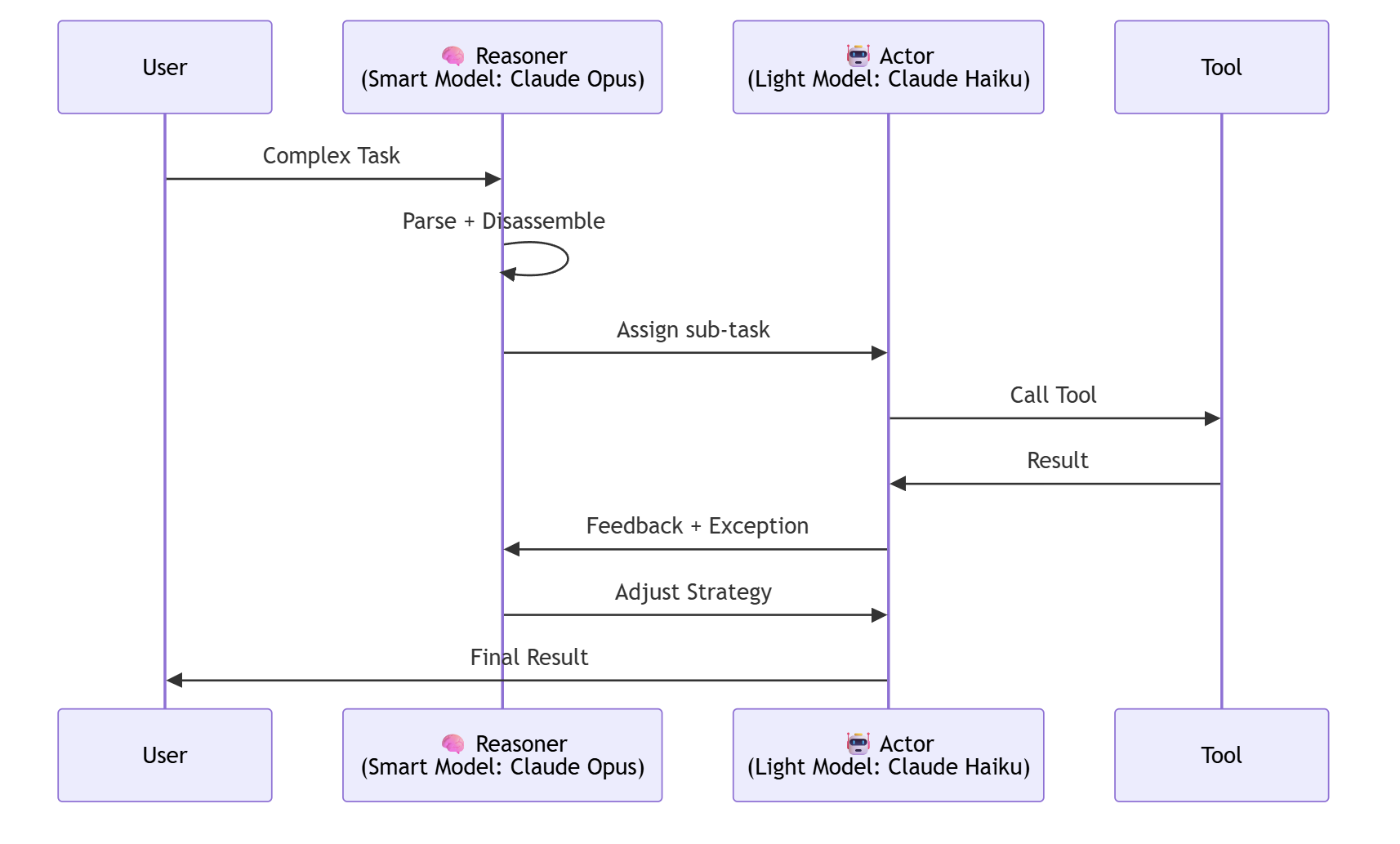
| Reasoner-Actor | Strong model thinking, weak model doing | cost-sensitive, frequently invoked | simple task |
| CoT+Tool | Embedding tools in reasoning | Reasoning as the main approach, tools as a supplement | precise structured output required |
2.2.1 ReAct Architecture
Take one step at a time, think clearly before act in each step.
| Appropriate For | Not Appropriate For |
|---|---|
| Need external info to decide | Task can be planned in advance |
| Highly uncertainty, requiring exploring | Strong dependency between steps |
| Blurred task boundaries | Task is simple and clear |
2.2.2 Plan-Execute Architecture
Make a plan before taking action, draw a complete roadmap first, and then follow the map to find the right path.
Step 0: Generate Plan→ [SubTask1, SubTask2, SubTask3, …] Step 1: Run SubTask1 → update state Step 2: Run SubTask2 → update state …If deviate the plan→ Regenerate Plan
| Appropriate For | Not Appropriate For |
|---|---|
| Complex but clearly structured tasks | Highly uncertain task |
| Multiple steps, with dependencies | Simple task, no need to plan |
| Need to anticipate resources/time | Requires frequent external information |
2.2.3 Reasoner-Actor Architecture
Let the smartest model think, and let the cheapest model do the work.
| Appropriate For | Not Appropriate For |
|---|---|
| Few calls of Reasoner, frequent calls of Actor. | Simple task (no need for 2 LLM) |
| Cost-sensitive (weak-model saves money) | Latency-sensitive (Call two LLM will cost more latency) |
| The requirements for reasoning and execution abilities are different |
2.2.4 CoT + Tool Architecture
In a nutshell: “Use tools to verify assumptions at any time in the thought chain.”
Difference from ReAct: ReAct follows an explicit Thought-Action-Observation format.
CoT+Tool, on the other hand, “incidentally” utilizes tools during the natural reasoning process.
1 | ReAct format (structured): |
1 | CoT+Tool format: |
| Appropriate For | Not Appropriate For |
|---|---|
| Reasoning is the main approach, with tools serving as a supplement | The action of each step needs to be parsed |
| The model needs to be allowed to perform freely | A precise structured output is required |
2.2.5 Example
ReAct vs Plan-Execute vs Reasoner-Actor:
Task: “帮我做一份北京三日游攻略,包括天气、景点和预算”
1 | ============================================================ |
2.3. Agent Prompt Engineering
The Prompt in Agent is not the same as it in LLM. You not only need to tell it “who you are”, but also “what tools you have, when to use them, what format to output, and what absolutely cannot be done”.
The vast majority of agent behavior issues stem from poorly written system prompts. Prompts cannot be casually composed; each level has its own nuances.
Agent Prompt has a 5-layer structure.
2.3.1 Role Definition
Here are some demo prompts:
1 | # ❌ too blurred: |
1 | # ✅ precise role definition |
2.3.2 Tool Guide
It is not enough that just put JSON Schema in the tools parameters.
System Prompt must includes the strategy of tool_call.
e.g. 1
2
3
4
5
6
7
8
9
10
11
12
13Tool_Guide =
"""
## Strategy of tool call:
- get_weather: Use when user ask for real-time weather.
- search_web: Use when you need upadate info or you are not sure for the result. Prioritize concise keywords(no more than 5 words)
- calculate: Only for precise mathematical calculations.Do not use it for simple unit conversions (you can do it yourself).
### Tool Selection Decision Tree:
1. Is the question related to real-time data? → search_web
2. Is the question related to precise calculations? → calculate
3. Is the question related to weather? → get_weather
4. None of the above? → Use your trained knowledge to answer directly
"""
Key rule: Tell LLM when to use which tool. Just providing the schema is not enough.
2.3.3 Output Format Instruction
It’s important to give LLM correct output format:
1 | FORMAT_INSTRUCTION = |
Key rule: Give LLM correct example and incorrect example.
2.3.4 Behavior Constrains
Give specific example, not a gross description.
1 | BEHAVIOR_CONSTRAINTS = |
2.3.5 Few-shot Example
This is a very important practice that you can show few examples to LLM so that LLM will answer more correctly.
1 | FEW_SHOT_EXAMPLES = |
2.4 Safety Guardrails and Termination Conditions
The biggest risk difference between Agent and ordinary LLM calls lies in this: ordinary calls get it wrong and that’s it, but Agent calls that get it wrong will continue to make mistakes, and may even get further and further astray.
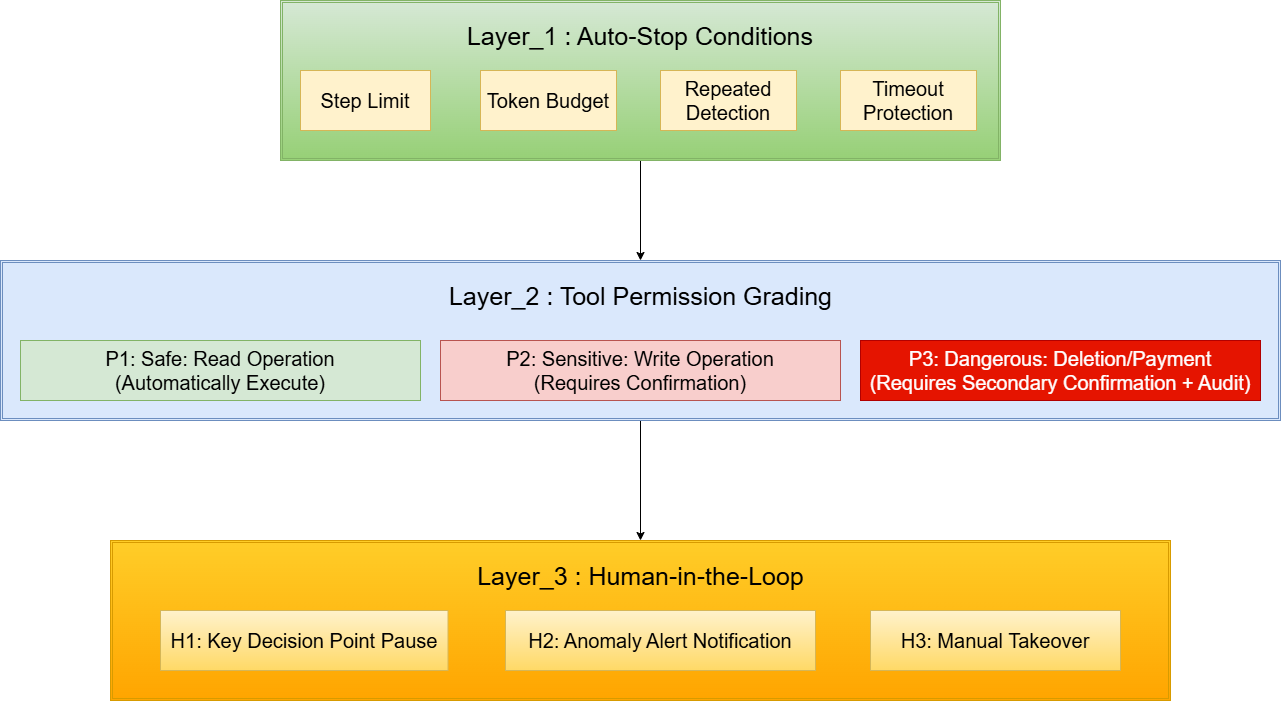
So it is necessary for us to build a guardrails for Agent:
The three-layer guardrails model is like this :
2.4.1 Layer_1: Auto-Stop Conditions
The design principle is: An agent that terminates early with clear reasons is better than one in endless loop.
1 | class SafetyConfig: |
2.4.2 Layer_2: Tool Permission Grading
We need classify different tools according to their operations:
1 | class ToolPermission(Enum): |
2.4.3 Layer_3 Human-in-the-Loop
Another interrupt of Agent is when it needs user to make decision, like confirmation, checkpoint or alternation of choice…
3. Tool
3.1 Tool Definition & Schema Design
Tool definitions are the only way an LLM understands “what I can do.” Schema quality directly determines tool-calling accuracy.
3.1.1 Anatomy of a Tool Definition
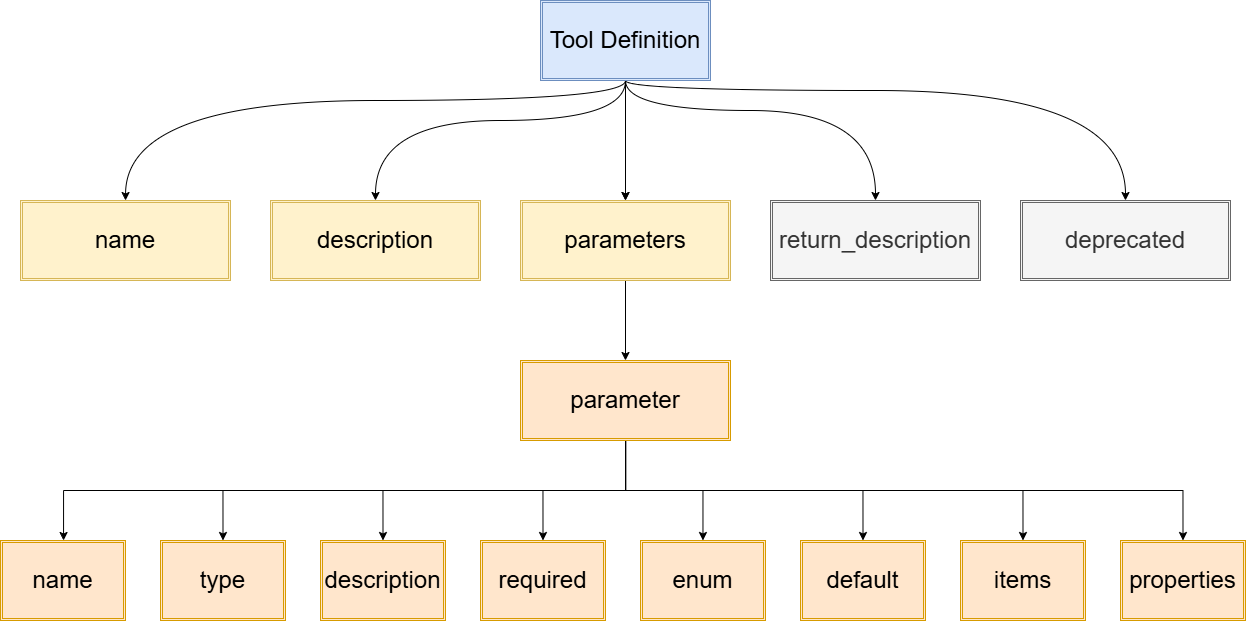
A complete tool definition has three core elements:
| Element | Purpose | Example |
|---|---|---|
| name | Unique ID the LLM uses to route among tools | get_weather, search_city_info |
| description | The most critical field — LLMs decide based on description, not name | "search detailed information information of a certain city, including weather, population, tourist attraction..." |
| parameters (JSON Schema) |
Constrains input types, formats, and value ranges | {"city_name": {"type": "string", "enum": [...]}} |
Optional extensions:
- returns_description — Tells LLM what to expect
back
- deprecated — Flags outdated tools
3.1.2 Why Description Matters
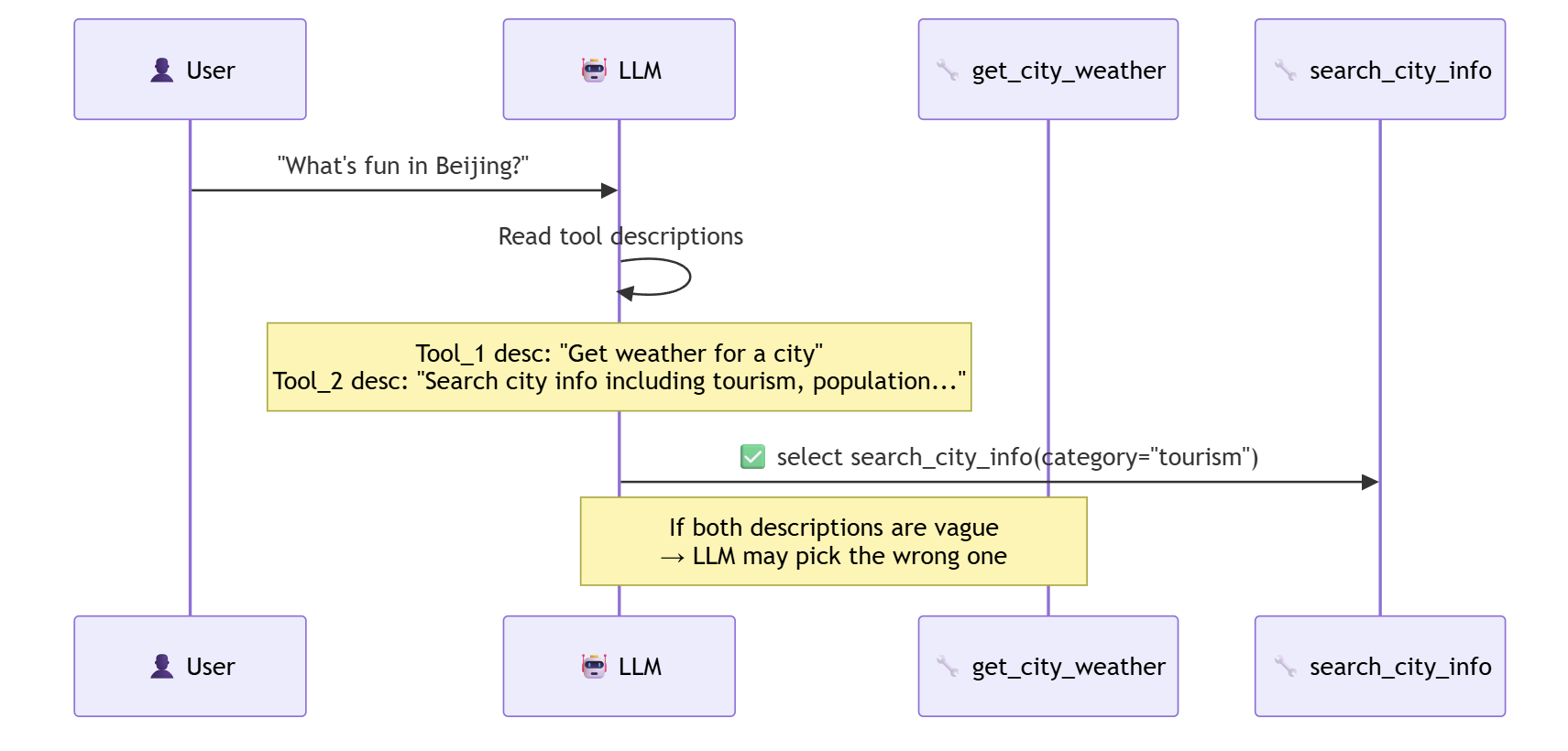
LLMs route by description, not
name. Two tools with similar names —
description clarity directly impacts selection accuracy.
Key Principle: Write descriptions as an “operation manual for the LLM,” not an “API doc for developers.
3.1.3 Parameter Type System
| Type | Use Case | Constraint Effect |
|---|---|---|
string |
Text | Most flexible, needs description |
number / integer |
Numeric | Auto-rejects non-numbers |
boolean |
Toggle | Prevents “maybe” hallucination |
enum |
Finite choices | Most valuable constraint — forces LLM to pick from valid options |
object |
Nested structure | Define sub-fields with properties |
array |
List input | Define element type with items |
3.1.4 Good Schema vs Bad Schema
Comparing two definitions of the same tool:
| Dimension | ❌ Bad Schema | ✅ Good Schema |
|---|---|---|
| description | "search for a city" |
"Search information of certain city, including weather, population and tourist attractions...Use when user asks about a specific city." |
| parameter name | q (vague) |
city_name + category (precise) |
| enum constrain | None |
["weather", "population", "tourism"] |
| type strictness | string (all in one field) |
string + string with enum
(strict classified) |
| LLM performance | Stuffs everything into parameter q |
Calls correctly:
city_name="Beijing", category="tourism" |
Core Insight:
Schema isn’t describing a function signature — it’s writing a manual that LLMs read.
Good Schema = fewer hallucinations +
fewer retries + less token waste.
3.1.5 Comparison of Two Prevailing Tool Definition
Now, we have 2 mainstream tool definition:
OpenAI (Function Calling) and Anthropic (Tool Use)
Function Calling:
1 | { |
Tool Use:
1 | { |
Their core structure is identical; only the wrapper differs.
Anthropic is more concise (one less nesting layer).
3.2 Tool Registry & Discovery
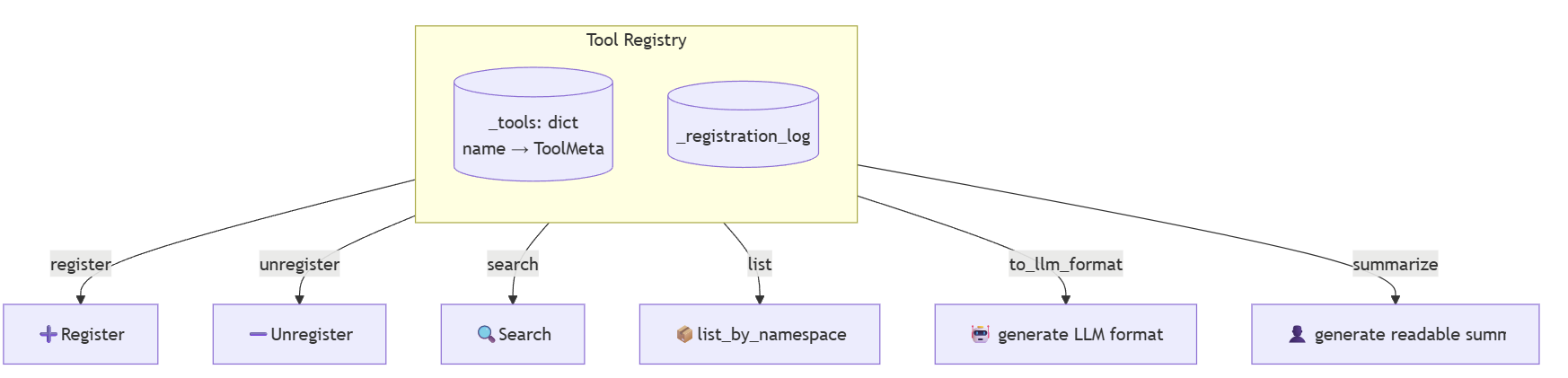
The tool registry is the Agent’s “capability catalog.” The Agent discovers what it can do and finds new tools at runtime through it.
3.2.1 Why a Registry
When you have 2-3 tools, a hardcoded dict works.
When you have 50+, you need:
- Centralized Management: centralized
register,unregisterandsearch - Discover Mechanism: Agent can ask “any weather-related tools?”
- Metadata:
permission,versionandcost estimate
3.2.2 Namespace
Flat naming breaks down around 15+ tools.
So it is necessary to introduce namespaces:
Namespace system likes a directory system, it allows you to classify your item by certain rules.
For example, we can classify the tools into file-class, web-class, email-class and so on.
| Flat Name | Namespace |
|---|---|
| read_file write_file search_web fetch_url calc delete_file |
file.read file.write web.search web.fetch cal.evaluate file.delete |
This way, we have some benefits:
Group (for Human):
Human can recognize the
file.*is a set of file operating tools;web.*is a set of web operating tools. No need to traverse the entire tool list.Discover (for LLM):
No need for LLM to traverse all tools. When LLM think there’s a operation needs a file-write, it will check
file.*to find the tool it needs.Strategy (for System):
“User has installed email-extension” ➡ Register the
email.*namespace“Current env is a ‘read-only’ env” ➡ Forbidden
file.writeandfile.delete.“Current user is a guest” ➡
file.*can only usefile.read; theweb.*is all available.
3.2.3 Dynamic Registration & Discover
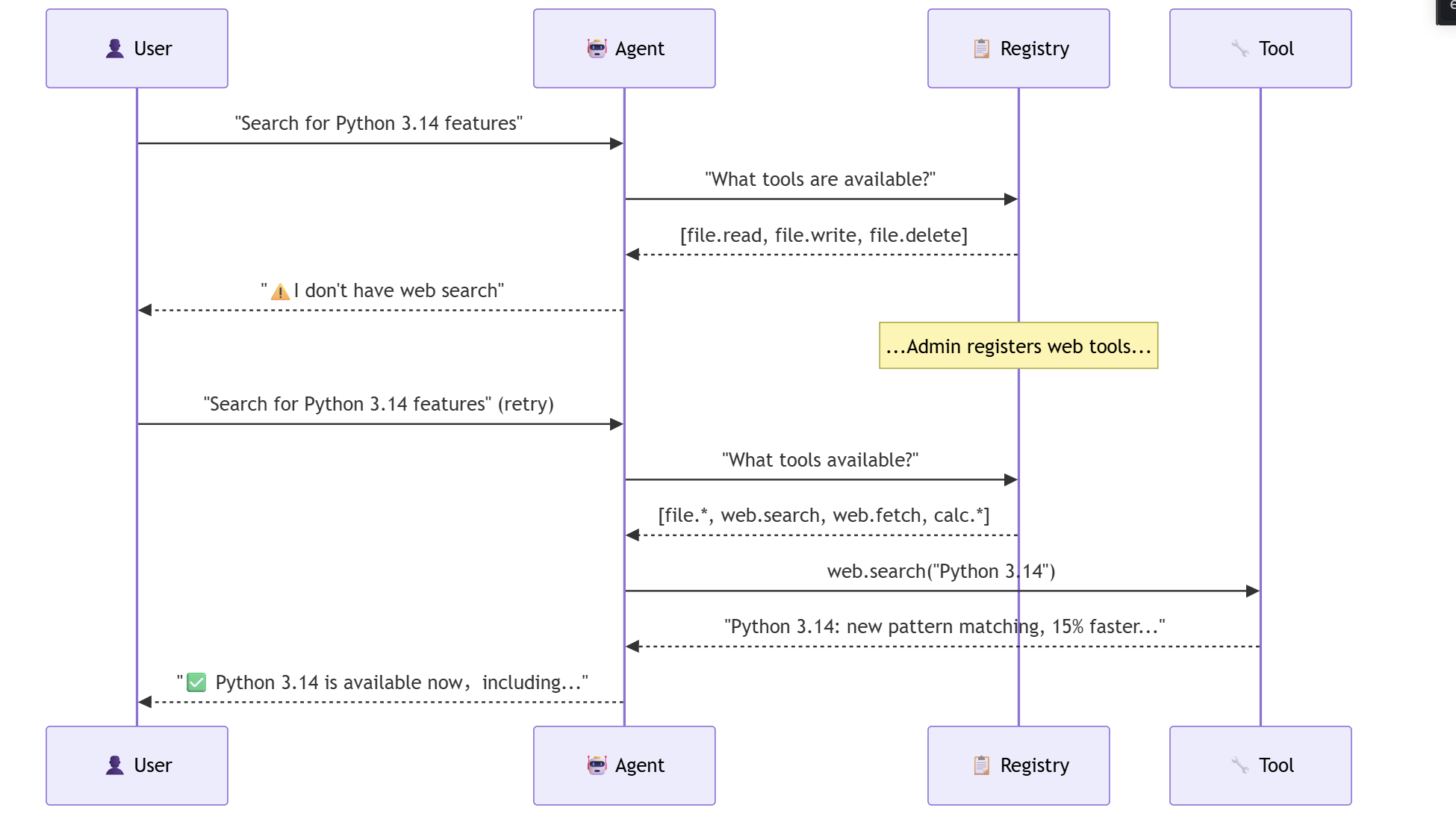
An Agent’s capabilities shouldn’t be frozen at startup.
These scenarios need to change the registry.
User installs a ne w plugin ➡ register new tools
Permission changes ➡ unregister sensitive tools
Feature flags ➡ enable/disable per environment
Agent Search ➡ Agent searches for “any tool that can send email ?” Then find ‘email.send’
The namespace makes
Batch Managementpossible.
3.2.3 Tool Selection Strategies
Core Problem: Agent has 50 tools. Before call LLM, Agent should put which tool-definition into prompt ?
There are three strategies of tool selection:
| Strategy | Approach | Token Cost | Accuracy | When |
|---|---|---|---|---|
| All-tools | Put all definitions in prompt | High (~120 tokens/tool) | High (when few tools) | < 10 tools |
| Pre-filter | Search first, then add to prompt | Low | Depends on search quality | > 20 tools |
| Reveal | Give summaries, expand on LLM request | Medium | High (two-stage) | > 50 tools |
Contrast of three different methods with a example of weather cheking:
All-tools:
1
2
3
4
5
6
7
8
9
10LLM Prompt:
Tools available:
file.read, file.write, file.delete,
web.search, web.fetch, db.query,
db.insert, email.send, calc.evaluate,
... (total 50 tool definitions, ~6000 tokens)
User: "How's today's weather of Beijing?"
LLM: (Search in the 50 tools) get_weatherAdvantage: LLM has global-view, maybe can have some unexpected link.
Disadvantage: Token-cost is very high, and because of rich choice, LLM might be confused.
Pre-filter:
1
2
3
4
5
6
7
8
9
10User: ""How's today's weather of Beijing?""
registry.search("weather") → find 3 candidates.
LLM prompt:
Tools available:
get_weather, web_search, city_info
(only 3 definitions, about 360 tokens)
LLM: (Search in the 3 tools) get_weatherAdvantage: It can save a lot of token, improves the efficiency.
Disadvantage: Search qualities determines the upper limit; If the tool can not be found, the LLM will never see it.
Reveal:
1
2
3
4
5
6
7
8
9
10
11
12
13andStep 1:
LLM Prompt:
categories:[file(5), web(3), db(4),
weather(2), email(3)]
LLM: "I need weather and web"
Step 2:
LLM Prompt:
weather: get_weather, forecast_7days
web: web.search, web.fetch
LLM: (Search in the 4 tools) → get_weatherAdvantage: Two steps strategy, high accuracy, support lots of tools.
Disadvantage: It takes one more LLM Call, which improves the latency and token-cost.
| Tool Num | 1 - 10 | 10 - 30 | 30 - 100 |
|---|---|---|---|
| Strategy | All | Filter | Reveal |
| Reason | low token-cost LLM has a comprehensive view |
filter the item to improve efficiency Avoid choice explode |
two-step to keep accuracy Avoid choice explode |
1 |
|
3.2.4 Tool Metadata
Beyond what the LLM needs, the registry should store management metadata:
| Field | Purpose |
|---|---|
category |
Group by function (file, web, db, email…) |
permission_level |
safe / sensitive / dangerous → Safety gating |
version |
API versioning |
cost_estimate |
Token/Time/Money →Scheduling decisions |
tags |
Free tags for flexible search |
deprecated |
Flag for deprecation |
func |
Lookup at execution time |
3.3 Execution Orchestration & Parallel Execution
When an Agent needs to call multiple tools at once, execution strategy determines efficiency. Not all tools must run sequentially — understanding dependencies maximizes parallelism.
3.3.1 Sequential vs Parallel
If the tools have no dependency, they can be called individually :
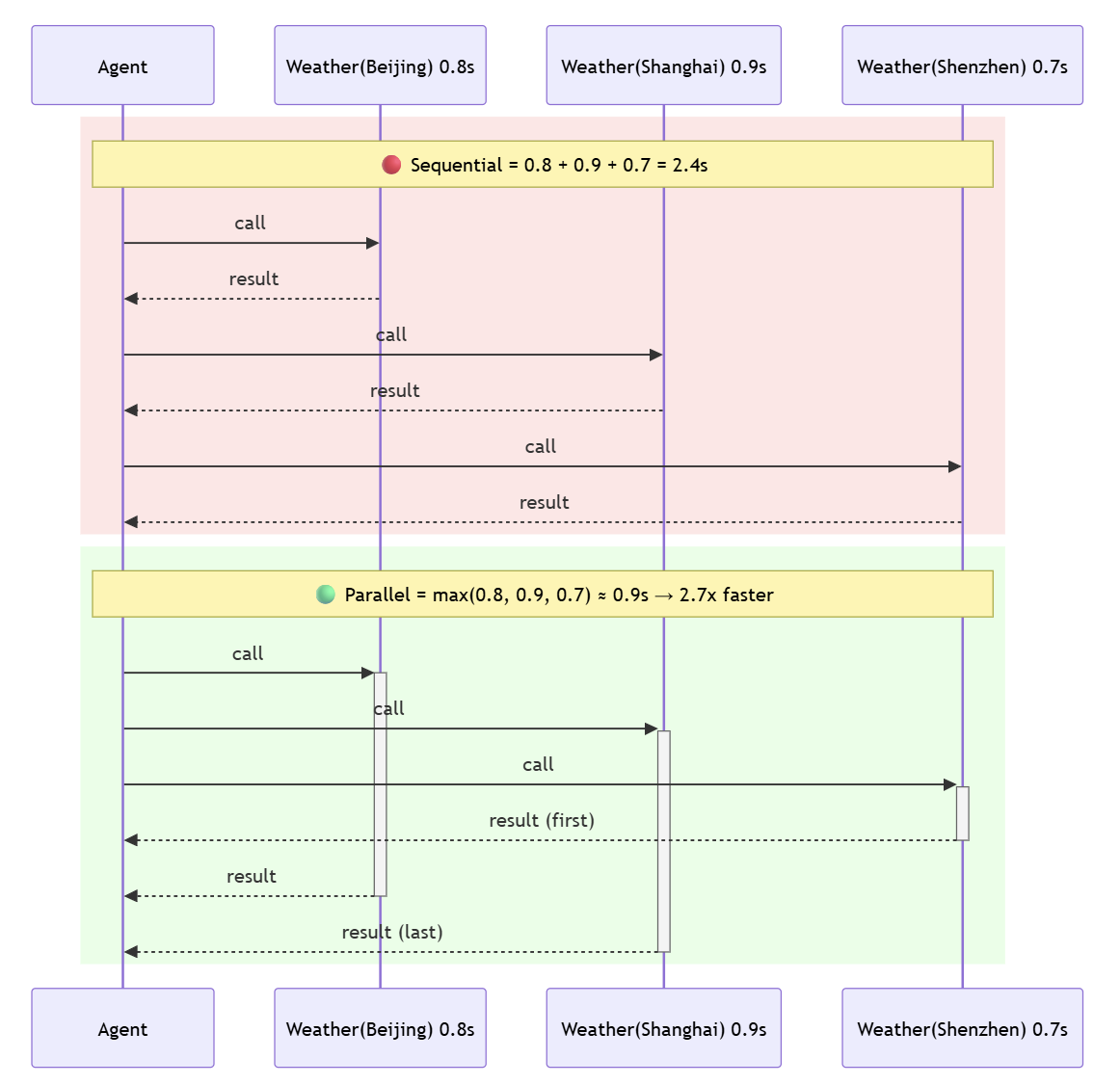
get_weather is a tool definition, but it supports
parallel call. The call parameters of each time are different:
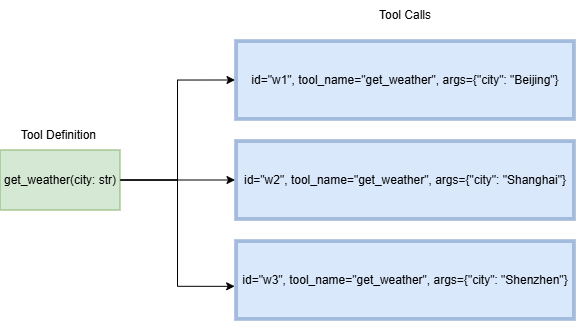
Sequential: total_time = Σ(t_i)
Parallel (no deps): total_time = max(t_i)
3.3.2 Dependency Graph
The standard of judging if the tools could be called parallel is that if their dependences have conflicts.
1 |
|
In real scenarios, tool calls form a DAG(directed acyclic graph).
e.g. Use plan a trip to Japan Trip in Chinese (规划日本旅行):
Plan Japan trip → search cities → parallel weather + attractions → translate
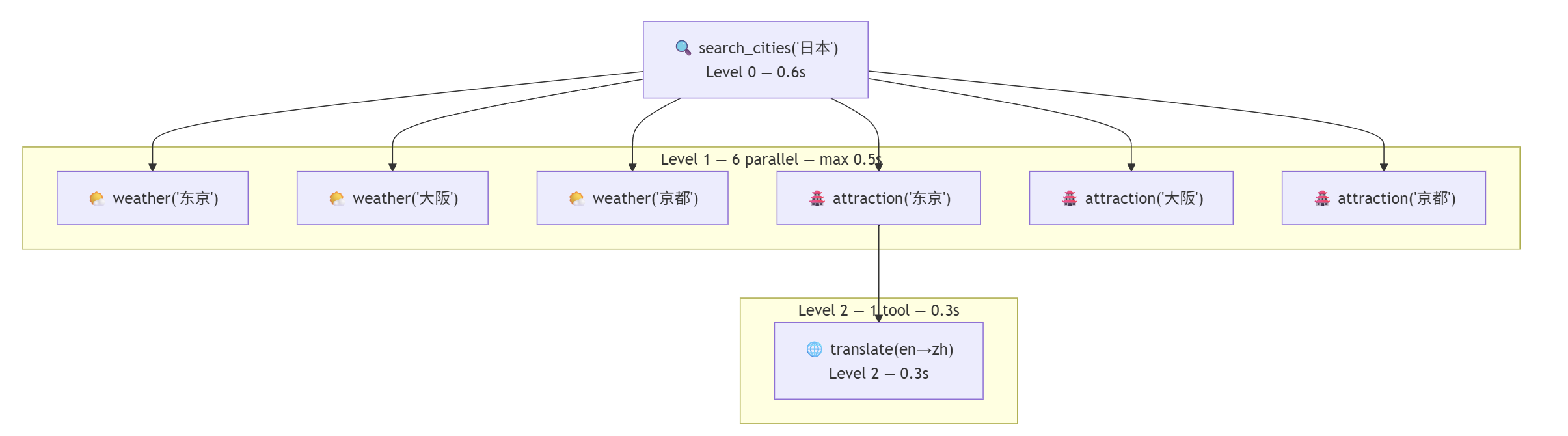
In this example, the translate tool_call is dependent on the the others, so it can only be called at last.
3.3.3 Three Execution Modes
| Mode | Strategy | Use Case | Python |
|---|---|---|---|
| SEQUENTIAL | Strict order | Each call depends on previous output | for call in calls: call.result = tool(**call.args) |
| PARALLEL | All at once | All calls independent | ThreadPoolExecutor + as_completed |
| DEPENDENCY_AWARE | Topo sort → parallel per level | Mixed dependencies | Topology grouping → intra-layer parallelism, inter-layer serialism |
Sequential and Parallel work flow is as follows:

The dependency_aware structure is like this:
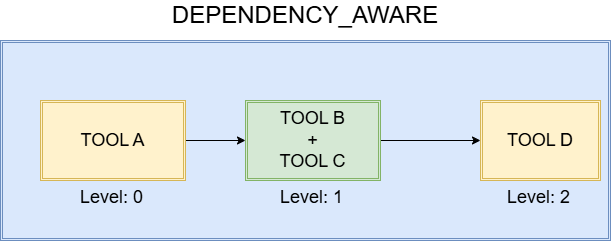
3.3.4 Race Pattern and All Pattern
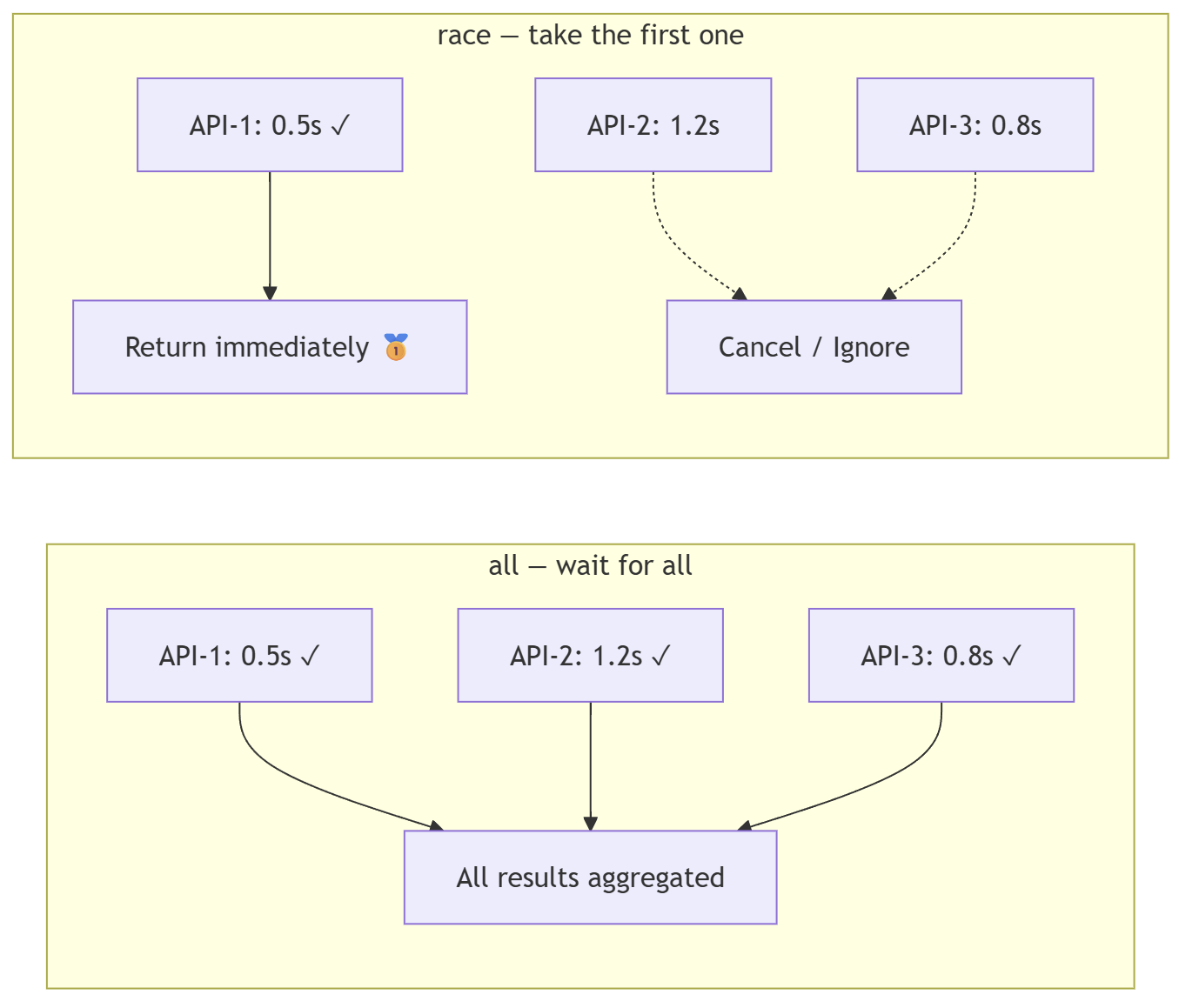
Race Pattern and All Pattern define “when
is it done”:
| Pattern | Completion | Example |
|---|---|---|
| all() | Wait for all tool_call | Need complete dataset |
| race() | Return when the first tool_call success | Competing backup APIs, take fastest one |
3.3.5 Timeout Management
Their are two types of timeout to distinguish:
| Timeout Type | Scope | After Timeout |
|---|---|---|
| per_tool | Single tool call | That single tool call fails, others continue |
| total | Entire execution batch | Cancel all pending calls |
1 | # Ideal configuration |
3.4 Error Handling & Retry Strategies
3.4.1 Error Classification
Not all errors should be retried. Classify first, then decide:
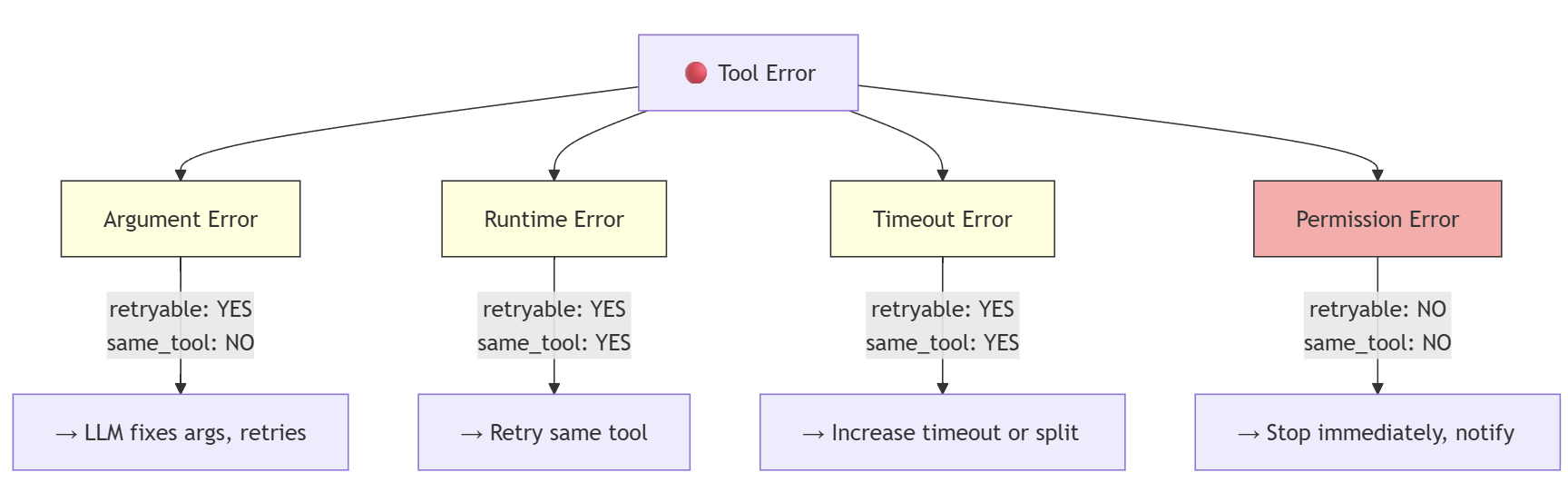
The detailed explain of these strategies: 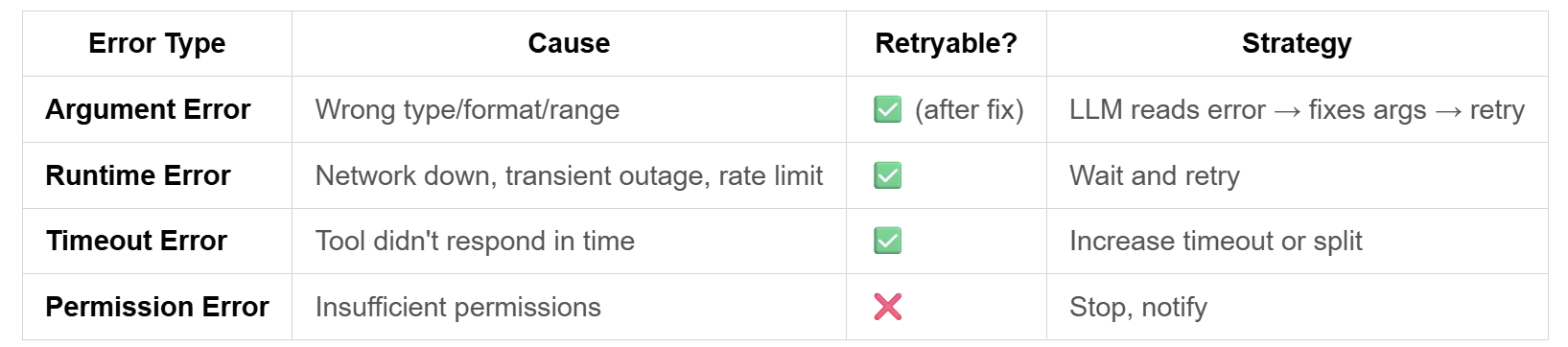
3.4.2 Retry Strategies Comparison
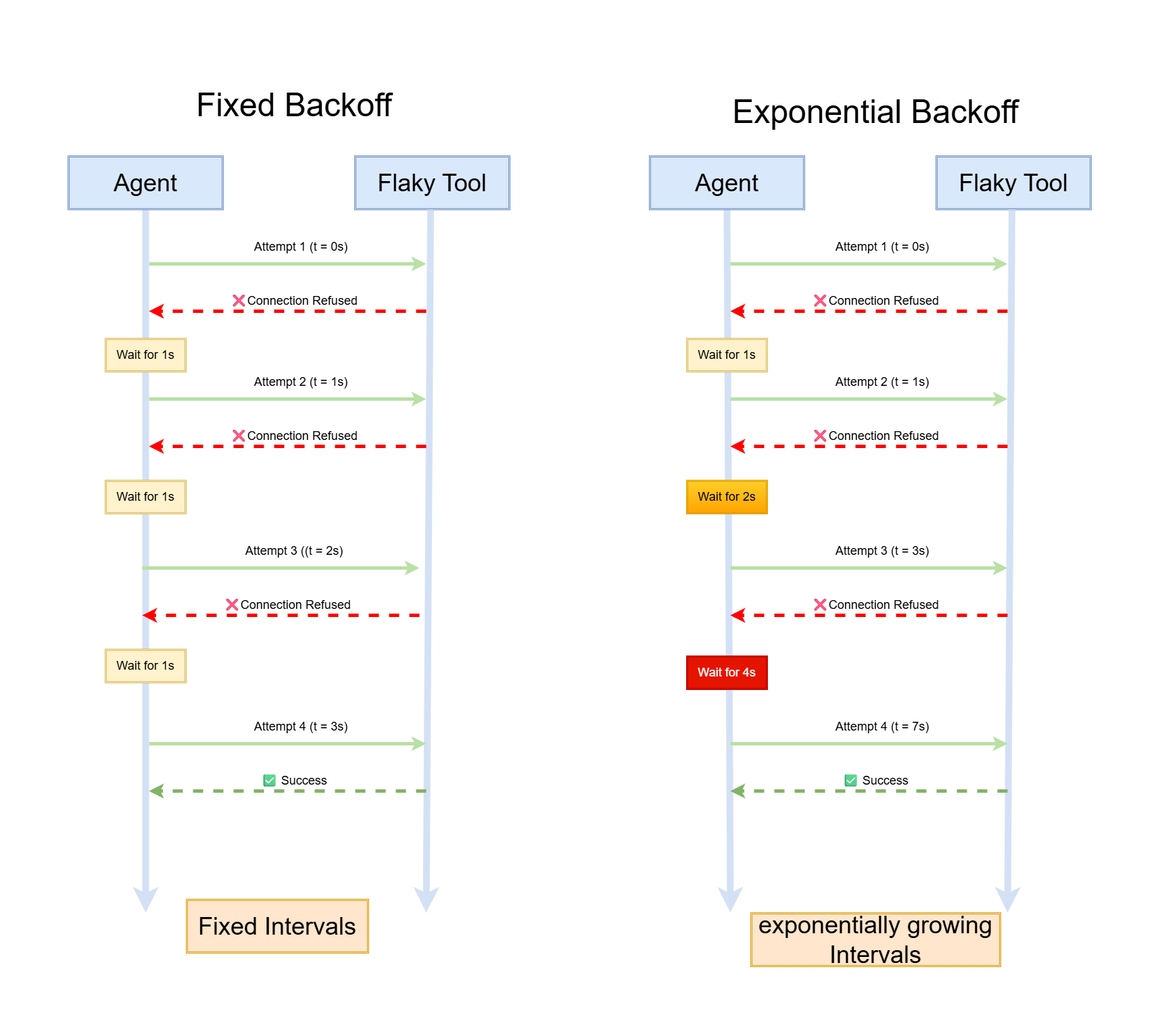
the detailed info:
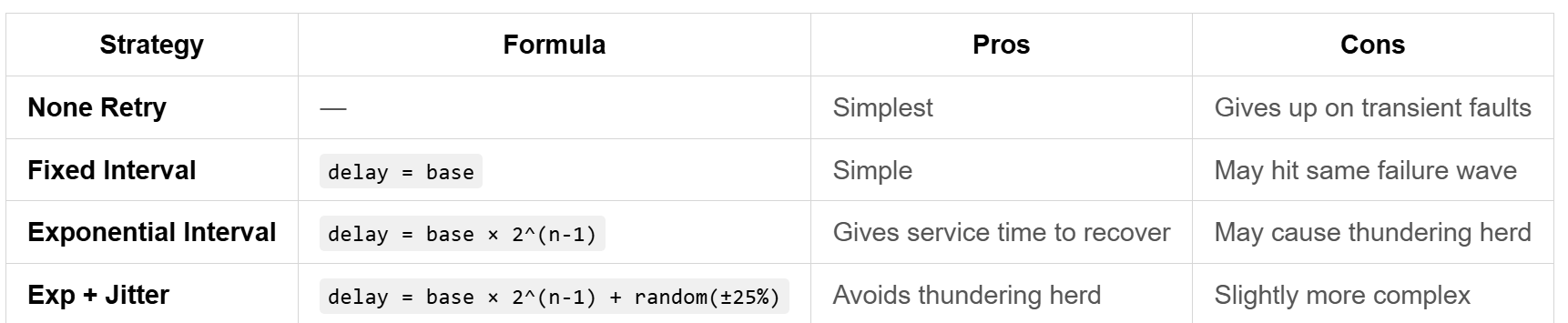
What is Thundering Herd ?
For example, 1000 visit the server at the same time, and they will
meet the rate limit error at the same time because of the
overloading of server. Then they all wait for 1s and retry and the
server will overload again.
With jitter, the clients retries are spread across ~1.5s instead of all at exactly 1s. So the server won’t overload.
3.4.3 Error as LLM Feedback
In an Agent, tool errors aren’t “exceptions” — they’re “signals.”
Error message quality determines if the LLM can self-correct.
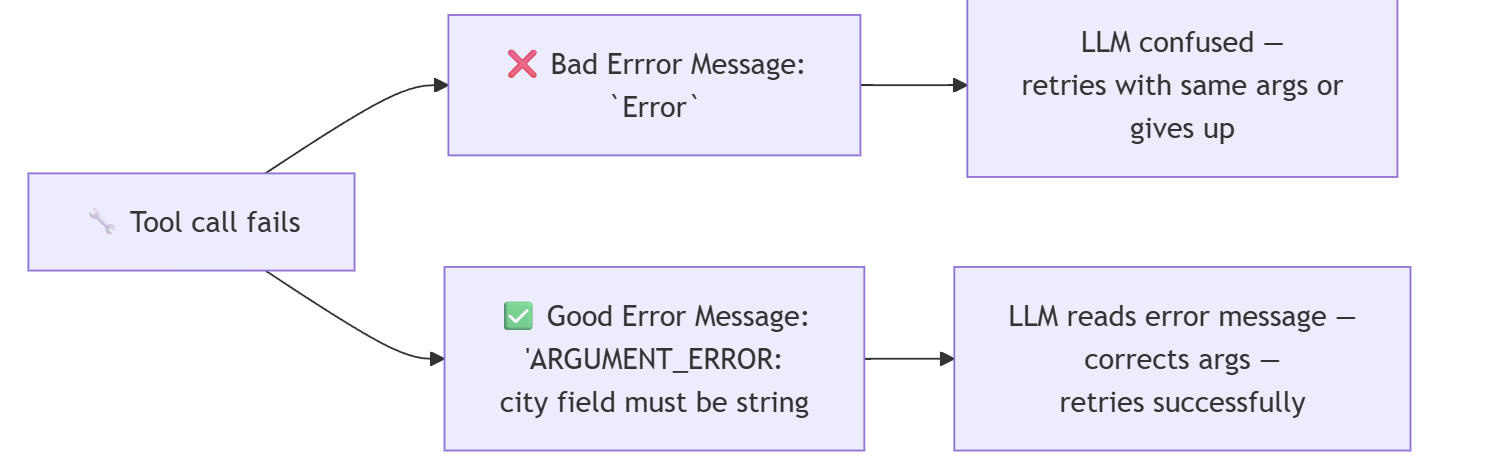
Good error message = tells the LLM three things:
- What happened — specific error code + description
- Why — arg error, network, or permission
- What to do — suggested fix direction
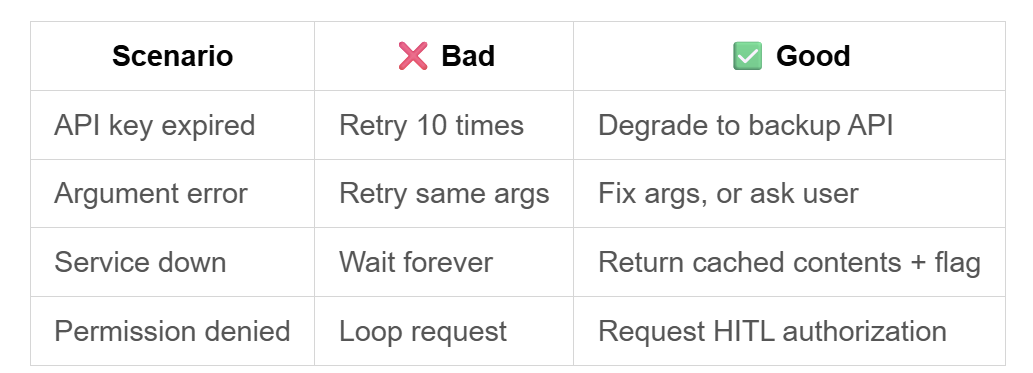
3.4.4 Graceful Degrading
When a tool keeps failing, stubbornly retrying the same call is a bad strategy. We have some other strategies:
3.5 End-to-End Error Handling Flow
1 | 1. Tool call |
4. Memory
4.1 Conversation History & Short-term Memory
4.1.1. Memory Taxonomy: A Three-Layer Model
Agent memory systems borrow the “sensory →
short-term → long-term” model from
cognitive science:
| Layer | Human Analog | Agent Implementation | Lifetime | Capacity |
|---|---|---|---|---|
| Sensory | What you see right now | Raw text of the current request | milliseconds | very short |
| Short-term | What was just said | Conversation history (message list) | single session | bounded by context window |
| Long-term | Remembering yesterday | Vector DB / Knowledge Graph | persistent across sessions | theoretically unlimited |
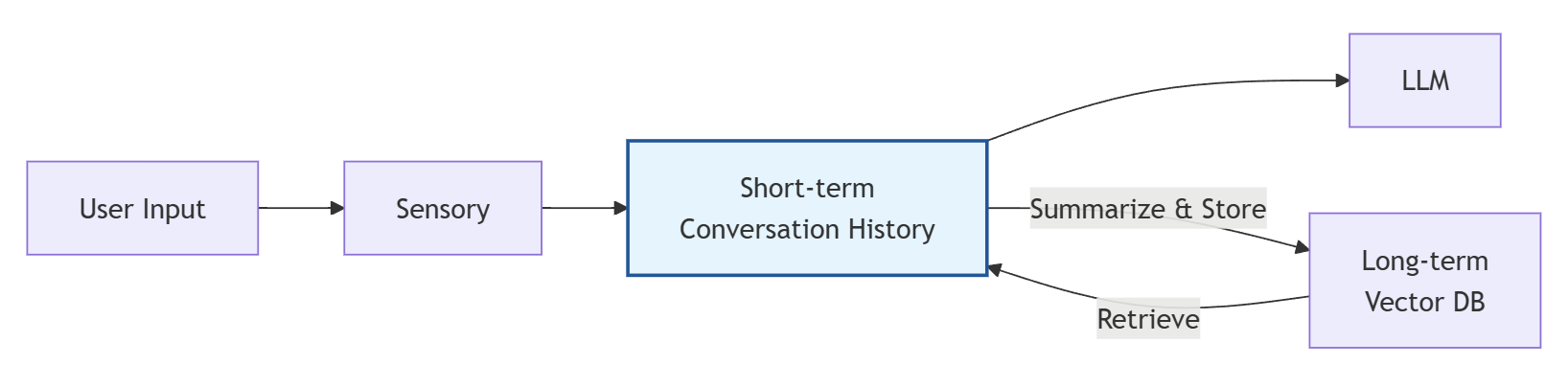
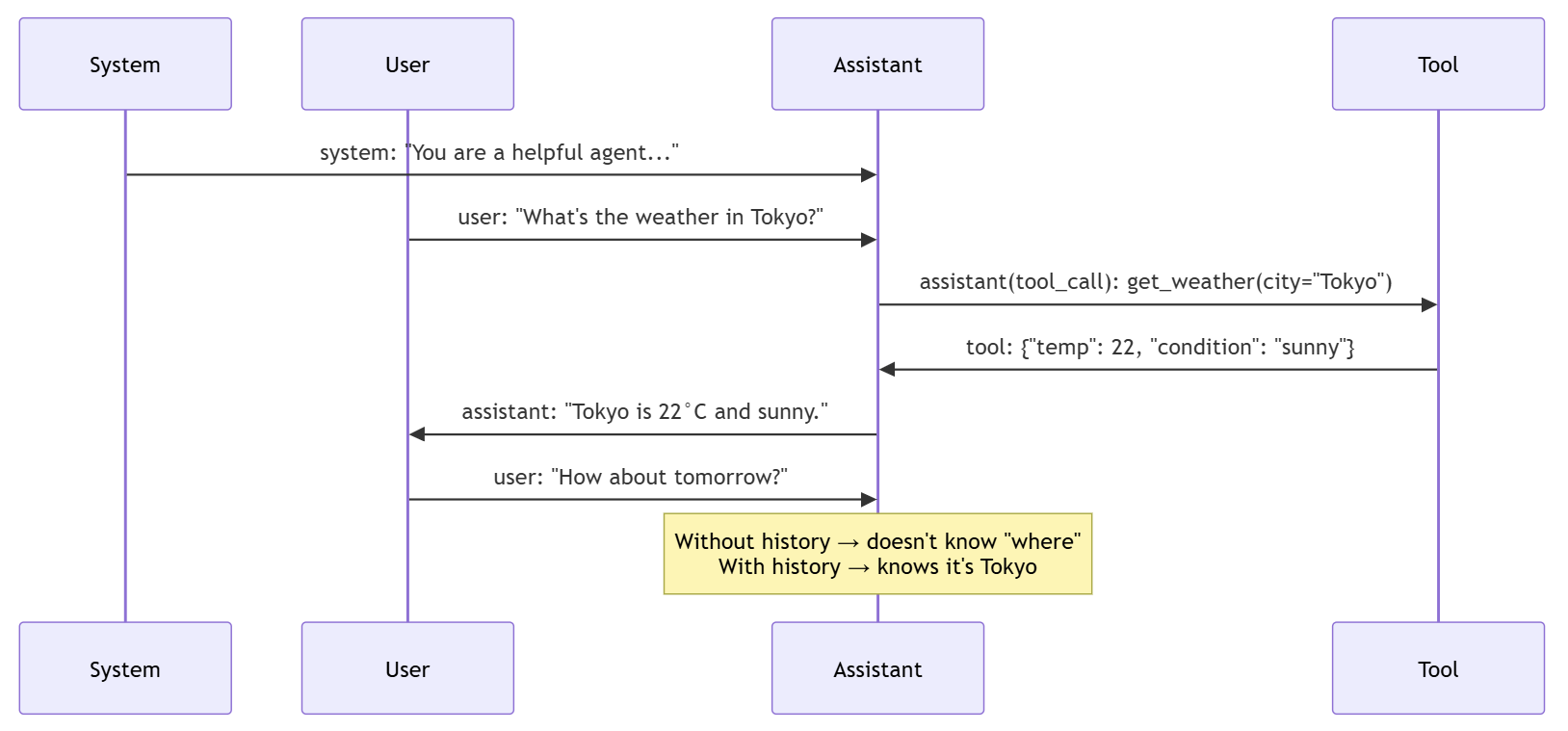
The reason why Conversation History cannot be omitted is
that each round of Agent’s ReAct Loop dependents on the
Observation of the previous round.
If the Conversation History is cleared, Agent won’t know
what is going on now, what tool have been called and what result have
been deducted.
For example:
User asked a question: “What’s the weather in Tokyo ?”
➡ Agent got the result.
➡ User asks again: “How about Beijing?”
➡ If there are no conversation history, Agent won’t know the “How about” refers to “How about the weather”
4.1.2 The Message List: Carrier of Short-term Memory
An Agent’s conversation history is a list of message objects, each with a “role” defining who is speaking:
| Role | Who Speaks | Purpose |
|---|---|---|
system |
Developer | Set Agent behavior rules and constraints |
user |
User | User input and queries |
assistant |
LLM | LLM’s text responses and tool-call decisions — the Agent manages these but does not generate them |
tool |
Tool execution result | Tool return values; must link to an assistant message’s
tool_calls |
example:
4.1.3 Truncation Strategies: When the Conversation Gets Too Long
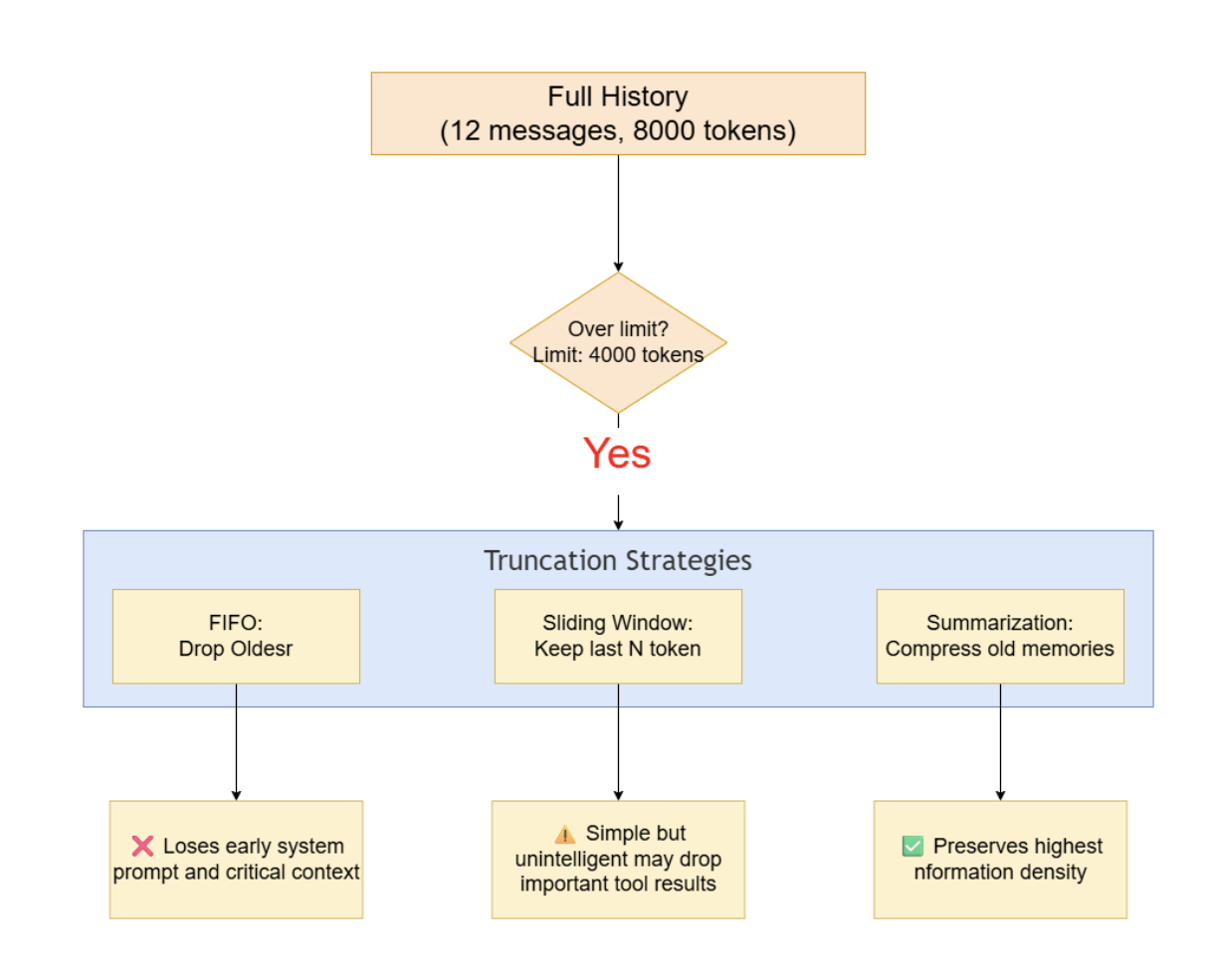
Context windows are finite (4K / 8K / 32K / 128K / 200K tokens). History will overflow. What do we cut?
Here are the three basic ways:
| Strategy | Mechanism | Pros | Cons | Best For |
|---|---|---|---|---|
| FIFO | Drop oldest messages | Simplest to implement | May delete system prompt | Simple chatbots |
| Sliding Window | Keep last N messages | Ensures recent context intact | Binary — loses ALL old context | Short single-task sessions |
| Summarization | Use LLM to compress old messages into a summary | Saves space while keeping old information | Extra LLM call cost | Production standard |
The deeper operation of truncation is :
Token-Aware Trimming which means regarding token as the
basic counting unit instead of message or
char.
| Unit | Logic | Problem |
|---|---|---|
| Character count | Save 8000 chars | English ~4 chars/token, Chinese ~1-2 chars/token — not linear at all, the bias is very huge |
| Message count | The token of different message differs | A message can be 10 tokens or 1000 tokens |
| token count | Save <= 4000 tokens | Match the context window precisely |
Correct approach: Use a tokenizer (e.g.,
tiktoken) for precise counting, with a safety margin
(typically 10-20% reserved for generation).
4.1.4 Summary Compression
The most practical compression strategy is a “reservoir” model: a summary of old conversation at the bottom, raw recent messages at the top:
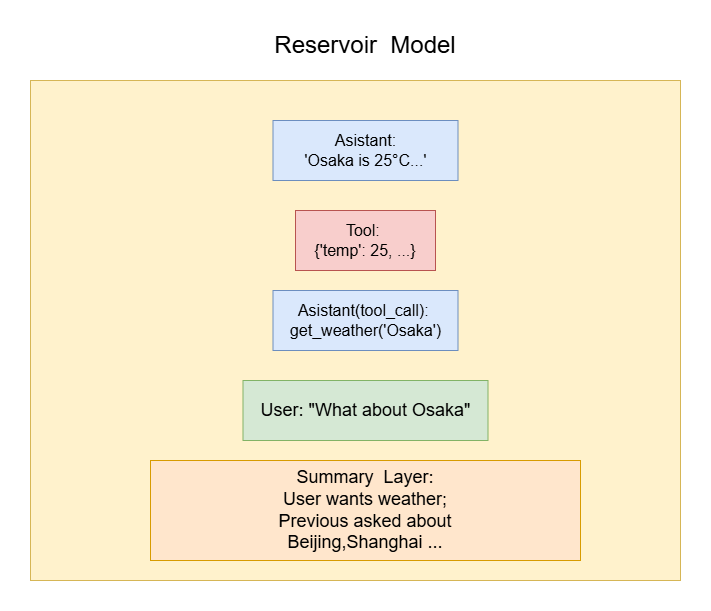
Workflow:
- Trigger compression when total tokens exceed the threshold.
- Send “compressible” old messages to an LLM for summarization.
- Replace compressed messages with a single
systemmessage containing the summary. - Keep the most recent N messages uncompressed (the “fresh layer”).
Some design choices:
| Choice | Option A | Option B | Recommendation |
|---|---|---|---|
| Who compresses? | Same LLM | Separate lightweight model | B is cheaper, A is simpler |
| When to trigger? | Fixed message count | Token threshold | B — Token threshold |
| What to compress? | All old messages | Keep system prompt + last N | B — system prompt is sacred |
| Summary format? | Natural language | Structured JSON | A more natural, B more precise |
4.1.5 A Complete Workflow from Add to Trim
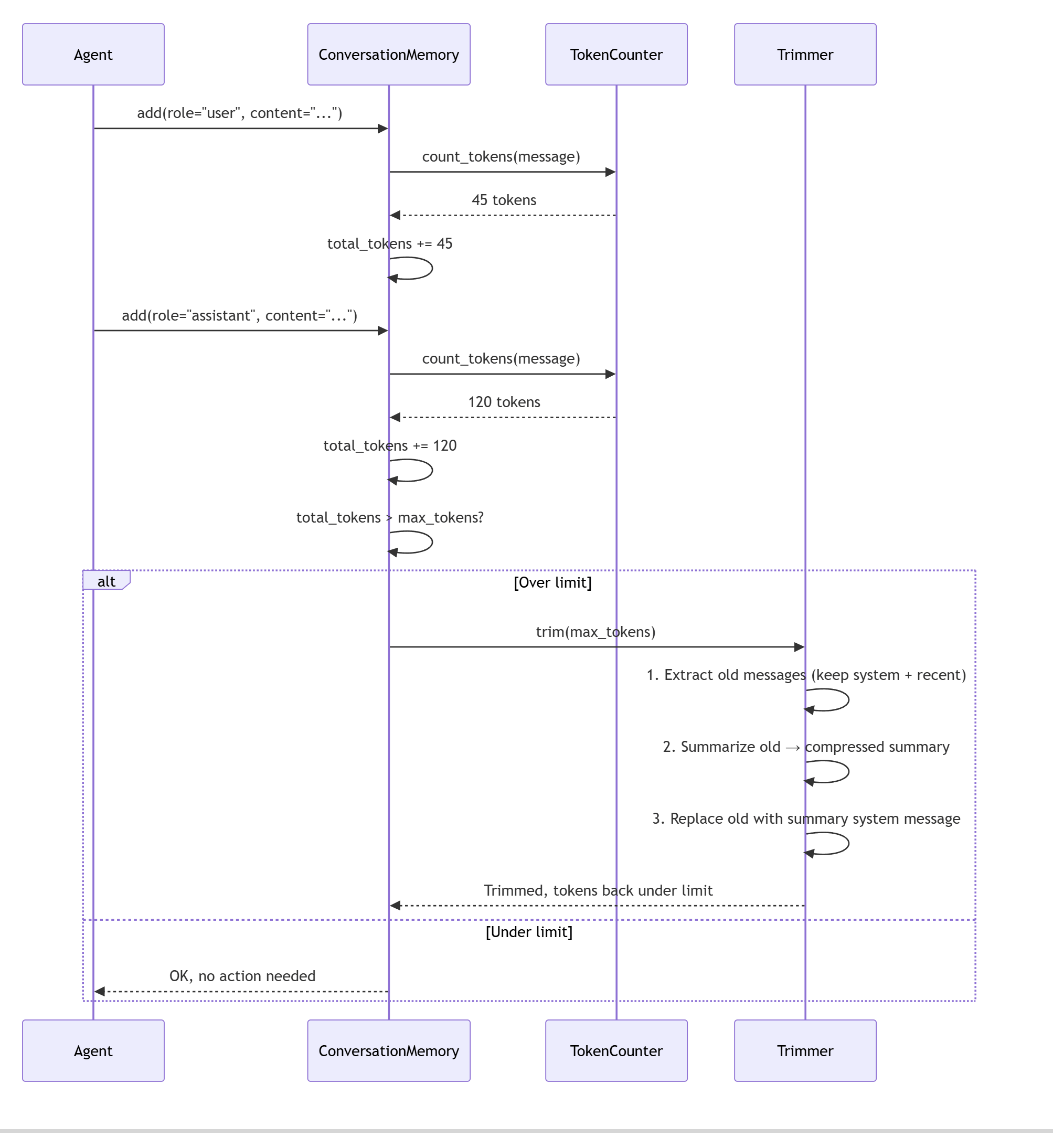
4.2 Vector Memory & Long-term Storage
4.2.1 Why we need long-term memory?
Short-term memory has a hard boundary: when the session ends, everything is gone.
Image a real scenario:
1 | Day 1: |
This is because the short-term memory(conversation history) ends when session is over. When the session ends, the message list will be cleaned.
Long-term memory bridges this gap by storing knowledge in a way that survives sessions. In a nutshell , the agent will extract info from conversation history into long-term history.
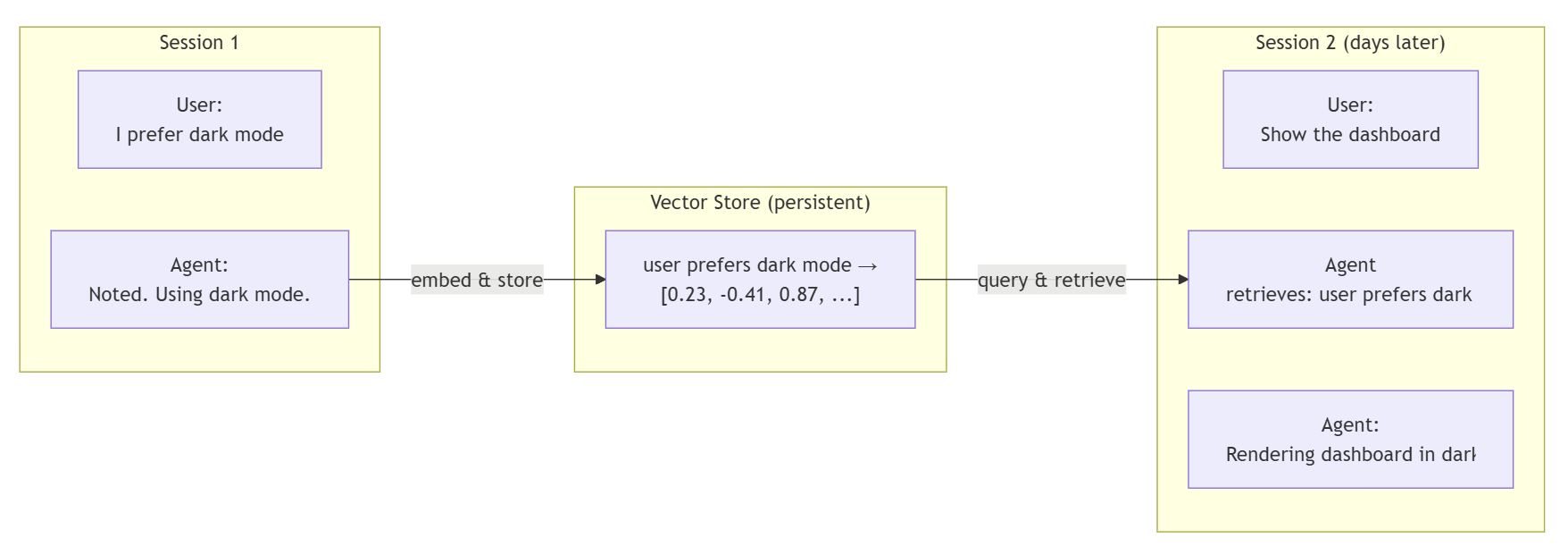
4.2.2 Complete Vector Memory Example
The training objective of the embedding model is to ensure that texts with similar semantics are close to each other in the vector space, while texts with unrelated semantics are far away from each other.
Look familiar ? It is exactly like the one in transformer.
The long-term memory storage has two main steps:
LLM: What is worthy to remember in this session? ➡ extract factsEmbedding Module: Embed the facts into vectors to restore.
4.2.2.1 When to extract facts?
Normally, when the conversation is over, send the complete conversation history to LLM, and ask LLM to extract facts the agent should remember.
4.2.2.2 What do LLM extract?
A Concrete Example is as follows:
Suppose a session:
1 | User: "I live in Tokyo" |
After the session: The Agent will send whole conversation history to LLM. The prompt likes:
1 | System: "Extract all information from the following conversation that is worth remembering for the long term." |
LLM Output:
1 | [PREFERENCE] User lives in Tokyo |
4.2.2.3 What is embedding?
An embedding is a dense vector (e.g., 1536 floats) that represents the semantic meaning of a piece of text. Texts with similar meanings have vectors that are close together in vector space.
1 | "cat" → [0.12, -0.34, 0.56, 0.78, ...] |
After the 3 items being extracted by LLM, the Embedding component will process them into vectors.
| Texts Extracted | Embedding Model | Vector Database |
|---|---|---|
| “User lives in Tokyo” | [0.023, -0.041, …] | semantic_store |
| “User prefers Celsius” | [0.019, -0.052, …] | semantic_store |
| “Company API: https://…” | [0.087, 0.031, …] | semantic_store |
The positions of these three pieces of memory in the vector space are determined by their respective semantics:
- The first two pieces, as they both involve “user preferences/personal information”, will be relatively close in the vector space
- The third piece, which is technical configuration information, will be in a different direction in the vector space
4.2.2.4 How to use the vector info?
Once User ask a question, the agent will search the relative memory in vector database, then return the relative top-k information. Then package the top-k information and original user’s question to the LLM.
For example:
In another session:
1 | Session 2: |
4.2.3 Why Not Just Keyword Search?
Why we use an embedding method instead of keyword search directly?
| Approach | Query: “canine companions” | Result |
|---|---|---|
| Keyword (BM25) | Documents containing “canine”, “companions” | Misses documents using “dog”, “pet”, “best friend” |
| Semantic (Embedding) | vector(“canine companions”) ≈ vector(“dogs as pets”) | ✅ Finds semantically related documents regardless of exact words |
Apparently, the keyword search method will miss many
semantically related info.
4.2.4 Read and Write of Vector Memory
4.2.4.1 Demo of Vector Memory R/W Operation
The core concept of two common operations of Vector Memory are Read and Before. Like the example listed before, they main steps are as follows:
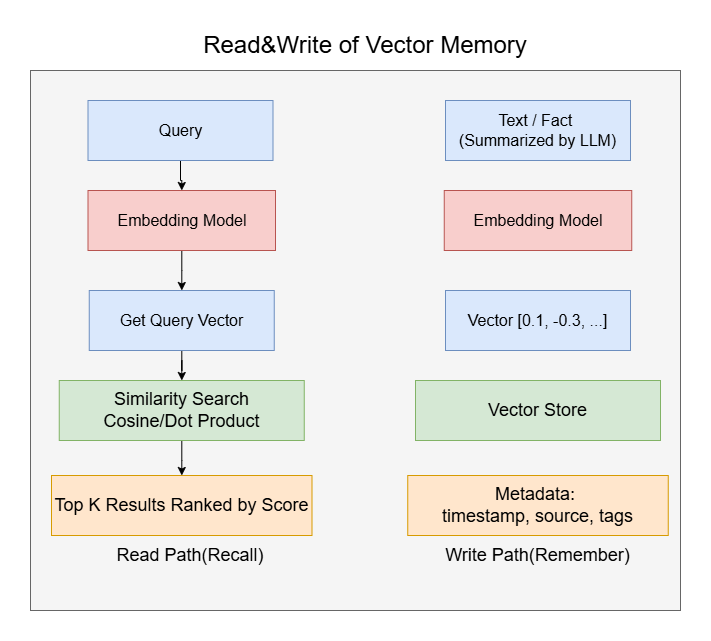
A real item of Vector Memory’s full structure like this:
1 | Vector Memory Entry: |
4.2.4.2 CRUD Operations
CRUD, is short for Create, Read, Update and Delete.
| Operation | Method | What Happens |
|---|---|---|
| Remember | store(text, metadata) |
Embed text → store vector + metadata + text |
| Recall | query(text, top_k) |
Embed query → similarity search → return top-K |
| Update | update(id, text) |
Re-embed → replace old vector |
| Forget | delete(id) |
Remove vector and metadata |
4.2.5 Episodic vs Semantic Memory
4.2.5.1 Features
There are two kinds of Long-Term memory in fact, the episodic one and semantic one.
Semantic Memory:
Stable, Long-term effective facts and knowledge:
1
2
3
4
5
6
7"User's name is Zhang Wei"
"User lives in Tokyo"
"User prefers dark mode"
"User prefers Celsius"
"Company API endpoint is https://api.example.com/v2"
"Default LLM model for this project is GPT-4"
"Tokyo is the capital of Japan"They have the following features:
- Stored once, used for a long time - Users do not change their names every day
- Frequently queried - User preferences may be used in almost every conversation
- Expiration method: Overwritten (when the user says “I now live in Beijing”, the old memory of Tokyo is overwritten), rather than naturally expiring over time
Episodic Memory:
The operation history of each session, likes log file:
1
2
3
4
5"2026-07-08: User asked for Tokyo weather, Agent used get_weather tool, 22°C sunny"
"2026-07-08: User asked to generate Q2 sales report, Agent queried SQL database, took 3 attempts due to timeout"
"2026-07-09: User reported bug in payment module, Agent searched codebase, found null pointer in PaymentService.java"
"2026-07-10: User deployed v2.1 to staging, all tests passed"
"2026-07-10: User asked about vector memory concepts, Agent explained embedding and cosine similarity"They have the following features:
- Continuous appending, with almost no modifications - generated daily.
- Occasional queries - used only when users ask “How was that bug fixed last time?”
- Depreciating over time - the details of a weather query from three months ago are now meaningless.
- Expiration method: automatic cleanup by time (episodic memories older than N days are directly deleted).
4.2.5.2 Why Need This Classification ?
Imagine, if we put all memories in the same vector space. Once the user ask: “How did I fix the previous payment bug?”
The retrieval result:
1 | #1 "User prefers dark mode" ← Semantic,not related |
The embedding algorithm only cares about the similarity. It doesn’t care about the vector is about fact or expierence.
The user’s preference information (frequent appearance, wide semantic coverage) tends to overshadow episodic memories that occur occasionally.
Separate storage has solved this problem:
1 | User: "How did I fix that payment bug before?" |
The agent does not need to search through hundreds of preferences and configurations to find that specific operation record.
| Type | What It Stores | Example | Storage Pattern |
|---|---|---|---|
| Semantic | Facts, knowledge, preferences | “User prefers dark mode”, “API base URL is https://…”, “Tokyo is the capital of Japan” |
Single facts with metadata |
| Episodic | Experiences, past interactions | “In session #42, the user asked for a sales report and the Agent used the SQL tool to generate it” | Conversation summaries linked by session ID |

4.2.6 The Retrieval-Augmented Loop
The Agent retrieves before reasoning — injecting relevant long-term context into the LLM’s prompt before the LLM decides what to do. This is the foundation of RAG.
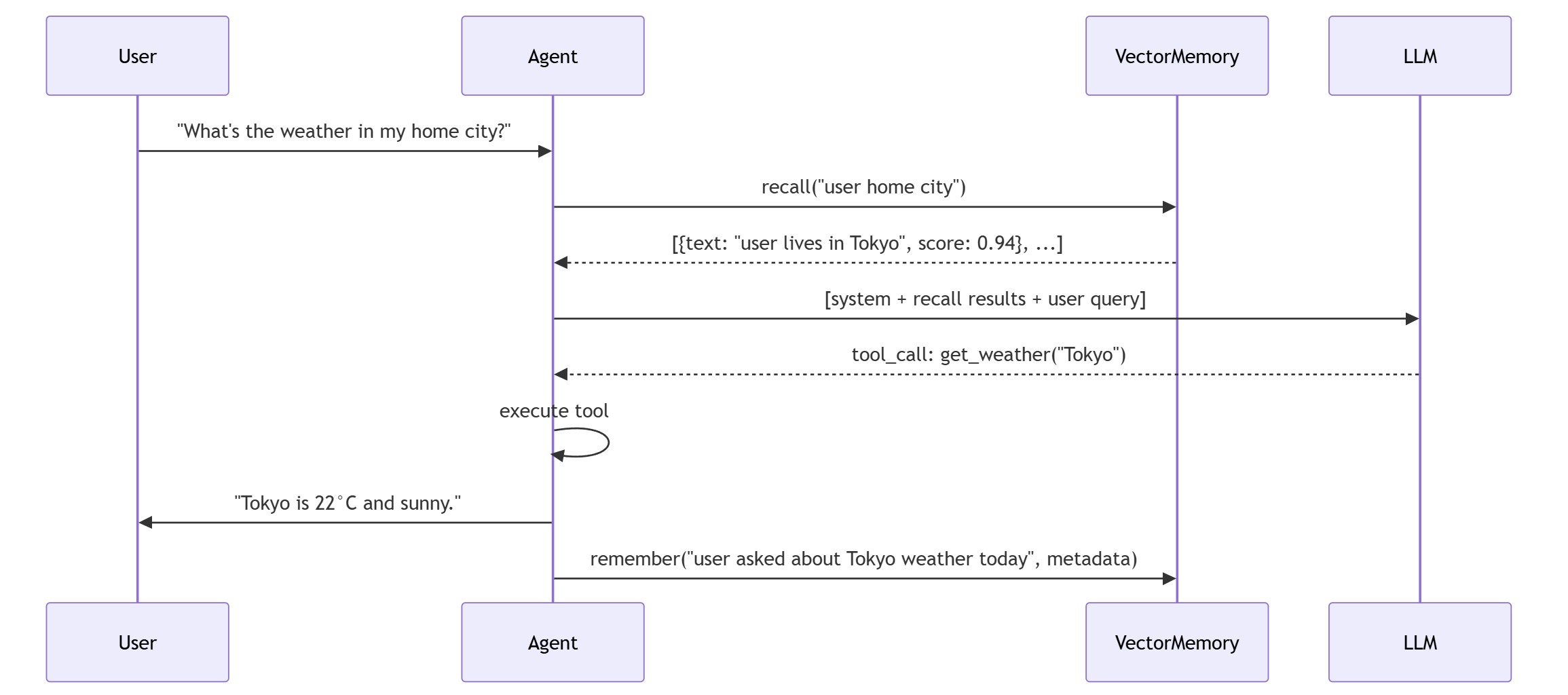
4.3 RAG (Retrieval Augment Generate)
4.3.1 Intro of RAG
What Is RAG in the Agent Context?
RAG (Retrieval-Augmented Generation) is a three-stage pipeline that grounds LLM responses in retrieved external knowledge. In the Agent context, it is the runtime integration of long-term memory into the decision loop.

Why it matters for Agents: An Agent without RAG is an amnesiac — it can only reason with what’s in the conversation. RAG makes the Agent’s memory actionable.
RAG vs. Fine-tuning vs. Long-context:
| Approach | Mechanism | When to use |
|---|---|---|
| RAG | Retrieve relevant docs, inject into prompt | Dynamic knowledge, frequent updates |
| Fine-tuning | Bake knowledge into model weights | Static knowledge, domain adaptation |
| Long-context | Stuff everything into the prompt | Small corpus, one-off analysis |
Agents typically use RAG + conversation history: the history handles the immediate reasoning chain, and RAG brings in cross-session context.
4.3.2 The Full Pipeline: Step by Step
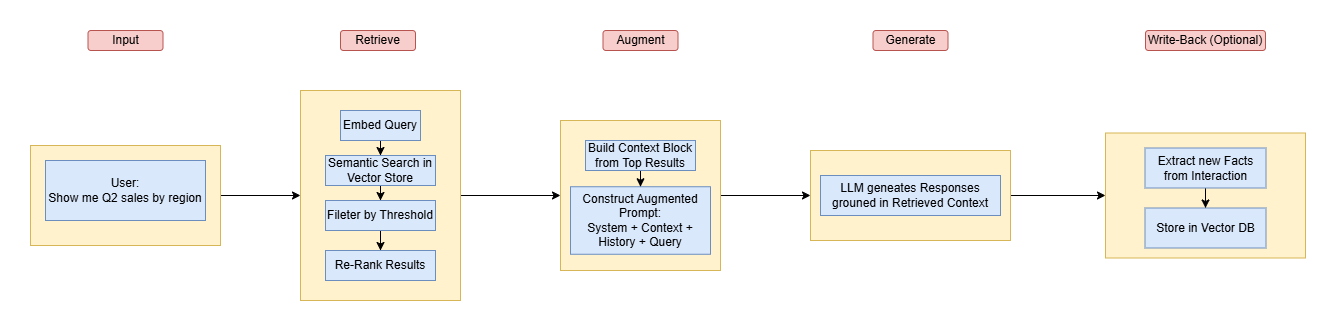
4.3.3 Retrieve Stage
4.3.3.1 Intro
The retrieval stage takes a user query and returns a ranked list of relevant documents/memories:
1 | query: "Q2 sales by region" |
Retrieval Strategies:
| Strategy | Description | Best for |
|---|---|---|
| Top-K | Return K highest-scoring results | General purpose, predictable context size |
| Threshold | Return all results with score > T | Unknown result count, precision-driven |
| Top-K + Threshold | Top-K, but drop any below threshold | Prevents irrelevant noise in top-K |
| Hybrid | Combine keyword (BM25) + semantic scores | When exact term matching matters |
4.3.3.2 Rewrite Query
Raw user input is often a bad retrieval query. An Agent should rewrite the query before searching:
1 | User Says: "how did we do last quarter?" |
Three patterns:
- Direct — use the user input as-is (fast, but noisy)
- LLM Rewrite — ask the LLM to expand/refine the query (adds latency, improves recall)
- HyDE (Hypothetical Document Embedding) — ask the LLM to generate a fake answer, embed that, and search with it (best for abstract queries)
4.3.3.3 Re-Ranking
The initial vector search is fast but coarse.
A re-ranker (cross-encoder) reads the query and each candidate document together, scoring relevance more accurately — at the cost of being slower.

When to re-rank:
- When precision matters more than latency
- When the initial search returns many moderately-relevant results
- When you have a cross-encoder model available
4.3.4 Augment Stage
4.3.4.1 Augmentation Pattern
1 | # BEFORE augmentation (no RAG) |
The retrieved documents are injected into the system prompt or a dedicated context block, before the user query.
4.3.4.2 Context Window Budgeting
You can’t stuff everything. You must budget the context window:
| Section | Approximate budget | Content |
|---|---|---|
| System prompt | 10-15% | Instructions, role, safety rules |
| Retrieved context | 30-40% | Documents from RAG |
| Conversation history | 40-50% | Recent messages |
| Generation reserve | 10-15% | Room for the LLM to actually generate |
4.3.4.3 Source Citation
Always tell the LLM where each piece comes from:
1 | Context: |
This reduces hallucination and gives the user a path to verify.
4.3.5 Generate Stage
4.3.5.1 How Context Reduces Hallucination
| Without RAG | With RAG |
|---|---|
| “Q2 revenue was $2.5M” (made up) | “According to the Q2 report, revenue was $2.3M” (grounded) |
| “I don’t know your preferences” | “Based on your stored preferences, you use dark mode” |
| Generic response | Personalized, knowledgeable response |
The key insight: hallucination happens in the gap between the LLM’s training data and the specific facts it needs. RAG closes that gap.
4.3.5.2 Instruction Design for Grounded Generation
1 | Instructions for grounded generation: |
4.3.6 The Memory Write-back Loop
RAG isn’t just read — it’s read + write. After generating, the Agent should store new knowledge:
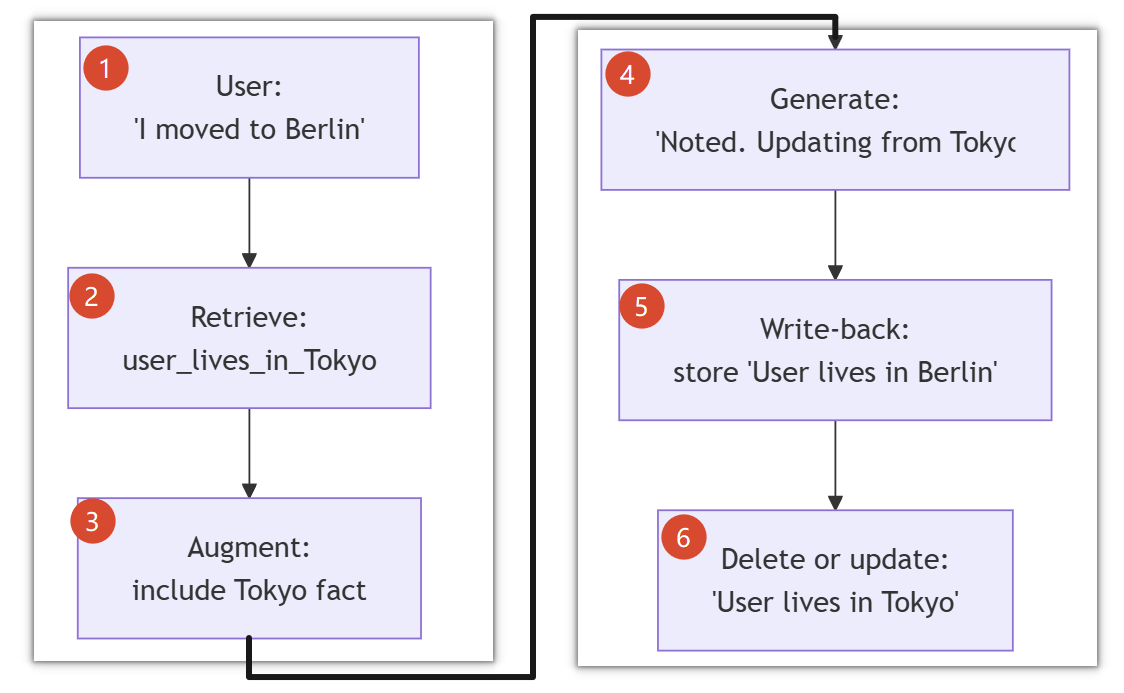
Write-back triggers:
- Explicit user correction: “Actually, I prefer X not Y”
- New information: “By the way, my team uses Rust now”
- Task completion: “Report generated successfully at /reports/q2.pd
4.3.7 Practical Considerations
Latency Budget:
| Stage | Typical Latency | Notes |
|---|---|---|
| Embed query | 10-50ms | One API call to embedding model |
| Vector search | 1-10ms | In-memory or local DB |
| Re-rank | 50-200ms | N cross-encoder calls (N = candidates) |
| LLM generation | 500-5000ms | Dominates total latency |
| Total RAG overhead | 60-260ms | Acceptable for most use cases |
Chunking Strategies:
Long documents must be split into chunks before embedding:
| Strategy | How it works | Best for |
|---|---|---|
| Fixed-size | Split every N characters with overlap | Simple, predictable |
| Semantic | Split at paragraph/section boundaries | Natural language docs |
| Recursive | Try large chunks first, split smaller recursively | Mixed content |
| Agentic | Let the LLM decide where to split | High-value, small corpus |
Relevance-Quality Tradeoffs:
1 | Precision ↑ → Fewer, more relevant results → Risk of missing context |
The rule of thumb: tune for precision when the LLM can handle missing context gracefully (“I don’t know”). Tune for recall when missing context means wrong answers.
Evaluation:
- Retrieval quality: precision@K, recall@K, MRR (Mean Reciprocal Rank)
- Generation quality: faithfulness (does the answer match the context?), answer relevance
- End-to-end: does the user get the right answer?
4.4 Context Window Optimization
4.4.1 Intro
Every token in the context window has a cost, both financial and cognitive:
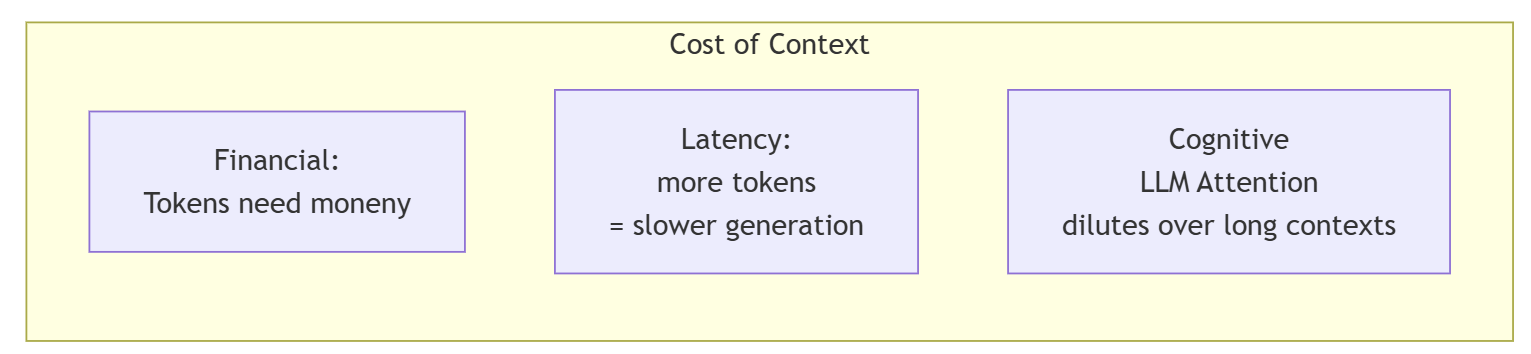
The “lost in the middle” problem: LLMs pay most attention to the beginning and end of the context. Information in the middle gets ignored.

There are many ways try to solve the problem:
| Naive approach | Optimized approach |
|---|---|
| “Keep everything, let the LLM figure it out” | “Curate what goes in, maximize information density” |
| Truncate by recency (last N messages) | Truncate by relevance + importance + recency |
| One-size-fits-all context | Dynamic allocation based on task |
| Verbose tool outputs stored as-is | Summarized/crunched tool outputs |
4.4.2 Structured Context Assembly
4.4.2.1 The Priority Ladder of Context
Not all context is equal. Assign every piece a priority:
1 | Priority 1 (ALWAYS KEEP): |
4.4.2.2 Assembly Algorithm
A exemplary algorithm is as follows:
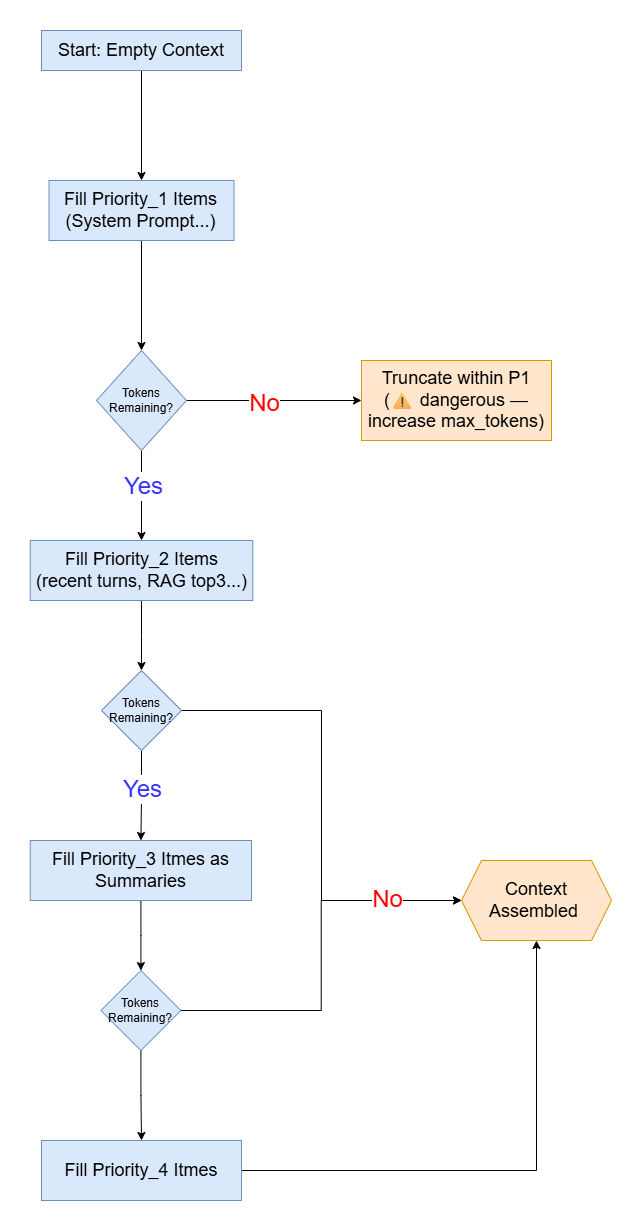
4.4.3 Summarization Context
Progressive summarization is an important rule.
Don’t just summarize once. Summarize in layers, each more compressed:
1 | Layer 0: Raw conversation (10,000 tokens) |
When to show which layer:
- Same session → Layer 0 or Layer 1
- Same day, different session → Layer 1 or Layer 2
- Weeks later → Layer 2 or Layer 3 (via vector memory recall)
What makes a good summary?
A good summary preserves:
- Decisions made — “Agreed to use PostgreSQL for the new service”
- Facts learned — “User’s team has 5 engineers”
- Unresolved items — “Still need to decide on monitoring tool”
- Task state — “Deploy to staging: DONE. Deploy to production: PENDING”
A bad summary just says “They discussed databases and
deployments.”
4.4.4 Tool Result Compression
Raw tool outputs are often the biggest context hogs. Process them:
1 | # ❌ Raw: 2,500 tokens |
The pattern: keep what’s actionable, compress what’s informational.
- If the Agent needs to parse the output → keep raw
- If the LLM just needs to know “it worked” or “found 15 matches” → compress
4.4.5 Relevance-Based Retention
The sliding window algorithm will keep the latest-N messages, but it’s not the best algorithm because many useful info will be dropped by time.
We should sort the messages by relevance. Then in the sliding window, drop the least relevant message. This is called Relevance-Based retention.
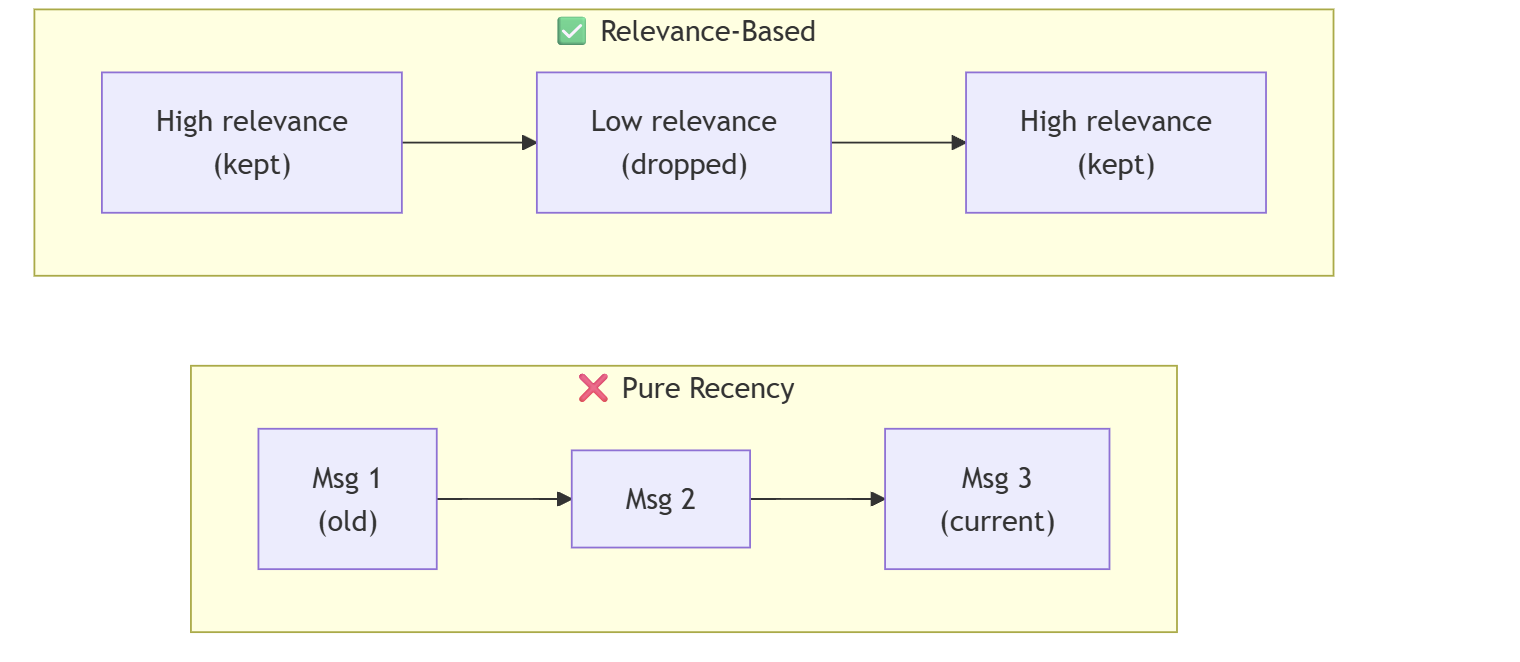
But only the relevance is not enough for ranking. Some message has less relevance but more importance. We include a comprehensive score to evaluate the degree of “if message should be kept.”
1 | keep_score = ( |
Importance signals (what makes a message “important”):
- Contains a user preference (“I prefer…”, “I use…”)
- Contains a decision (“Let’s go with…”, “We’ll use…”)
- Contains a tool call or its result
- Contains an error or correction
- Contains a number, date, or named entity
When the context window is full and a new message arrives:
- Score every message in the window
- Evict the lowest-scoring message
- If it contains a “high importance” signal → summarize it instead of dropping it
- Repeat until enough space is freed
4.4.6 Cache-Aware Context Design
4.4.6.1 How LLM Prompt Caching Works
Most LLM APIs cache the prefix of the prompt.
If you send the same system prompt + first N messages, those tokens are cached and you don’t pay for them on subsequent calls.
Once the token at a certain position changes, the cache of all subsequent content becomes invalid.
1 | Request 1: [System] [Msg1] [Msg2] [Msg3] ← full price |
4.4.6.2 Design for Cacheability
So we should take the rule into consideration to organize the agent’s context:
1 | # ❌ Cache-unfriendly: dynamic content at the FRONT |
Cache-friendly rules:
- System prompt: static content ONLY — no dates, no counters, no session IDs
- Retrieved context: put at the END of
systemor beginning of a dedicated user message - Conversation history: newest messages last (appending preserves the prefix cache)
- Don’t insert messages in the middle of the array
4.4.7 Token-Efficient Formatting
The limit of context window and token price make it important to save
token. We should exploit token efficiently. The rule is
Less token, same info.
e.g. 1
2❌ Verbose: "The user has indicated that they prefer to use dark mode for all of their applications."
✅ Compact: "user_pref: dark_mode=true"
And we have many ways to compress output info of tools:
| Format | Example | Use when |
|---|---|---|
| Key-value | city=Tokyo, units=metric, temp=22C |
Simple structured results |
| Table-like | file | size | modified\nmain.py | 1KB | today |
Lists of items |
| Diff | +added line\n-removed line |
Changes, updates |
| JSON-minified | {"status":"ok","count":42} |
When the LLM needs to parse it |
There are some common filler that wastes tokens:
- Politeness padding: “I hope this message finds you well…”
- Redundant acknowledgments: “Thank you for your query. I understand you want to…”
- Repeated context: the same instruction appearing in system prompt AND user message
4.4.8 Dynamic Context Allocation
A “check the weather” query doesn’t need the same context as “analyze this 50-page report”, so we should allocate context window dynamically:
| Task complexity | Context strategy |
|---|---|
| Simple (weather, time, quick fact) | Minimal: system + query + 1-2 relevant memories |
| Medium (code review, data analysis) | Standard: system + recent history + RAG top-5 |
| Complex (architecture design, debugging) | Maximum: full history + RAG top-10 + summarized older sessions |
This is an example:
1 | def allocate_budget(query: str, available_tokens: int) -> ContextBudget: |
Why more reserve for simple tasks? Because the LLM answer will be short — it doesn’t need elaborate generation. The reserve mostly goes unused.
4.4.9 Optimization Checklist
Before sending to the LLM, ask:
5. Plan
5.1 Plan & Execute
5.1.1 Intro
The characteristic of ReAct pattern is “Take one step at a time” which causes many problems:
No Global Plan
Sometime, it will stuck into local problems.
Global Drift
If there no plan, the step will drift after 3~5 steps. Especially in a complex task.
Accumulating Errors & No Backtracking
Step 3 goes wrong ➡ Step 4 based on Step 3 ➡… ➡ Step 7 finds it is on a wrong way ➡ No mechanism for ReAct to go back to Step 2.
Context Bloat
Every step, agent send “thought-action-observation” history into context which makes the context window bloat fast.
…
In a nutshell:
"local optimization, global blindness."
1 | User: "Plan a trip to Tokyo: find flights, book hotel, create itinerary" |
The plan acts as a global constraint — a roadmap that prevents the Agent from wandering off.
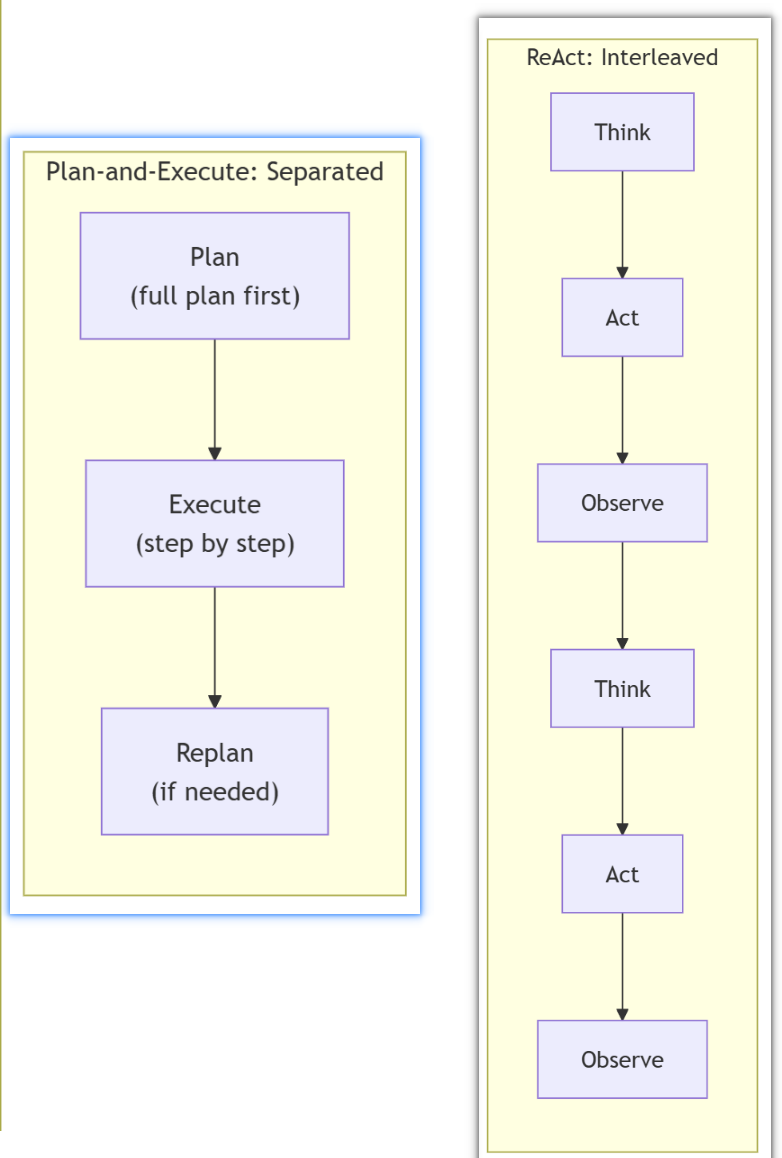
5.1.2 Architecture
P&E is not a substitute of ReAct, in fact, it’s a shell of ReAct.
The architecture of P&E and be divided into 3 pieces:
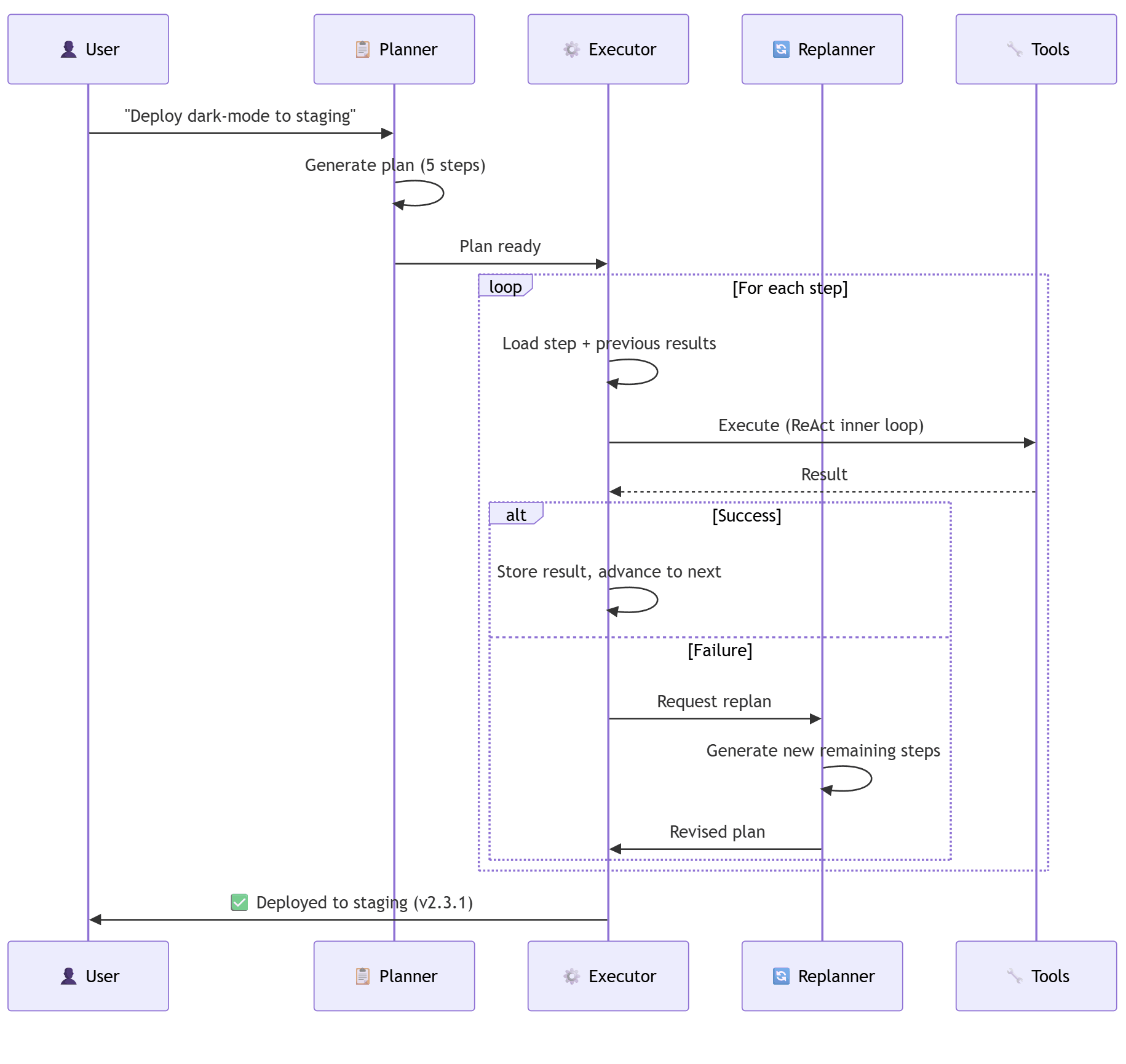
Plan ➡ Execute ➡
Replan(If Execution Fails)
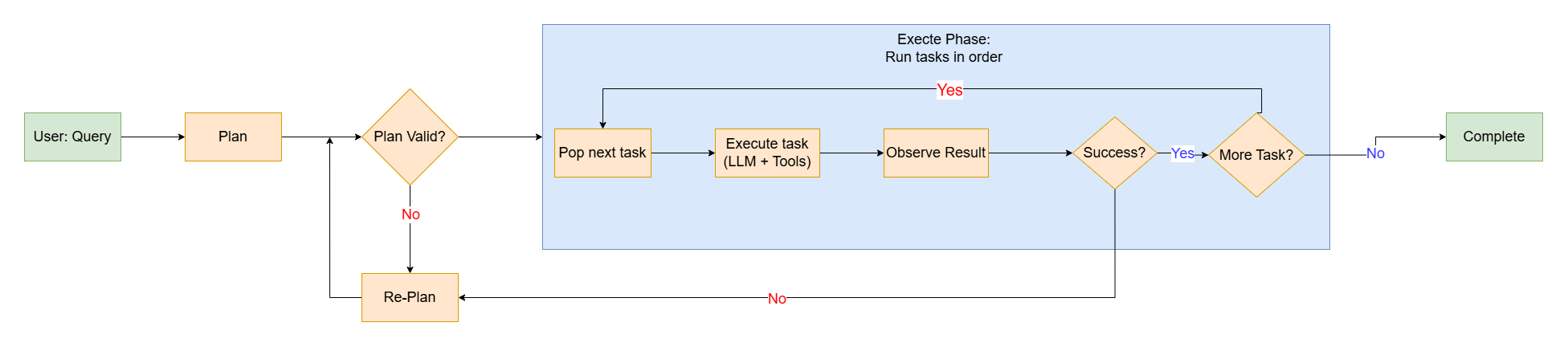
There are three main components of this structure:
| Component | Responsibility | When it runs |
|---|---|---|
| Planner | Decompose the user’s goal into an ordered list of subtasks | Once, at the start |
| Executor | Execute each subtask with tools, collect results | For every task in the list |
| Replanner | Adjust the remaining plan when a step fails or reveals new info | On execution failure or unexpected results |
5.1.3 Plan Representation
A plan is more than a bullet list. A good plan encodes:
1 |
|
Each step:
1 |
|
Example plan for “Deploy a new feature to staging”:
1 | Plan = { |
5.1.4 Planner Desgin
A good plan has these properties:
- Complete — covers all aspects of the user’s goal
- Ordered — steps are sequenced correctly (dependencies first)
- Granular — each step is a single, executable action
- Verifiable — each step has a clear success criterion
- Adaptable — steps can be reordered or replaced if needed
The planner's prompt must
enforce structure:
1 | You are a task planner. Given a user's goal, generate a step-by-step plan. |
When you force the LLM to write the full plan before acting, several things surface:
- Missing information: “Step 1: ask for budget” — the LLM realizes it needs input it doesn’t have
- Dependency awareness: “I can’t deploy before tests pass” — structural, not reactive
- Scope estimation: A 20-step plan for “check the weather” signals the LLM misunderstood
This is the planning dividend: bugs caught at plan time are free. Bugs caught at execution time cost tool calls.
5.1.5 Executor Design
Each step receives the results of all previous steps as context:
1 | def execute_step(step: Step, previous_results: dict[str, Any]) -> StepResult: |

In fact, the ReAct is within the P&E loop.
Plan-and-Execute doesn’t replace ReAct — it wraps it. The outer loop is P&E (sequential steps), but each step internally uses ReAct (think→act→observe) to accomplish its specific sub-goal.
1 | P&E (outer loop): Step 1 → Step 2 → Step 3 → Step 4 |
This is the key insight: P&E provides structure; ReAct provides flexibility within that structure.
5.1.6 Replanning
A step can fail for many reasons:
| Failure type | Example | Response |
|---|---|---|
| Tool error | API returns 500 | Retry step or use alternative tool |
| Unexpected result | Search returned 0 results | Broaden search or replan |
| New information | User says “actually, my budget is $200” | Replan remaining steps with new constraint |
| Dependency broken | Step 3 failed, so steps 4-8 are now invalid | Truncate and replan from step 3 |
We have a replan trigger:
1 | def should_replan(failed_step: Step, remaining_steps: list[Step]) -> bool: |
Replanning Prompt:
1 | The following step FAILED: |
5.1.7 Complete Work Flow
5.2 Task Decomposition
5.2.1 Intro
You can’t eat an elephant in one bite.
Task decomposition is the knife that cuts it into
pieces.
We’ve learned that we should cut the plan into many tasks in order. But we didn’t discuss how to do this.
That’s task decomposition — the
algorithm (or prompt strategy) that takes a complex goal
and breaks it into executable subtasks.
Task decomposition is the process of
breaking a complex, high-level goal into smaller, well-defined subtasks
that an Agent can execute with its available tools.
Because of the complexity of tasks’ dependencies, the tasks’ performing order is always not linear.
e.g.
1 | Query: "Analyze customer churn and recommend retention actions" |
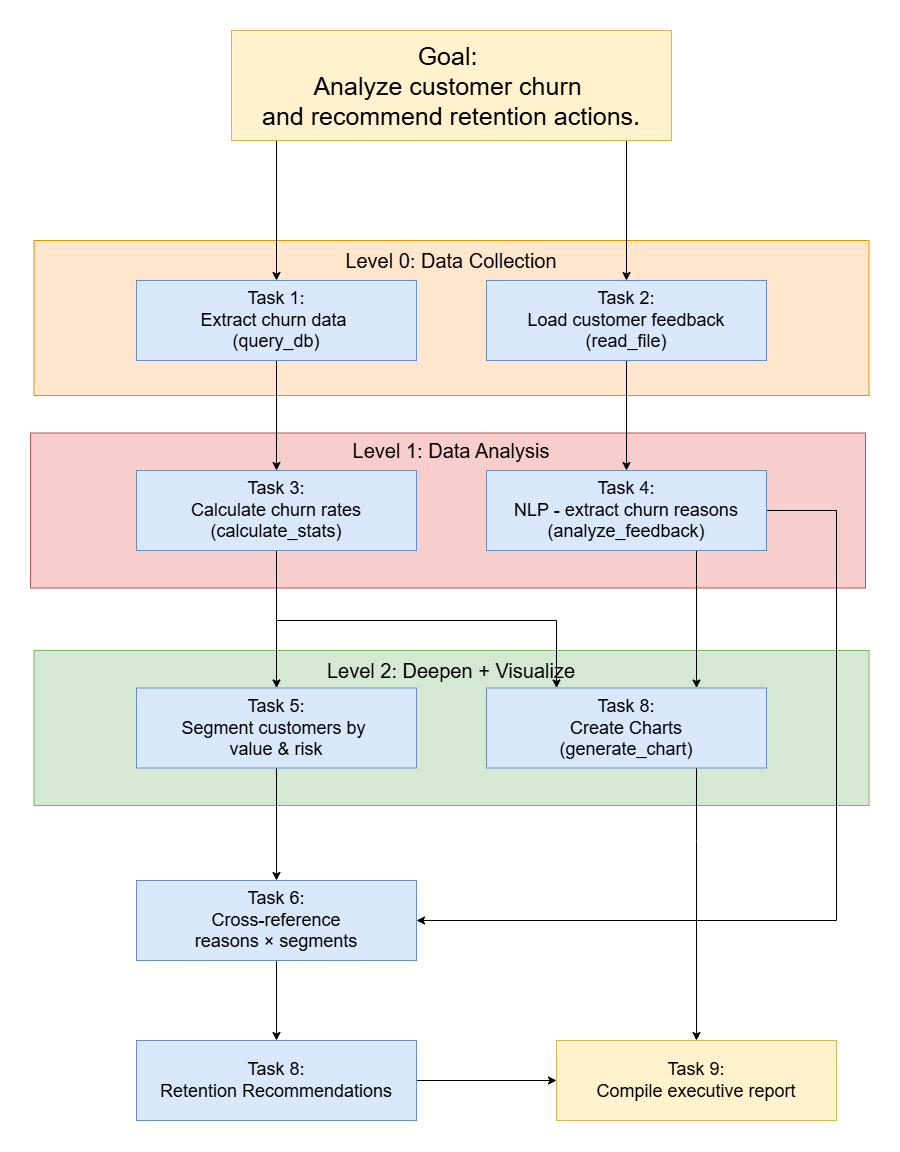
A task graph encodes:
- What needs to happen (tasks)
- In what order (dependencies → edges)
- What can run together (independent tasks → parallel)
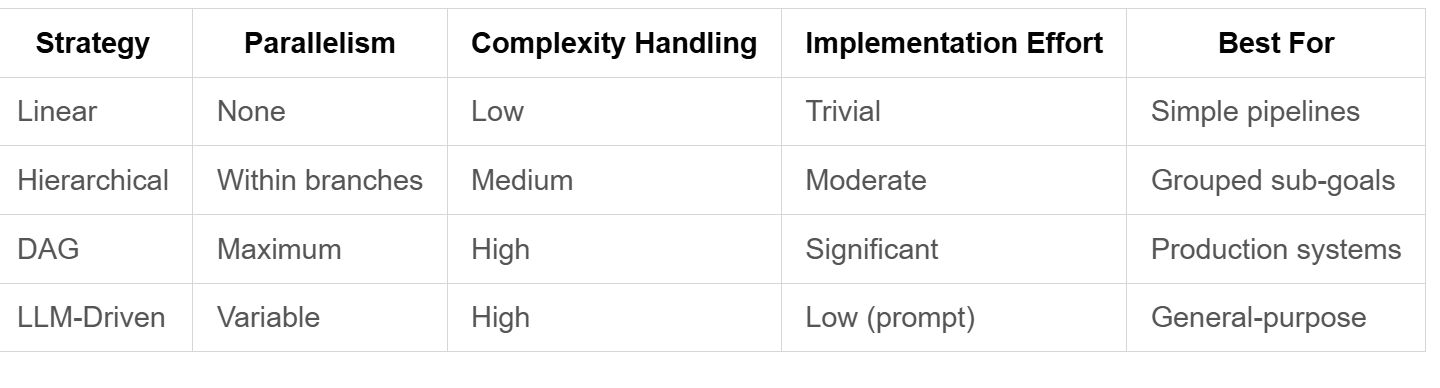
5.2.2 Four Fundamental Decomposition Strategies
There are four fundamental decomposition strategies:
5.2.2.1 Linear (Sequential) Decomposition
The simplest strategy — break the goal into a sequence of steps where each depends on the previous.
1 | Goal: "Deploy a feature" |
When to use: The task has a clear pipeline/waterfall structure. Each step’s output is the next step’s input.
Weakness: No parallelism. One slow step blocks everything.
5.2.2.2 Hierarchical (Tree) Decomposition
Recursively break tasks into subtasks until each leaf is executable.
1 | Goal: "Build a dashboard" |
When to use: The goal has natural high-level groupings. Sub-goals are independent enough to decompose separately.
Weakness: Tree structure misses cross-branch dependencies (e.g., frontend needs API contract from backend).
5.2.2.3 Dependency-Aware (DAG) Decomposition
The most powerful strategy. Tasks form a Directed Acyclic Graph where edges represent “B needs A’s output.”
1 | tasks = [ |
This is what we used in 5.1’s plan structure. The executor can run C and D in parallel after B completes:
1 | A → B → ┬ → C ─ ┬ → E |
When to use: Almost always. This is the default strategy for production Agents.
Key advantage: Maximum parallelism + explicit dependency tracking.
5.2.2.4 LLM-Driven Decomposition
Simply ask the LLM to decompose the task, with a structured output format.
1 | You are a task decomposer. Given a complex goal, break it into subtasks. |
This is simple to implement but quality depends entirely on the prompt + the LLM’s reasoning ability.
5.2.3 The Granularity Problem
To decompose a goal into subtasks, there is an important problem:
How Fine-Grained Should Tasks Be?
1 | Too coarse ("Analyze the data") |
A task is at the right level of granularity when it passes three tests:
- Single Tool Test: Can this task be accomplished with ONE tool call or ONE focused reasoning step?
- Verifiable Output Test: Is there a clear,
checkablesuccess criterion? (“Churn rates calculated” is checkable. “Analyze data” is not.) - Context Fit Test: Does the task’s context (inputs + instructions) fit comfortably in the LLM’s working memory? Rule of thumb: if describing what the task needs takes more than 3-4 sentences, it’s probably too big.
The Decomposition Termination Rule:
1 | Decompose(task): |
5.2.4 Dependency Detection
Not all “B needs A” relationships are the same, there many types of dependencies:
| Dependency Type | Example | Detection |
|---|---|---|
| Data dependency | Task C needs the CSV file that Task B produces | Output of A = input of B |
| Resource dependency | Two tasks both need the GPU — can’t run simultaneously | Resource constraint |
| Logical dependency | “Deploy” doesn’t make sense before “Build” | Domain knowledge |
| Conditional dependency | Task B only runs if Task A finds anomalies | Branching logic |
Data dependencies are the most common and the easiest to detect automatically. Resource and logical dependencies usually require domain knowledge or LLM reasoning.
How to detect dependencies?
Ask LLM
1
2
3
4
5For each pair of tasks (A, B), ask:
"Does Task B need the output of Task A to execute?
If yes: data dependency (A → B)
If B doesn't make logical sense before A: logical dependency (A → B)
If they're independent: no edge"This is
O(n²)but works well for reasonable task counts (n ≤ 20).Data-flow analysis
1
2
3
4
5
6
7
8
9
10
11
12
13def detect_dependencies(tasks: list[Task]) -> dict[str, list[str]]:
"""Detect dependencies by analyzing input/output descriptions."""
deps = {}
for task_b in tasks:
deps[task_b.id] = []
for task_a in tasks:
if task_a.id == task_b.id:
continue
# Does task_b's input mention what task_a produces?
if any(keyword in task_b.input_description.lower()
for keyword in task_a.output_keywords):
deps[task_b.id].append(task_a.id)
return depsThis function’s purpose is to extract task_B’s dependencies of task_A by matching keywords.
Explicit declaration
The planning prompt requires the LLM to declare dependencies for each step. This is the most reliable approach — make the LLM think about dependencies during planning, not as a post-processing step.
5.2.5 Parallelism
This is where task decomposition delivers its biggest advantage over ReAct.
1 | Task: "Research competitor pricing and analyze our churn data" |
Tasks at the same topological level can run in parallel:
1 | def topological_levels(tasks: list[Task]) -> list[list[Task]]: |
For the previous DAG example:
1 | Level 0: [A] ──── can't parallelize (only one task) |
Sequential vs Parallelism in Math:
1 | Sequential: Total time = Σ(time per task) |
5.2.6 Common Failure Problems
5.2.6.1 Over-Decomposition
e.g.
1 | Bad: "Send an email" decomposed into: |
These aren’t Agent tasks — they’re UI actions. The Agent doesn’t
click buttons; it calls send_email(to, subject, body).
Fix: Decompose to the level of tool calls or reasoning steps, not UI actions or API internals.
5.2.6.2 Missing Dependencies
1 | Task A: "Clean the dataset" |
Fix: Always ask “what does this task need that it doesn’t produce itself?” during decomposition.
5.2.6.3 Phantom Dependencies
1 | Task A: "Search for flights" |
Consequence: Lost parallelism. B waits for A unnecessarily.
Fix: For each declared dependency, ask “would B literally fail without A’s output?” If no → remove the edge.
5.2.6.4 The Mega-Task
1 | Task: "Analyze customer churn, segment customers, identify patterns, |
This isn’t decomposed — it’s just a description with commas.
Fix: Each task should be describable in
ONE sentence with ONE verb.
5.2.6.5 Assuming the LLM Will Figure It Out
1 | Prompt: "Here's a complex goal. Do it." |
This works for simple tasks but fails silently on complex ones — the LLM does something, but you have no visibility into whether it covered everything.
Fix: Always decompose explicitly. The decomposition is your observability into what the Agent plans to do.
5.2.7 Implementation
5.2.7.1 The Task Graph Data Structure
1 |
|
5.2.7.2 The Decomposer Prompt Template
1 | You are a task decomposition specialist. Break down the following goal into executable subtasks. |
5.2.7.3 The Full Decomposition → Execution Pipeline
1 | def decompose_and_execute(goal: str) -> Result: |
5.3 Self-Reflection
5.3.1 Why Agent needs Self-Reflection
An Agent that never questions its own output is an Agent that will confidently deliver wrong answers.
So far, the agent work pipeline is:
1 | Plan + Execute + Done |
But there’s a gap: who checks the quality?
We have the re-plan mechanism, but it only triggers on failure — the tool returned an error. But what about:
- The plan is complete but suboptimal (missed a faster approach)?
- The execution succeeded but the answer is wrong (tool returned valid data, but the LLM misinterpreted it)?
- The plan has a logical flaw that won’t cause a tool error (e.g., analyzing churn before checking if we have enough data)?
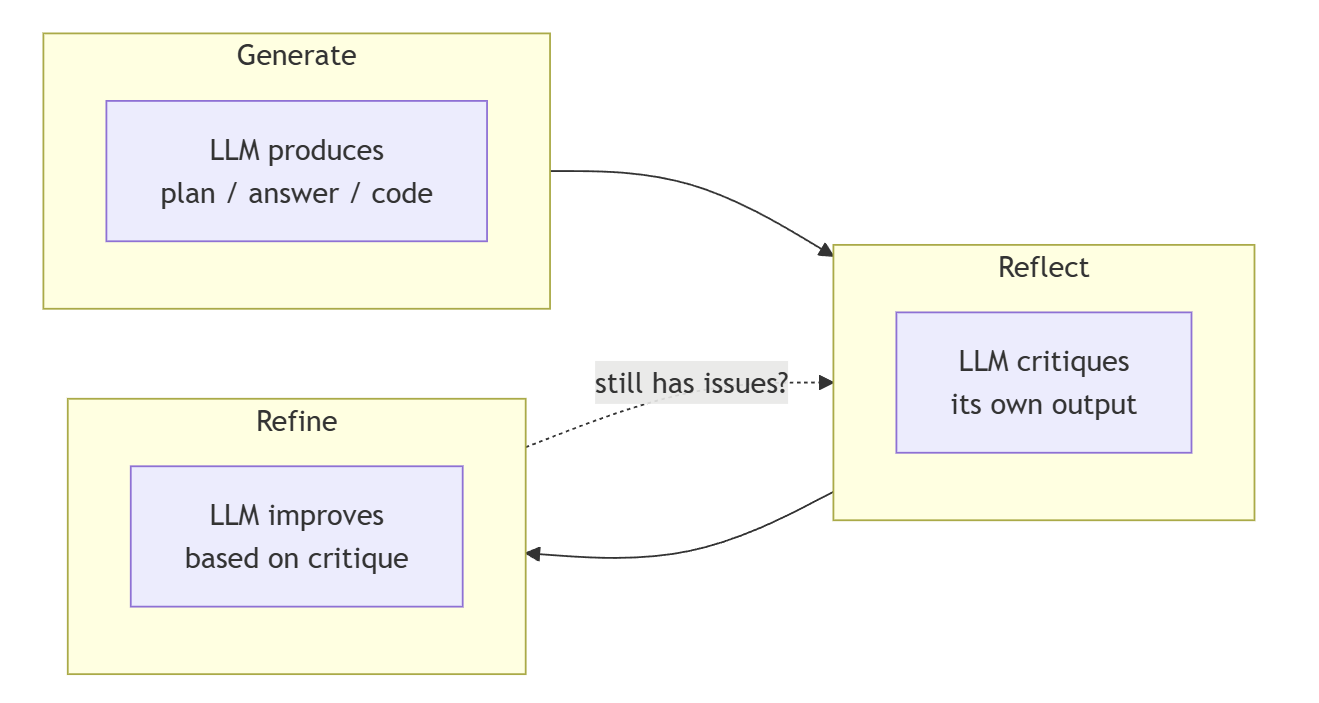
Self-reflection fills this gap. It adds a quality gate:
1 | Plan → Reflect → Refine → Execute → Reflect on outcome |
The precise definition a
Self-Reflection is:
Self-Reflection is the Agent’s ability to critique its own reasoning, plans, and outputs — and use that critique to improve before delivering to the user.
Key insight: LLMs are better at evaluating than generating. Given an answer, an LLM can spot flaws more reliably than it can avoid making those flaws in the first place. Reflection exploits this asymmetry.
Comparison:
| Without reflection | With reflection |
|---|---|
| “The plan looks fine” → execute blindly | “Step 3 assumes data is sorted — is it?” → fix before execution |
| Tool returned 200 OK → assume success | “200 OK but response body says ‘0 results’” → catch semantic errors |
| Deliver first draft to user | Deliver third draft, after two rounds of self-improvement |
| Hallucinated facts go unnoticed | “Where did this number come from? I don’t see it in the tool output” |
5.3.2 Three Reflection Patterns
5.3.2.1 Reflexion (Post-Execution)
When: After execution produces a result. The Agent looks at what happened and asks “was that good? if not, why?”
1 | Loop: |
The key mechanism is the
reflection memory — a persistent note
about what went wrong, carried into the retry:
1 | Attempt 1: |
5.3.2.2 Self-Critique (Pre-Execution)
When: Before executing a plan. The Agent critiques the plan itself — “what could go wrong with this plan?”
This is cheaper than Reflexion because you catch problems before spending tool calls:
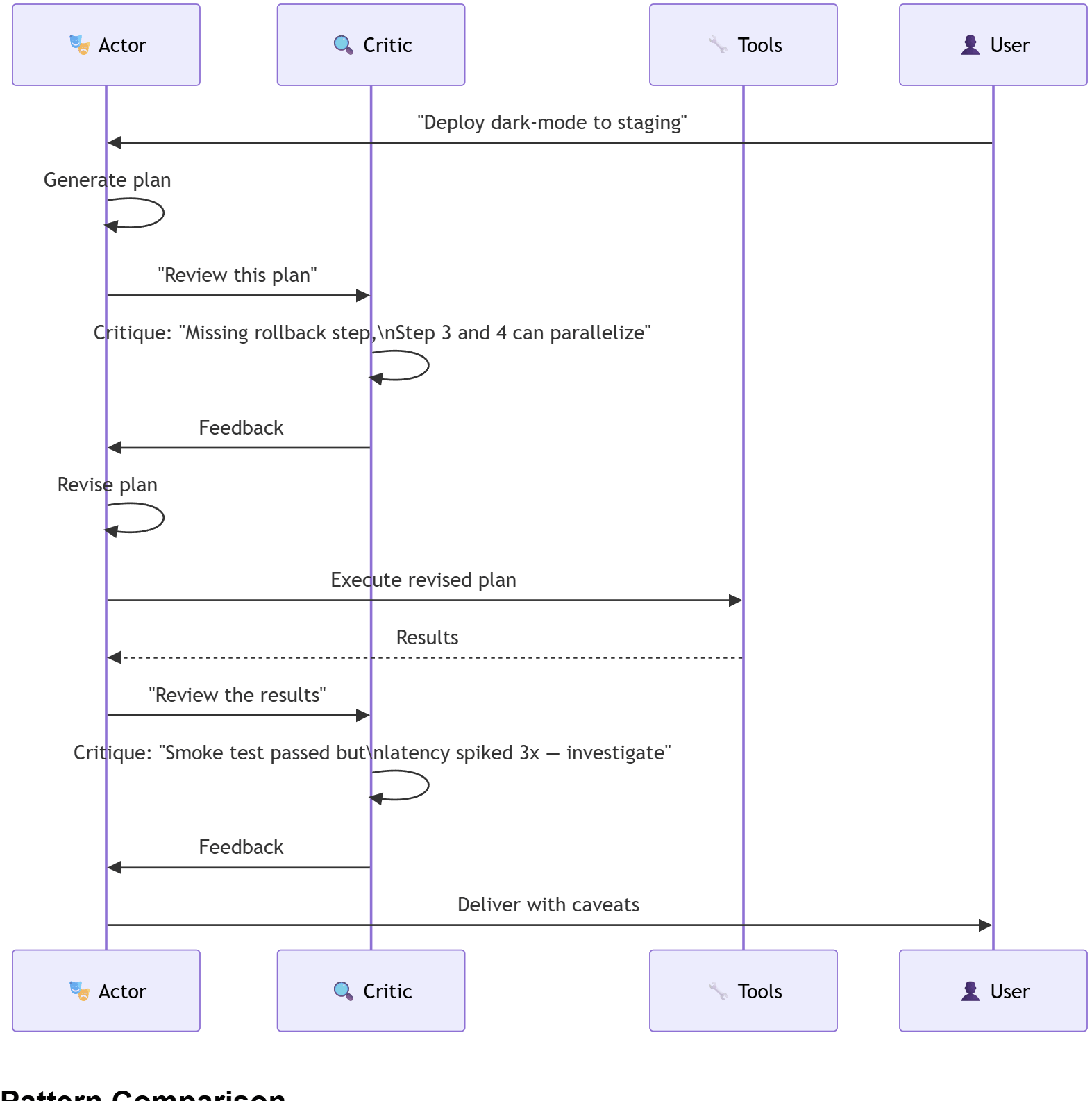
1 | Planner: Here's my 5-step plan for deploying to staging. |
The Critic doesn’t need tools — it just needs reasoning ability. This makes it fast and cheap.
5.3.2.3 Actor-Critic (Continuous)
When: Throughout the entire process. One “Actor” generates, one “Critic” evaluates — continuously.
This is the bridge to multi-agent systems. The Actor and Critic are two different “personas” — same LLM, different prompts:
1 | Actor prompt: "You are a software engineer. Solve this problem." |
Comparison:
| Pattern | When | Cost | What it catches | Best for |
|---|---|---|---|---|
| Reflexion | After failure | 1 extra LLM call per retry | Execution mistakes, wrong tool choices | Tasks where failure is obvious |
| Self-Critique | Before execution | 1 extra LLM call | Plan flaws, missing steps, assumptions | Complex plans with many dependencies |
| Actor-Critic | Throughout | 2× LLM calls (Actor + Critic) | Everything — planning + execution + output | Production systems, high-stakes tasks |
5.3.3 The Reflection Prompt
5.3.3.1 Critic Prompt
The Critic needs a different persona from the Actor. Here’s the template:
1 | You are a CRITIC. Your job is to find flaws, not to be nice. |
5.3.3.2 Refinement Prompt
After critique, the Actor needs to incorporate feedback:
1 | Your previous {artifact_type} was reviewed. Here's the critique: |
5.3.3.3 Reflection Termination Condition
Reflection can loop forever (critique → refine → critique → refine…). We need an exit rule:
1 | def should_continue_reflecting( |
5.3.4 When Reflection Helps or Not
Scenarios Where Reflection Adds Value:
| Scenario | Without reflection | With reflection |
|---|---|---|
| Complex reasoning (math, logic) | First answer may have subtle errors | Critique catches reasoning gaps |
| Code generation | May miss edge cases, have bugs | Code review catches issues before execution |
| Plan generation | Missing steps, wrong order | Plan critique catches structural flaws |
| Data analysis | Misinterprets results | “This conclusion doesn’t follow from the data” |
| User-facing output | Typos, unclear explanations | Quality review before delivery |
Scenarios Where Reflection Is Wasteful:
| Scenario | Why reflection doesn’t help |
|---|---|
| Simple factual queries | “What’s 2+2?” — nothing to critique |
| Single tool calls | “Search for X” — either works or doesn’t, no planning to review |
| Subjective/creative tasks | “Write a poem” — critique is taste, not correctness |
| Model is already confident + correct | Extra LLM calls with no new insights |
So we should classify if the process need reflection:
1 | def should_reflect(task: Task, stakes: str) -> bool: |
5.3.5 Connection to Multi-Agent Systems
Actor-Critic Is the Simplest
Multi-Agent Pattern.
Self-Reflection with Actor-Critic uses one LLM with two prompts. This is the conceptual bridge:
1 | Single-Agent Self-Reflection: |
Once you accept that “having another perspective improves quality,” the natural next step is:
- “What if the Critic had its own tools?” → specialized review agent
- “What if I had multiple Critics with different expertise?” → panel review
- “What if the Actor could delegate sub-tasks to other Actors?” → agent orchestration
5.3.6 Implementation
The Reflection Loop:
1 | class ReflectiveAgent: |
Critic's Output Format
The critique must be structured so the Actor can act on it:
1 |
|
6. Multi-Agent
Having the concept of “Actor-Critic” pattern, we can introduce the concept of “Multi-Agent” system.
It’s like a enhanced version of “Actor-Critic”.
In a nutshell, we independent the “Critic” system as an independent agent which has its own tool interface…
6.1 Agent-as-a-Tool
6.1.1 Intro
If one Agent is a chef, Agent-as-a-Tool is the sous-chef — a specialized helper you call when you need their specific skill.
In previous context, we had one Agent switching between two “hats”:
1 | Same LLM, different prompts: |
The pattern worked: Generate → Critique → Refine. But it had limits:
- Both hats share the same context window — the Critic’s harshness bleeds into the Actor’s creative space
- Both hats share the same tool set — you can’t give the Critic review-specific tools without cluttering the Actor
- No parallelism — you can’t critique Plan A while simultaneously generating Plan B
Agent-as-a-Tool splits the two hats into two separate Agent instances. The Critic becomes a tool that the Actor can call:
1 | Before (Just as Prompt): After (as an independent Agent): |
The Specialist Agent is wrapped as a tool. The
Orchestrator doesn’t know or care that the tool is backed by an LLM —
it’s just review_code(code) returning structured
feedback.
Agent-as-a-Tool is the simplest multi-agent pattern: wrap a specialized Agent behind a tool interface so that another Agent can call it as part of its tool-calling loop.

Why should separate the agents?
Advantages:
| Advantage | Switch Prompt | Agent-as-Tool |
|---|---|---|
| Context isolation | Actor and Critic share one context window → prompt interference | Each Agent has its own context → clean separation |
| Tool specialization | All hats share the same tool set | Each Agent has only the tools it needs (Critic gets linter, Actor gets deploy tools) |
| Parallelism | Sequential — generate then critique | Both can run simultaneously on different inputs |
Trade-off:
Not everything should be an Agent-as-a-Tool. The pattern adds:
- Latency: calling an Agent means an LLM round-trip (or multiple, if the specialist uses ReAct)
- Cost: each Agent call is at least one LLM API call
- Complexity: debugging two interacting Agents is harder than debugging one
Rule of thumb: Use Agent-as-a-Tool when the specialist needs its own context, its own tools, or independent reasoning. Otherwise, a prompt switch is cheaper.
6.1.2 Architecture
6.1.2.1 The Wrapper
How can we build a agent as a tool?
We need three core parts, the Tool Schema,
Specialist Agent and Callable Interface:
| # | Component | Why it’s needed |
|---|---|---|
| ① | Tool Schema | Orchestrator needs to know: this tool exists, what it does, what arguments it takes. Same as any other tool in the registry. |
| ② | Specialist Agent | The actual Agent that runs when called — own prompt, own tools, own context, own ReAct loop. |
| ③ | Callable Interface | Two translations: (a) tool args (dict) → natural language task for the specialist; (b) specialist output → structured dict for the Orchestrator to parse. Without these, the two Agents can’t communicate. |
1 | class AgentAsTool: |
6.1.2.2 The Orchestrator’s View
From the Orchestrator’s perspective, calling an Agent-as-a-Tool is identical to calling any other tool:
1 | Orchestrator thinks: |
The Orchestrator doesn’t see the specialist’s internal reasoning — just the structured output. This is encapsulation, same as with any tool.
The orchestrator sees it as just another tool in its tool list:
1 | tools = [ |
6.1.2.3 The Specialist Agent’s View
When the Orchestrator calls review_code(code=script),
the specialist Agent runs its own loop:
1 | Specialist (Code Reviewer Agent): |
The specialist can use its own tools (linter, grep, security scanner) that the Orchestrator doesn’t even know about.
6.1.3 Common Patterns
6.1.3.4 Reviewer Pattern
1 | Orchestrator generates → Reviewer Agent checks → Orchestrator fixes |
The most direct evolution of the Actor-Critic pattern.
The Reviewer Agent has:
- Its own strict prompt (“be harsh, find everything”)
- Specialized tools: linter, type checker, test runner
- No permission to modify — read-only, critique-only
6.1.3.5 Verifier Pattern
1 | Orchestrator claims a fact → Verifier Agent checks it → Orchestrator corrects or cites |
e.g.
1 | Orchestrator: "Python 3.12 introduced the match statement." |
6.1.3.6 Delegation Pattern
1 | Orchestrator decomposes → delegates sub-tasks to specialists → synthesizes results |
e.g
1 | Orchestrator: "Build a full-stack feature" |
This connects directly to Task Decomposition.
The DAG’s leaf tasks become Agent-as-a-Tool calls.
6.1.3.7 Debate Pattern
1 | Orchestrator asks a question → two specialists argue opposite sides → Orchestrator judges |
1 | Orchestrator: "Should we use microservices for this project?" |
6.1.4 Design Decisions
6.1.4.1 How Much Context to Pass?
The Orchestrator shouldn’t dump its entire context into the specialist. Pass only what the specialist needs:
1 | # Bad: passes everything |
6.1.4.2 Structured Output
The Orchestrator needs to parse the specialist’s result and act on it. The specialist must return structured data:
1 |
|
If the specialist returns free-text, the Orchestrator has to parse it — and parsing LLM output is fragile.
6.1.4.3 Timeout and Cost Control
An Agent-as-a-Tool call is expensive (the specialist runs its own ReAct loop). Set bounds:
1 | result = review_code(code=script, |
6.2 Communication between Agents
6.2.1 Problem
6.2.1.1 Problem Discription
After encapsulating agent into a tool and implementing a basic communication pattern:
1 | Orchestrator ➡ calls review_code() ➡ CodeReviewer Agent |
But this single pattern raises questions it can’t answer:
| Question 6.1 can’t answer | Why it matters |
|---|---|
| Should the Orchestrator wait for the review, or keep working? | If review takes 10s, the Orchestrator is idle for 10s. Maybe it could do other work. |
| What if three agents all need the build result? | Do we call each one? Broadcast? Put it somewhere they can all read? |
| What if there’s no Orchestrator — agents are peers? | 6.1 assumes a caller-callee hierarchy. What if agents are equals? |
| What if we add a new agent next week? | Does every existing agent need code changes to know about the new one? |
6.2.1.1 Three Dimensions of Communication
Every agent-to-agent communication can be described along three dimensions:
1 | ┌──────────────────────────────────────────────────────────────┐ |
You can mix and match. For example: “Hub-and-Spoke topology, with a Message Queue mechanism, carrying Delegation handoffs.” Each combination has different trade-offs.
6.2.2 Message
Before discussing topologies and mechanisms, we need to define what a
message actually is. In 6.1, the Orchestrator just
passed code="..." to a tool. For richer communication,
messages need structure.
6.2.2.1 The Message Data Model
A message between agents needs to carry more than just content — it needs to carry intent:
1 | class HandoffType(Enum): |
Why each field exists:
| Field | Purpose | Example |
|---|---|---|
sender / receiver |
Routing — the topology | "Orchestrator", "ALL" |
handoff_type |
Intent — what the receiver should DO | DELEGATION = “do this”, CONSULTATION =
“review this” |
content |
The natural language body — what the LLM reads | "Review this code for security issues" |
data |
Structured payload — what the code parses | {"code": "...", "language": "python"} |
timestamp |
Ordering and timeout | 1712345678.0 |
reply_to |
Conversation threading | References a previous message ID |
6.2.2.2 Separation of
content and
data
Why Separate content
from data?
1 | # content: for the LLM to read |
The content is what the receiving Agent’s LLM sees in
its prompt. The data is what the receiving Agent’s
tools consume (e.g., a linter needs
language to know which rules to apply). Keeping them
separate means:
- The LLM gets a concise natural-language summary (not raw JSON)
- The tools get typed, structured input (not free text they have to parse)
6.2.3 Five Topologies
A topology defines the routing graph: which agents are allowed to talk to which other agents. This is the most visible architectural decision in a multi-agent system.
6.2.3.1 Point-to-Point
Point-to-Point is the simplest structure. One agent directly invokes exactly one other agent. There is exactly one sender and exactly one receiver.
How it works in code:
1 | class DirectCall: |
When to use:
- Clear caller-callee hierarchy (Orchestrator → Specialist)
- Request-response interactions (ask a question, get an answer)
- The caller NEEDS the result before it can proceed
When NOT to use:
- N > 3 agents — managing O(N²) possible connections becomes unwieldy
- The caller doesn’t need the result immediately — use async instead
- Multiple agents need the same information — use broadcast or blackboard
Concrete scenario: An Orchestrator writes a function, needs it reviewed before deploying. Calls the CodeReviewer Agent directly. Blocks until the review comes back. Then decides: fix issues or proceed with deploy.
6.2.3.2 Hub-and-Spoke
1 | ┌──→ Backend Agent (API design) |
What it is: A central Orchestrator (the Hub) routes all communication. Spoke agents never talk to each other directly — they only communicate with the Hub. The Hub decomposes tasks, delegates to specialists, collects results, and synthesizes.
Why this is the most common production pattern: It gives you a single point of control and observability. To understand what the system is doing, you look at the Hub. To add a new agent, you register it with the Hub — no other agent needs to change.
How it works in code:
1 | # The Hub decides the plan and delegates to each specialist |
The Hub’s responsibility:
- Decompose the task
- Route each sub-task to the right specialist
- Collect results from all spokes
- Synthesize a final answer for the user
- Handle failures — if one spoke fails, the Hub decides: retry, reassign, or skip?
The Spoke’s responsibility:
- Receive a well-scoped sub-task
- Execute using its own tools and expertise
- Return a structured result
That’s it. Spokes are simpler than the Hub — they do one thing well.
Key insight — the Hub is both a bottleneck AND a advantage:
- Bottleneck: All results flow through the Hub’s context window. If three spokes each return 2000 tokens of output, the Hub’s context gets 6000 tokens heavier. At some point, the Hub can’t hold everything.
- Advantage: Because the Hub sees everything, it can make global decisions. “Backend designed the API, but Frontend said they need an extra field — let me reconcile that.” No other topology gives you this.
When to use:
- One agent has the “big picture” and coordinates others
- You need a single place to observe and debug
- Task decomposition + delegation
- You want to add/remove specialists without changing other agents
When NOT to use:
- The Hub becomes a bottleneck (too many spokes, too much context)
- The system needs to work without the Hub (single point of failure)
- Agents need to collaborate directly without mediation
6.2.3.3 Broadcast
1 | BuildBot ➡ "Build complete: app:v2.3.1" ➡ DeployBot |
What it is: One agent sends a message to ALL other
agents simultaneously. The sender sets receiver="ALL" and
doesn’t know or care who receives it.
How it works in code:
1 | class MessageQueue: |
Key design choice — push vs pull: In the code above, receivers poll for messages. An alternative is push — the queue calls each receiver’s callback immediately. Poll gives receivers control over when they process; push gives lower latency. For notification-style messages, poll is usually fine (nobody needs millisecond response to a build notification).
When to use:
- Status updates that multiple agents care about (“build passed”, “deploy complete”)
- Context changes that affect everyone (“budget is now $500”, “we’re pivoting to a different approach”)
- Alerts that anyone might act on (“production error rate spiking”)
When NOT to use:
- The message is only relevant to one agent — use point-to-point
- You need confirmation that someone acted — broadcast is fire-and-forget
- The message is large — don’t broadcast 10KB of data to 20 agents
The “noisy channel” problem: Every agent receives
every broadcast, even irrelevant ones. DeployBot doesn’t need to know
about a frontend lint failure. Mitigation: agents filter messages by
handoff_type or by checking data fields. But
the filtering logic lives in each receiver, not in the channel.
The “noisy channel” problem: Every agent receives
every broadcast, even irrelevant ones. DeployBot doesn’t need to know
about a frontend lint failure. Mitigation: agents filter messages by
handoff_type or by checking data fields. But
the filtering logic lives in each receiver, not in the channel.
6.2.3.4 Mesh
1 | Alice ─── Bob |
What it is: Every agent can communicate directly with every other agent. No central hub. No routing rules. Any agent can initiate a conversation with any other agent.
How it works in code:
1 | # In a mesh, every agent has a reference to every other agent |
When to use:
- Collaborative problem-solving where expertise is distributed
- Peer-to-peer negotiation (debate pattern, consensus building)
- No clear “boss” — all agents are equals
- The communication graph is genuinely dynamic (you can’t predefine who talks to whom)
When NOT to use:
- More than 3-4 agents — O(N²) connections become unmanageable
- You need audibility — “who said what to whom?” is hard to trace
- The system needs predictable behavior — mesh conversations evolve unpredictably
Why production systems rarely use pure Mesh: N agents → N×(N-1) possible directed conversations. With 5 agents, that’s 20 possible call paths. With 10 agents, it’s 90. Debugging a 10-agent mesh when something goes wrong is extremely difficult — the conversation could have followed any of 90 paths. Most production systems use Hub-and-Spoke with limited mesh (the Hub authorizes two spokes to talk directly for a specific sub-task).
The “conversation explosion” problem visualized:
1 | 3 agents: 6 possible conversations — manageable |
6.2.3.5 Shared Blackboard
1 | DataEngineer ──write "churn_data" ➡ 📋 |
What it is: Agents don’t message each other at all. They read and write to a shared memory space — the “blackboard.” Communication is indirect and implicit: Agent A writes something, Agent B notices it and acts on it. Neither knows the other exists.
This is fundamentally different from the other four
topologies. There are no messages, no sender, no receiver, no
handoff type. The only primitive is read(key) and
write(key, value).
How it works in code:
1 | class SharedState: |
The implicit contract: Agents agree on key
names and value schemas.
"churn_data" always means “a dict with rows
and fields”. This is the equivalent of an API contract, but
enforced by convention rather than by a type system.
When to use:
- Many agents need the same information (natural publish-subscribe)
- Agents work at different speeds (asynchronous by default)
- You want extreme loose coupling — adding a new agent means just teaching it which keys to read/write
- The workflow is pipeline-like: A produces → B consumes → B produces → C consumes
When NOT to use:
- You need guarantees that data was read — nobody might be watching
- Ordering matters — Agent B might read
churn_databefore Agent A finished writing it - You need synchronous request-response — blackboard is inherently async
The stale data problem: Agent B reads
churn_data, starts analyzing. Meanwhile, Agent A writes an
updated churn_data with 2000 more rows. Agent B’s analysis
is now based on stale data. Solutions: versioning
(churn_data_v2), timestamps (check updated_at
before using), or immutable writes (never overwrite, always create new
keys).
Why this is the most underrated pattern: Many
multi-agent problems don’t need agents to “talk.” They need agents to
process data in sequence. A blackboard is simpler, more
scalable, and more loosely coupled than any message-based topology. It
was invented in the 1980s for expert systems and works just
as well for LLM agents.
6.2.3.6 Topology Comparison
| Topology | Coupling | Max Agents | Debuggability | Key Weakness |
|---|---|---|---|---|
| Point-to-Point | Tight | ~3 | Easy — explicit caller | O(N²) connections, doesn’t scale |
| Hub-and-Spoke | Medium | ~5-10 | Easy — hub sees all | Hub is bottleneck + single point of failure |
| Broadcast | Loose | Many | Medium — who acted? | Noisy, no delivery guarantee |
| Mesh | Tight | ~3-5 | Hard — any-to-any | Conversation explosion, un-debuggable |
| Blackboard | Very loose | Many | Hard — implicit flow | Stale data, no one may read your writes |
6.2.4 Message Passing Mechanisms
Topology defines who talks to whom.
Mechanism defines how the message gets from sender to receiver. The same topology can use different mechanisms.
6.2.4.1 Direct Invocation (Synchronous, Blocking)
1 | Timeline: |
The simplest mechanism. A calls B. A does nothing else until B responds.
1 | class DirectCall: |
The blocking cost is real. If B takes 3 seconds (LLM round-trip + tool calls), A sits idle for 3 seconds. In a Hub-and-Spoke with 5 spokes, the Hub spends 15 seconds just waiting — time it could use to process early results or plan next steps.
When to use: The caller CANNOT proceed without B’s result. Example: Orchestrator can’t decide “deploy or fix” until the review comes back. Blocking is correct — there’s nothing else to do.
When not to use: The caller COULD do other work while waiting. Example: Orchestrator could send review requests to three specialists simultaneously and process results as they arrive.
6.2.4.2 Message Queue (Asynchronous, Non-Blocking)
1 | Timeline: |
Agent A does not block. It pushes a message and continues working. Agent B pulls the message when it’s ready. Responses come back the same way — B pushes a response that A polls for later.
1 | class MessageQueue: |
The trade-off: Async is more efficient (no idle time) but more complex (need callback/polling logic, harder error handling). If B crashes before processing the message, A might never know.
When to use: B’s work takes significant time, and A can productively do other things while waiting. Or: multiple receivers process at different speeds (broadcast scenario).
When not to use: A literally cannot proceed without B’s result, and there’s nothing else for A to do. Async only adds complexity with no benefit.
6.2.4.3 Shared Memory (Communication Through Memory)
1 | Agent A: memory.write("build_result", {...}) # Store in shared space |
Agents don’t send messages at all. They communicate
by reading and writing to a shared memory space. There are no messages,
no sender, no receiver, no handoff type, no blocking calls. The only
primitives are write(key, value) and
read(key).
This is not a messaging mechanism — it’s a memory mechanism. Each Agent has its own internal memory (conversation history, vector store, working memory). Shared Memory is a separate space that sits between agents, accessible to all of them. One agent’s output becomes another agent’s input — not by being delivered, but by being stored where the other agent can find it.
1 | class SharedMemory: |
e.g.
1 | board = SharedMemory() |
6.2.4.4 Event-Driven (Publish-Subscribe)
1 | Agent A: emit("build_complete", data) # Publish |
The publisher doesn’t know who’s listening. Subscribers register callbacks for specific event types. When an event fires, all subscribers are notified automatically.
1 | class EventBus: |
The key advantage — adding subscribers requires ZERO changes to publishers:
1 | # Later, we add a SecurityScanner that also wants to review deployment scripts: |
The key disadvantage — event ordering and missed
events: If Reviewer subscribes AFTER Orchestrator emitted
"review_requested", Reviewer never sees that event. If
events A and B fire in quick succession, subscribers might process B
before A. For idempotent operations (reviewing code twice doesn’t hurt),
this is fine. For non-idempotent operations (deploying twice), it’s a
bug.
When to use: Pipeline workflows (A→B→C→D, each step triggers the next). Systems where you expect to add new consumers over time. Loose coupling is more important than strict ordering.
6.2.4.5 Mechanism Comparison
| Mechanism | Blocking? | Coupling | Complexity | When to use |
|---|---|---|---|---|
| Direct Call | Yes | Tight | Low | Request-response, caller needs result |
| Message Queue | No | Loose | Medium | Async workflows, different-speed receivers |
| Shared Memory | No | Very loose | Medium | Pipeline: A produces → B consumes |
| Event-Driven | No | Very loose | High | Reactive systems, dynamic subscribers |
6.2.5 Handoff Patterns
Topology is the “who,” Mechanism is the
“how,” and Handoff is the “why.” When
Agent B receives a message, it needs to know: am I supposed to
DO this, REVIEW this, TAKE OVER
this, or just KNOW about this? The
handoff_type field answers that question.
6.2.5.1 Delegation
Delegation — “You handle this sub-task”
1 | TechLead: "I've decomposed the project. Step 3 — API design — is your specialty." |
Ownership model: TechLead remains the owner of the overall task. Backend is a contributor — it does one piece and returns the result. TechLead is responsible for integrating that piece.
Code:
1 | msg = Message( |
6.2.5.2 Escalation
Escalation — “I can’t solve this — you take over”
1 | GeneralAgent: "The user's question is about database deadlocks. |
Ownership model: OWNERSHIP TRANSFERS. The General Agent stops being responsible. The DBA Agent becomes the new owner. The user’s next message goes to the DBA, not the General Agent.
This is fundamentally different from delegation. In delegation, the delegator integrates the result and remains accountable. In escalation, the delegator walks away.
1 | msg = Message( |
When to use: The current agent genuinely cannot help — lack of expertise, lack of tools, or lack of authority. The user experience should be seamless: the user shouldn’t notice the handoff happened.
6.2.5.3 Consultation
Consultation — “What do you think about this?”
1 | Planner: "Here's my 5-step deploy plan. Does step 4 look safe to you?" |
Ownership model: Planner remains the owner. Security is an advisor — it provides feedback but doesn’t make decisions or execute changes. This is 5.3’s Actor-Critic pattern extended to separate agents.
Code:
1 | msg = Message( |
When to use: The sender has a draft and wants expert review before committing. The sender believes it CAN do the task but wants a second pair of eyes.
6.2.5.4 Notification
Notification - FYI (For Your Information)
1 | BuildBot: "Build complete: app:v2.3.1. All 142 tests passed." |
Ownership model: Not applicable. The sender is not asking for anything — no action, no response, no ownership change. Receivers independently decide what (if anything) to do.
Code:
1 | msg = Message( |
6.2.5.5 Handoff Comparison
| Handoff | Ownership | Response Expected? | Receiver’s Role | Analogous to… |
|---|---|---|---|---|
| Delegation | Sender keeps | Yes — result | Contributor | “Do this task for me” |
| Escalation | TRANSFERS | Yes — takeover | New owner | “I’m out, you’re in charge now” |
| Consultation | Sender keeps | Yes — feedback | Advisor | “What do you think?” |
| Notification | N/A | No | Observer | “FYI” |
6.2.6 Combination
The three dimensions are orthogonal. We can combine them arbitraryly.
But some combinations are naturally compatible.
6.2.6.1 Choose a Topology
The first question of Decision Tree is:
“Is there an agent who knows the whole picture and is responsible for
coordination?”
In a multi-agent system, as long as One Agent performs
task decomposition, it becomes the natural center.
It knows the steps of the entire process, the
dependencies, and who excels at what. Naturally, it becomes
the hub.
So in 90% of the cases, the choice is
“Hub-and-Spoke”.
There are two typical scenarios without
Orchestrator:
Full-team Notification Type:
BuildBot needs to notify the entire team after the build is completed. BuildBot is not a “coordinator”; it is merely an information publisher. BuildBot is not a “coordinator”; it is merely an information publisher. It does not care who receives the information or who takes action.
In this scenario, there is no orchestrator, and the decision tree follows the NO branch(No Orchestrator) → “All agents require the same information” → determining whether to use
BroadcastorBlackboardmessages passing mechanism.How to distinguish between Broadcast and Blackboard?
- One producer, multiple consumers → Broadcast. “BuildBot informs everyone that the build is complete.” There is only one information source.
- Multiple producers, multiple consumers → Blackboard. “Three analysts each write their findings and read each other’s.” There are multiple sources of information.
Peer-to-Peer Collaboration:
Three experts work together to troubleshoot online issues. There is no leader - whoever finds a clue speaks up.
Go NO branch → “Do all agents need the same information?” → No, each expert needs different things → “Do you need direct collaboration?” → Yes → Mesh
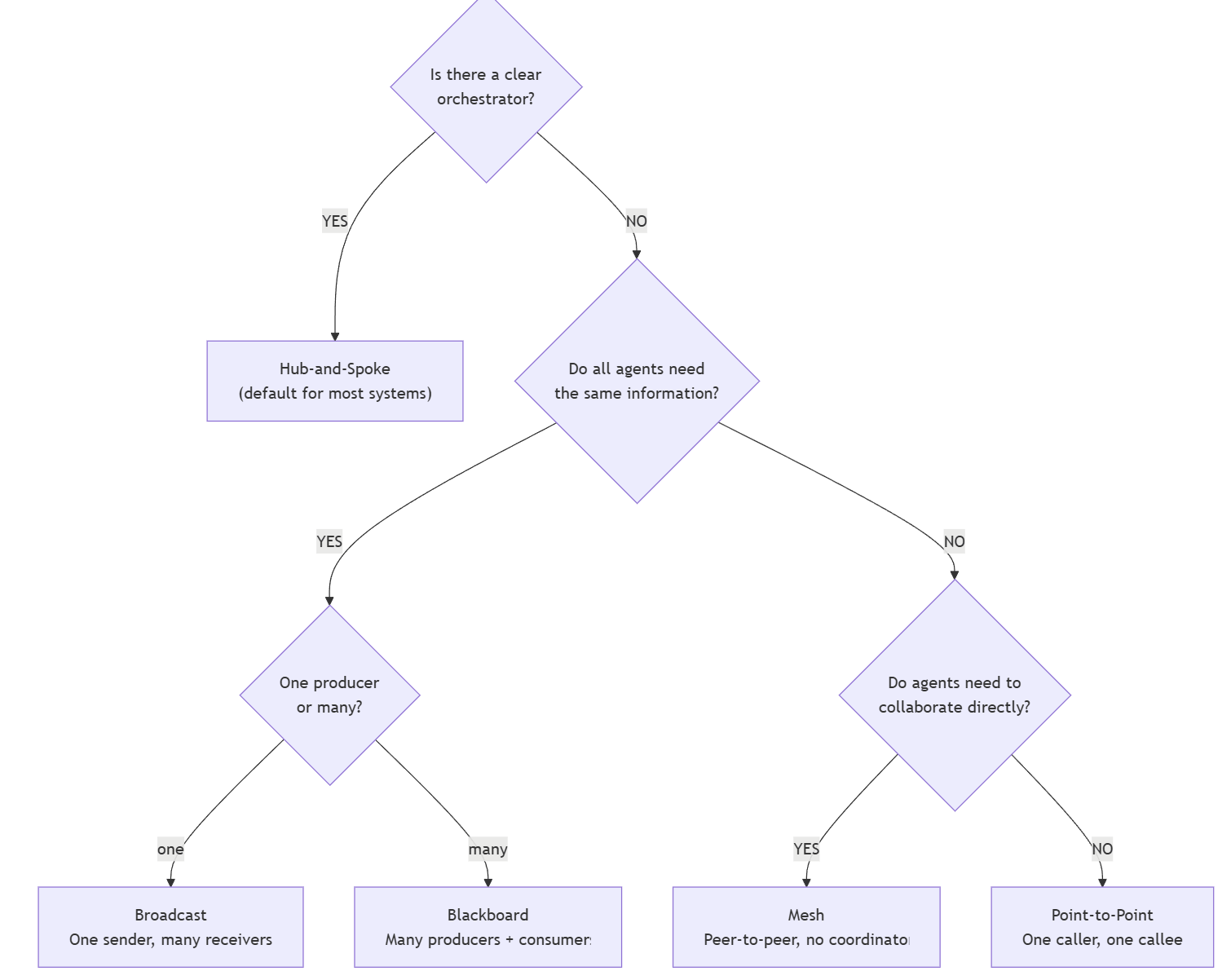
6.2.6.2 Choose a Message Passing Mechanism
Decision Tree first question: Does the
caller need the result to proceed?
This question is more subtle than it seems. It’s not about whether the caller cares about the result - almost any call cares about the result.
The question is: before getting the
result, is there any other useful work the caller can do?
Direct Call(Blocking): The caller’s next logical step depends on the return value.1
2
3
4
5
6# pseudo code
review = review_code(script)
if review["score"] < 0.7: # ← This judge depends on review's result
fix_issues(script, review["issues"])
else:
deploy(script)Event Driven: When the dynamic subscriber is important.1
2
3
4# pseudo code
queue.send(review_request_1)
queue.send(review_request_2)
queue.send(review_request_3)Shared Memory: When there’s pipeline workflowEach step reads the previous output and writes its own.
Agents don’t know each other.
Message Queue (Asynic): Simple async fallback. Send now, poll later.
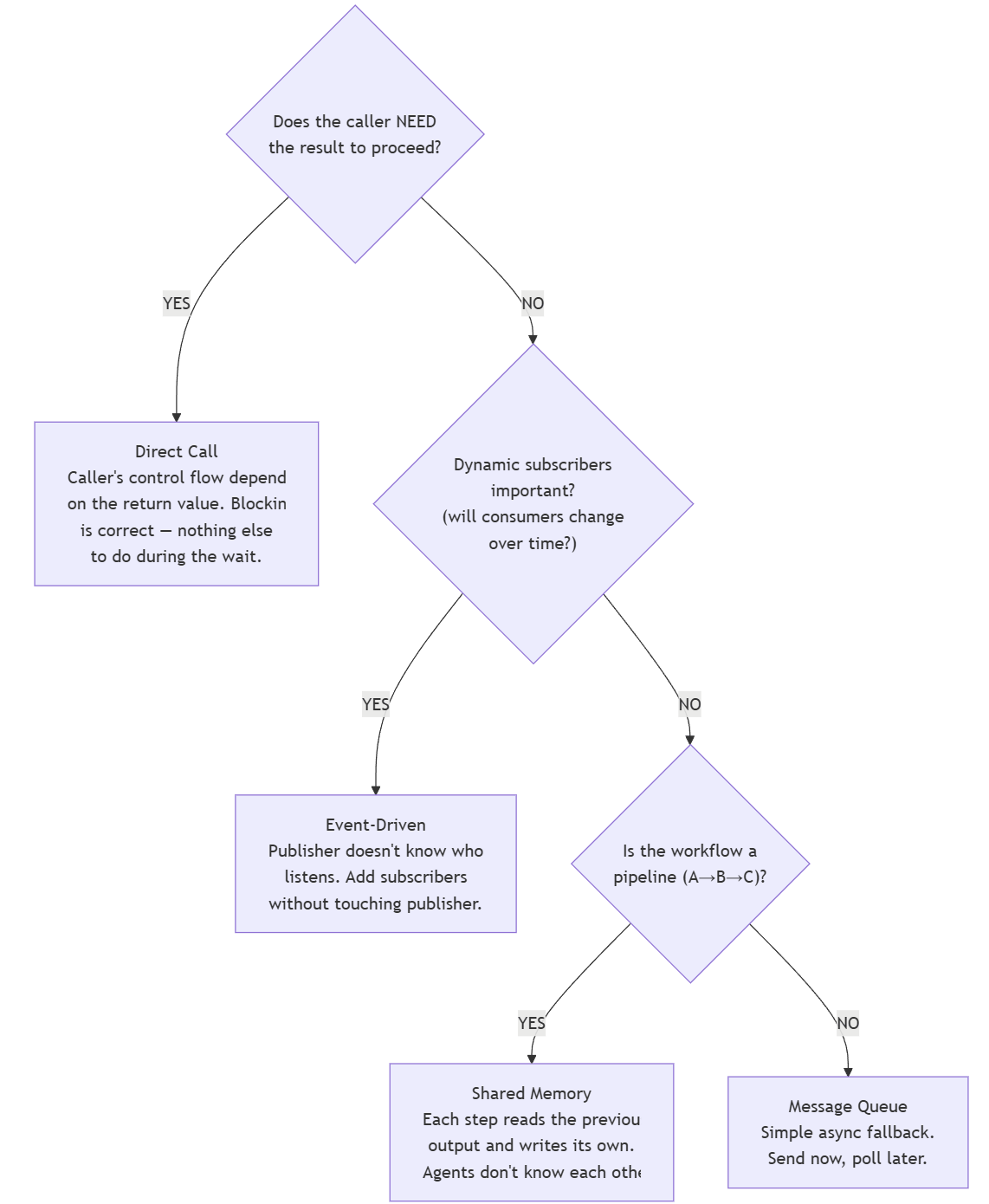
6.2.6.3 Choose a Handoff
Core question:
Who should be responsible for the sub_task when message arrives ?
- Still the
Sender:Delegation&Consultation- Delegation: “Help me with this step, give me the results, and I’ll integrate them.” The receiver is the contributor.
- Consultation: “Check if the result is right, tell me your advice.” The receiver is a consultant.
- Escalate this task to the
receiver:Escalation- “I can’t handle it, you take over. I won’t be involved anymore.”
Ownership
transferred.
- “I can’t handle it, you take over. I won’t be involved anymore.”
Ownership
- No one is responsible just
Notification.
6.2.6.4 Concrete Combination
案例 1: Orchestrator 拆任务 + 委托执行
Hub-and-Spoke + Direct Call + Delegation
为什么 Hub-and-Spoke:Orchestrator 把任务拆成子任务,分给不同 specialist。它需要看到所有结果才能合成最终答案。这是最经典的 Hub-and-Spoke 场景。
为什么 Direct Call:Orchestrator 在没有拿到所有 specialist 结果之前无法合成最终答案。它没有”等待期间可以做的其他事”——它必须等。
为什么 Delegation:Orchestrator 把子任务分配给 specialist,但它仍然是整个任务的 owner。Specialist 返回结果,Orchestrator 负责整合。
案例 2: 构建系统通知团队
Broadcast + Message Queue + Notification
为什么 Broadcast:一条消息,多个 receiver,发送者不关心谁收到。BuildBot 只负责”构建完了”这个事实,不负责协调后续动作。
为什么 Message Queue:三个 receiver 的处理速度完全不同——发 Slack 要 1 秒,部署要 5 分钟。如果用 Direct Call,BuildBot 会被最慢的 receiver 拖死。用 Queue,每个 receiver 按自己的节奏 poll。
为什么 Notification:BuildBot 不是在”要求”DeployBot 部署,也不是在”委托”MonitorBot 监控。它只是在说”这件事发生了”。DeployBot 自己决定要不要部署、什么时候部署。
案例 3: 三专家协作排查故障
Mesh + Event-Driven + Consultation
为什么 Mesh:故障排查没有领导。谁发现线索谁说话。如果设一个 Hub,Hub 就成了瓶颈——每个专家都要通过 Hub 转发,延迟增加,而且 Hub 可能不理解专家之间的技术讨论。
为什么 Event-Driven:故障排查是响应式的——一个专家发现 CPU spike,其他专家需要立刻知道,因为 CPU 问题可能跟网络问题、DB 问题相关。Event 让信息实时流动,而不是等某人来 poll。
为什么 Consultation:每个专家都在问其他专家”你怎么看这个现象?“没有人把任务”委托”给别人——每个人都在贡献自己的视角,但每个人仍然对自 己的领域负责。
案例 4: 多人共同编辑研究报告
Blackboard + Shared Memory
为什么 Blackboard:三个分析师(市场、技术、财务)各自写各自的部分,读别人的部分来避免重复和交叉引用。没有”一个人发号施令”——每个人独 立工作,靠读/写共享文档协调。
为什么 Shared Memory:不需要消息——市场分析师不需要”通知”技术分析师自己写完了。技术分析师在需要的时候自己去读市场部分的最新版本就行 。这种按需读取天然适合 Shared Memory。
注意:这个案例没有 Handoff 维度,因为根本没发 Message。Shared Memory 的通信方式不涉及 handoff——通信通过 key-value 的读写隐式完成。不是所有组合都需要三维。
案例 5: 安全审计
Point-to-Point + Direct Call + Delegation
为什么 Point-to-Point:一个 Orchestrator 调一个 Reviewer,一对一的请求-响应。没有第三个 agent 参与。不需要 Hub、不需要 Broadcast、不需要 Mesh。
为什么 Direct Call:Orchestrator 需要 review 结果来决定”部署还是修复”。等是合理的。
为什么 Delegation:Orchestrator 把”审查代码”这个子任务交给 Reviewer。Orchestrator 仍然是整个部署流程的 owner。
常见错误的心理模型
错误 1: 挨个通知代替广播
心理模型:“我要让三个人都知道这件事”
for agent in [A, B, C]: comm.invoke(agent, msg)
问题:串行等待 3 次。新增第四个 agent 时可能忘加。
正确:一条 broadcast,队列负责分发。
错误 2: A 调 B, 但实际上 B 只是需要 A 的输出
心理模型:“B 需要我产出的数据,所以我调用 B”
comm.invoke(B, Message(data=A_result))
问题:A 和 B 耦合了。B 的接口变了,A 要改。
正确:A 写 Shared Memory,B 自己去读。A 不需要知道 B 的存在。
错误 3: Delegation 和 Escalation 混淆
心理模型:“我处理不了,让 DBA 来处理这个”
msg = Message(handoff_type=DELEGATION, …)
问题:DELEGATION 意味着你还是 owner。
你会试图把 DBA 的结果包在你的回复里,而不是让 DBA 直接跟用户对话。
正确:Escalation。所有权转移。DBA 直接跟用户对话,你退出。
错误 4: 4 个 agent 全互联
心理模型:“每个 agent 都可能需要跟任何其他 agent 说话”
→ 12 条调用路径
问题:加第 5 个 agent 增加 8 条新路径。谁记得住?
正确:Hub-and-Spoke。4 条路径(Hub ↔︎ 每个 spoke)。除非有明确需求的 agent pair,才开放临时 Mesh。